
Vyfakturuj for WooCommerce
Toret Vyfakturuj is a WooCommerce plugin that connects your store with the Vyfakturuj invoicing system. Save time and issue and send invoices, proforma invoices, and credit notes directly from the e-shop administration – with a click or using automation. The plugin allows automatic pairing of payments with orders, supports OSS mode, and offers extensive setting options.

- Invoicing without clicking thanks to automatic issuing and sending.
- Fast and error-free generation of invoices, proforma invoices, and credit notes directly in the e-shop.
- Sending and printing PDF documents from the store administration.
- Enables automatic pairing of bank transfer payments with orders.
- Supports OSS mode, reverse charge and other Vyfakturuj features.
- Fits every e-shop thanks to rich configuration options.
Invoicing directly in store administration
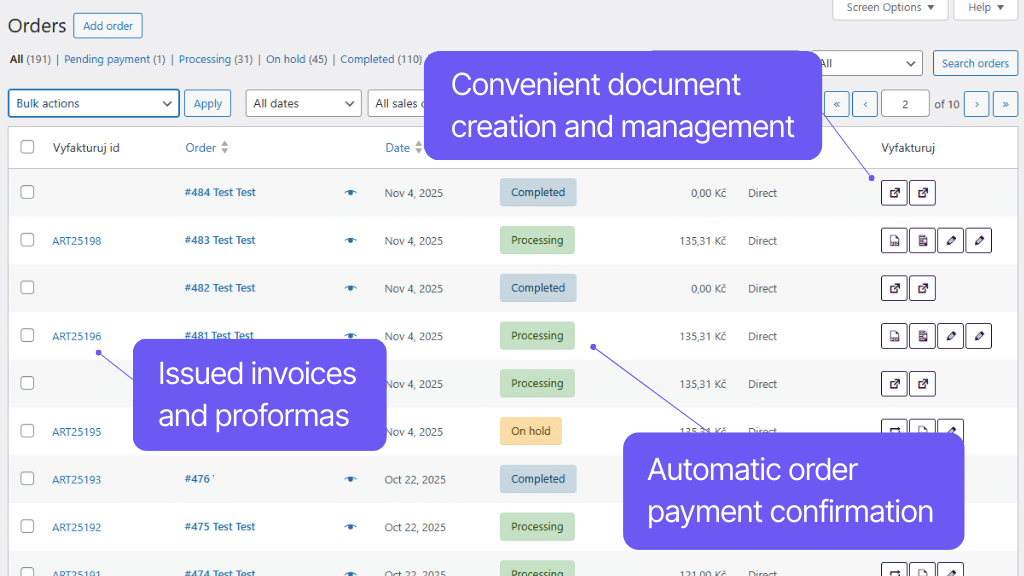
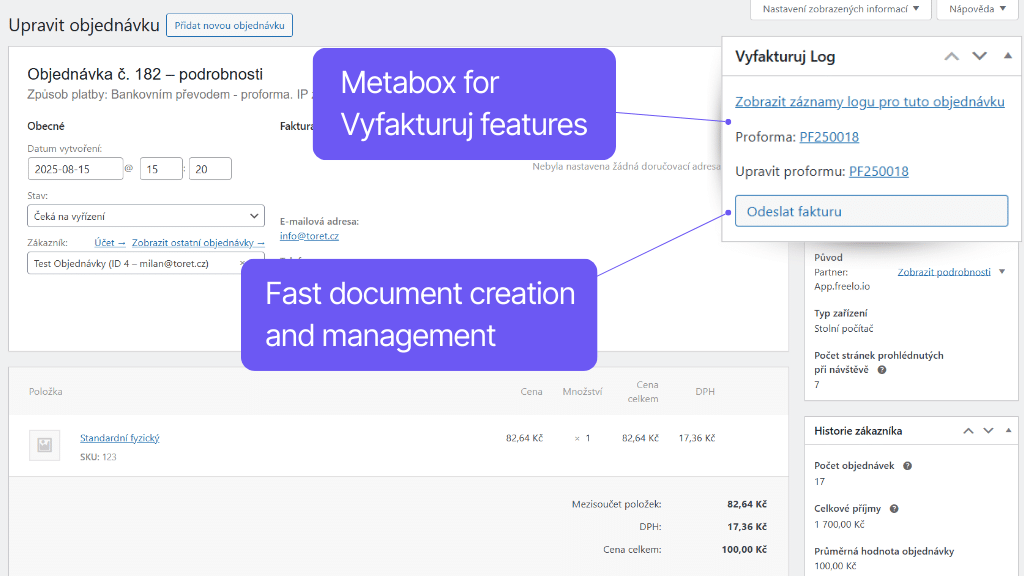
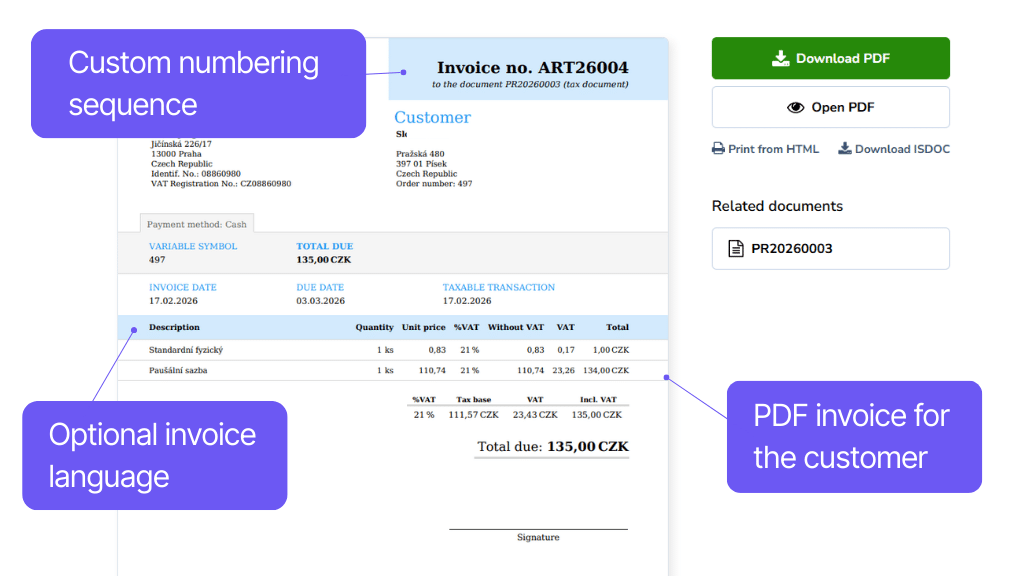
Connect your e-shop with the Vyfakturuj invoicing system, speed up the invoicing process, and eliminate errors. No more lengthy filling out; issue invoices, proforma invoices, and credit notes simply directly in the e-shop administration.
All documents can be created manually, by clicking a button, or automatically. Everything in PDF format. Downloading or editing an invoice is available at a click in the order detail or overview. The invoice link for customers is automatically added to the order email and can also be displayed on the thank you page or in the customer account.
Automatic invoicing saves time
With the Vyfakturuj plugin, you can generate invoices, proforma invoices, and credit notes fully automatically – based on order status change. Set custom invoicing rules for each payment method separately. You can thus create invoices at a different stage of the process each time as needed. If for some reason the document is not issued, the plugin will send you an email notification.
E.g., when paying via payment gateway, have the invoice issued immediately after payment confirmation; for COD payments, only after parcel handover and COD payment.
The plugin connects the WooCommerce e-shop with the Vyfakturuj system and enables automatic or manual creation of proforma and regular invoices.
Invoices, proforma invoices, and credit notes can be created automatically based on order status change in WooCommerce or manually by clicking a button in the administration.
Issued documents can be downloaded or edited with one click directly in the Vyfakturuj system.
The link to the issued document is automatically added to the email about the order for the customer and can also be displayed on the thank you page.
The invoicing plugin can set the creation of a proforma invoice, regular invoice, and credit note separately for any payment method.
You can thus issue an invoice at a different stage of working with the order each time. For example, when paying via payment gateway, issue the invoice in the Processing state, but for COD only in the Completed state.
In the plugin settings, you have the option to add an email address where an error notification will be sent in case an invoice or proforma invoice is not issued.
So you don’t have to go back through orders and check where the document wasn’t issued.
Automatic pairing of payments with orders
The Vyfakturuj plugin supports the function of pairing bank transfer payments with orders. Thanks to this, you will no longer have to tediously search whether the order was paid. Just connect your bank account with Vyfakturuj.
Received payments are assigned to corresponding invoices and the respective orders automatically change status according to your choice. At a glance in the administration, you can see whether the order was paid or not.
In case you have your Vyfakturuj account connected with a bank account, you can have payment information transferred from Vyfakturuj to the website.
When someone pays to the bank account, the invoice in Vyfakturuj is marked as paid and payment information is sent to the e-shop.
If you do not want to use this function, it can be easily deactivated in the settings.
More information in the article How to automate pairing of bank transfer payments and orders in WooCommerce.
Easy setup and wide feature support
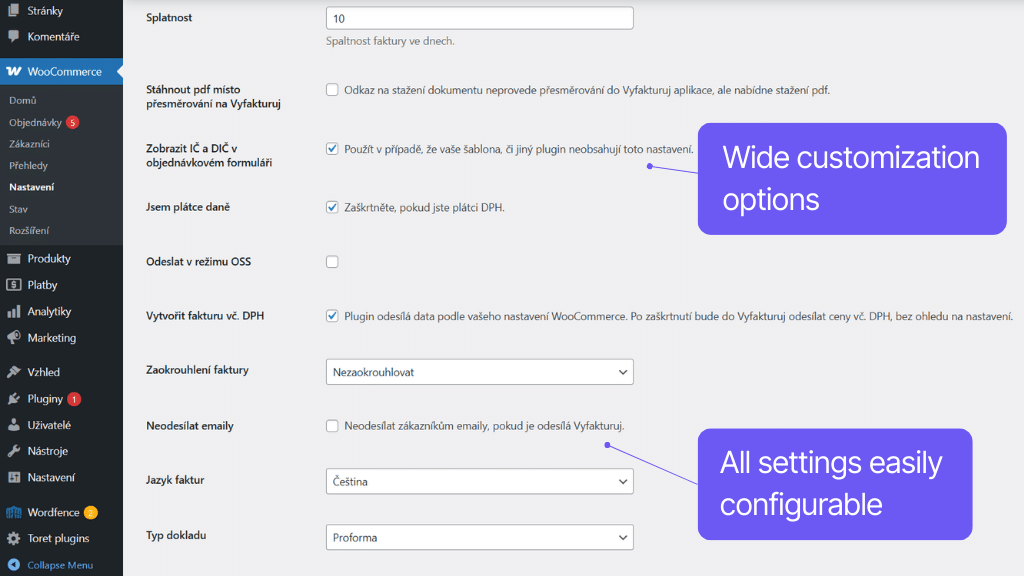
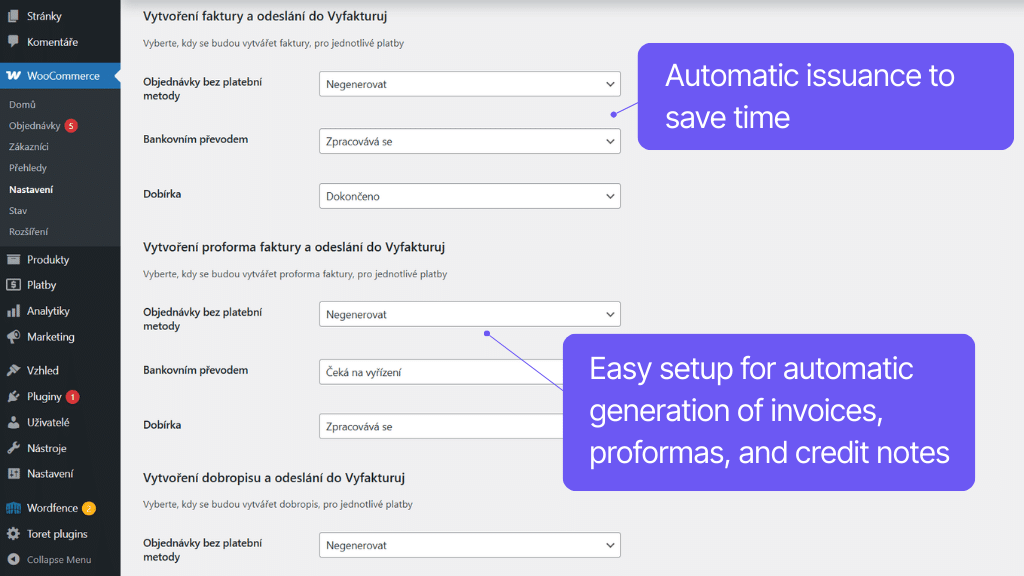
The Vyfakturuj plugin allows you to set everything up directly in the administration as you need. Simply pair payment methods, set the order number as variable symbol, or add Company ID (IČ) and VAT ID (DIČ) fields to the checkout.
Invoices can be generated in Czech, Slovak, English, and German. Besides CZK, the plugin also supports all currencies available in the Vyfakturuj service, OSS mode (One stop shop) and reverse charge.
Any WooCommerce store payment method can be assigned to the Vyfakturuj plugin payment method. Thanks to this, you will have everything correctly listed on the invoice.
By default, the internal invoice number from Vyfakturuj is written as the variable symbol on the invoice. In the plugin, it is possible to simply set the variable symbol to be written into the invoice or proforma invoice according to the order number.
The plugin includes the option to activate custom fields for Company ID (IČ) and VAT ID (DIČ).
The fields are then automatically passed to the Vyfakturuj invoice during creation.
In the plugin, you simply set the preferred language for the generated invoice or proforma invoice.
You can choose from these languages:
Czech, Slovak, English, and German.
Invoice currency setting is automatic according to the main currency in WooCommerce. Therefore, it is not a problem for the plugin to accept any currency supported by Vyfakturuj.
Most used:
CZK – Czech Republic
EUR – Eurozone
GBP – Great Britain
USD – United States
If your e-shop is registered for OSS, you can activate this mode in the Vyfakturuj plugin.
The plugin allows you to issue invoices under the reverse charge mechanism in conjunction with the Toret EU VAT plugin.
Carefree management and regular maintenance
The Toret Vyfakturuj for WordPress and WooCommerce plugin is fully compatible with other Toret plugins as well as popular block page builders (Elementor, Divi, and Gutenberg) and multi-currency plugins. You do not have to worry that its implementation would disrupt the design or function of your e-shop.
The subscription includes access to updates, ensuring compatibility and adding new features, and customer support in case of issues.
All our plugins are mutually compatible and can be used on a single WooCommerce e-shop.
Usage example:
In the checkout, the customer can select delivery to an address or pick-up point via the shipping plugin, pay using a payment gateway, and finally, an invoice is automatically generated and sent in the order confirmation email.
The plugin fully supports WordPress Multisite, where a single license is sufficient for all managed sites. Each Multisite web can have its own plugin settings.
The plugin supports use alongside popular block page builders Elementor and Divi.
High-Performance Order Storage (HPOS), formerly known as Custom Order Tables, is a solution that provides an easy-to-understand and solid database structure – designed specifically for e-commerce needs. It uses the WooCommerce CRUD design to store order data in custom tables – optimized for WooCommerce queries with minimal impact on store performance.
We are constantly improving the plugin and updating compatibility with WooCommerce. We guarantee compatibility with WooCommerce 6.7 and higher.
Extensive documentation is prepared for the plugin. It helps you easily configure the plugin and quickly get oriented with its features.
€69,00 / year
+FREE: 3-month subscription to Toret WooCommerce Manager
Need help?
[email protected]Do you need advice on choosing a product or have a question about a feature?
What’s included?
- 1 year of updates
- 1 year support (beware of resellers)
- 14-day money-back guarantee
14-day money-back guarantee
We want to ensure that you are 100% satisfied with your purchase. That’s why we offer a 14-day money-back guarantee.