
Custom order numbers for WooCommerce
The Custom order numbers for WooCommerce is a WordPress plugin that allows you to customize order numbering to your needs. Use a sequential series, distinguish a number series for free orders, and adjust the prefix, suffix, or series length. You can also set up an automatic numbering reset at the beginning of a new year.

- Enables sequential order numbering.
- Number series can be set as needed – custom format, prefix, suffix, and length.
- Separate number series for classic orders and free orders.
- Allows using variables for year, month, and day as part of numbering.
- Option to set automatic number series reset upon year change.
- Simple setup.
Order numbering exactly as you need it
In the default WooCommerce settings, order numbering is not sequential, which makes orientation difficult. With the Custom order numbers plugin, you won’t get lost anymore – thanks to sequential order numbering and further personalization of number series.

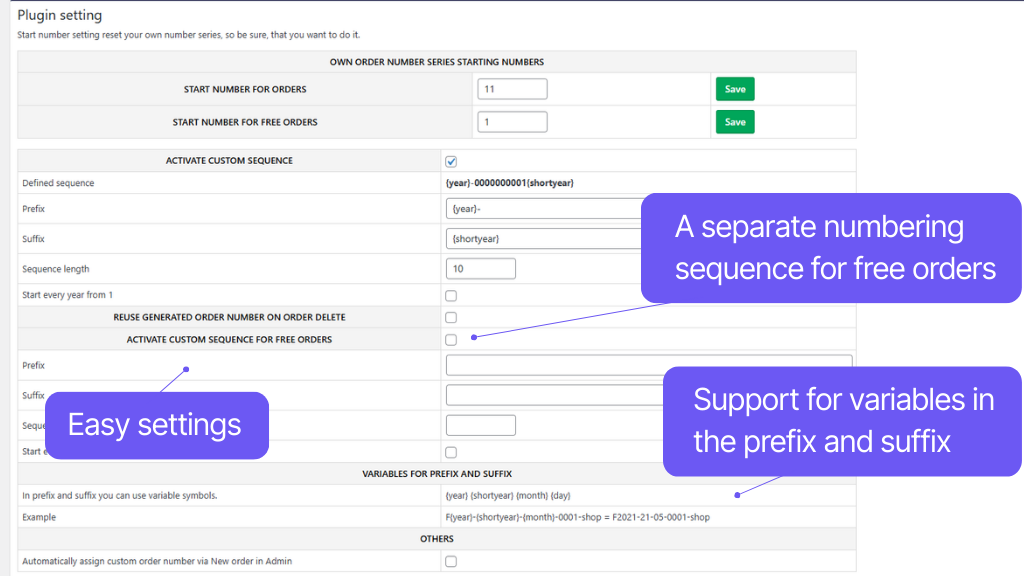
In the administration, you can simply set a number series separately for classic orders and separately for free orders. For each series, you can choose a starting number, and thus smoothly continue from existing order numbers. Furthermore, it is possible to set the series length and custom prefix and suffix, in which you can use variables for year, month, and day.
The plugin also allows setting an automatic numbering reset at the start of a new year. In combination with variable date values in the prefix or suffix, this is a very clear solution. Thanks to compatibility with search in the order overview and with the WooCommerce Order tracking function, you and your customers can easily find an order by number.
WooCommerce uses WordPress ID for order numbering by default. This ID is shared for all content types (posts, pages, comments…) and is always unique, so it can easily happen that order numbering in WooCommerce is not sequential and some numbers are missing.
The plugin replaces the default numbering with its own and allows for sequential order numbering.
The plugin allows setting a custom number series for free orders. Thanks to this separation, there will be no gaps in numbering when issuing invoices, and everything will be much clearer.
Toret Order Number allows setting a starting number. If needed, it is easy to follow up on an already existing number series.
For both number series, it is possible to set a custom prefix or suffix.
In the prefix or suffix of the number series, you can also use variables that automatically insert the year, month, and day into the invoice number.
Year: {year}
Year (short version without millennium): {shortyear}
Month: {month}
Day: {day}
For both number series, it is possible to define a custom length of the number series. The order number thus always has the required format and length.
For both number series, an automatic numbering reset from 1 with the new year can be set. In combination with variables, a clear automatic numbering can be set up.
The plugin includes programmed compatibility with WooCommerce search, so you can use the custom order number in the search field on the order overview page.
The plugin is compatible with the WooCommerce shortcode woocommerce_order_tracking. This shortcode is used to display a form for customers where they can search for and track orders by their number, even without logging in.
Carefree management and regular maintenance
The Toret Custom order numbers plugin is fully compatible with other Toret plugins as well as popular block page builders (Elementor, Divi, and Gutenberg) and multi-currency plugins. You do not have to worry that its implementation would disrupt the design or function of your e-shop.
The subscription includes access to updates, which ensure compatibility and add new features, and customer support in case of issues.
All our plugins are mutually compatible and can be used on a single WooCommerce e-shop.
Usage example:
In the checkout, the customer can select delivery to an address or pick-up point via the shipping plugin, pay using a payment gateway, and finally, an invoice is automatically generated and sent in the order confirmation email.
The plugin fully supports WordPress Multisite, where a single license is sufficient for all managed sites. Each Multisite web can have its own plugin settings.
The plugin supports use alongside popular block page builders Elementor, Divi, and Gutenberg.
High-Performance Order Storage (HPOS), formerly known as Custom Order Tables, is a solution that provides an easy-to-understand and solid database structure – designed specifically for e-commerce needs. It uses the WooCommerce CRUD design to store order data in custom tables – optimized for WooCommerce queries with minimal impact on store performance.
We are constantly improving the plugin and updating compatibility with WooCommerce. We guarantee compatibility with WooCommerce 6.7 and higher.
Extensive documentation is prepared for the plugin. It helps you easily configure the plugin and quickly get oriented with its features.
€29,00 / year
+FREE: 3-month subscription to Toret WooCommerce Manager
Need help?
[email protected]Do you need advice on choosing a product or have a question about a feature?
What’s included?
- 1 year of updates
- 1 year support (beware of resellers)
- 14-day money-back guarantee
14-day money-back guarantee
We want to ensure that you are 100% satisfied with your purchase. That’s why we offer a 14-day money-back guarantee.