
Toret Toolkit for WooCommerce
The Toret Toolkit for WooCommerce WordPress plugin is a set of tools that no e-shop can do without. The plugin adds functions for fulfilling legal obligations to the store. It takes into account the requirements of the consumer amendment (2023), the amendment to the Price Act (2025), as well as the Digital Services Act (DSA) and the General Product Safety Regulation (GPSR). In addition, Toolkit offers new useful features for product pages, checkout, and emails that improve the customer experience and facilitate order management.

- Adjusts the e-shop according to legal requirements and prevents sanctions.
- Improves user experience during purchase, thereby increasing conversions.
- Reduces time needed for order management thanks to automation.
- Adds useful features for product pages, checkout, and emails.
- Extends WooCommerce with new order statuses.
- Simple and fast setup.
New features for products
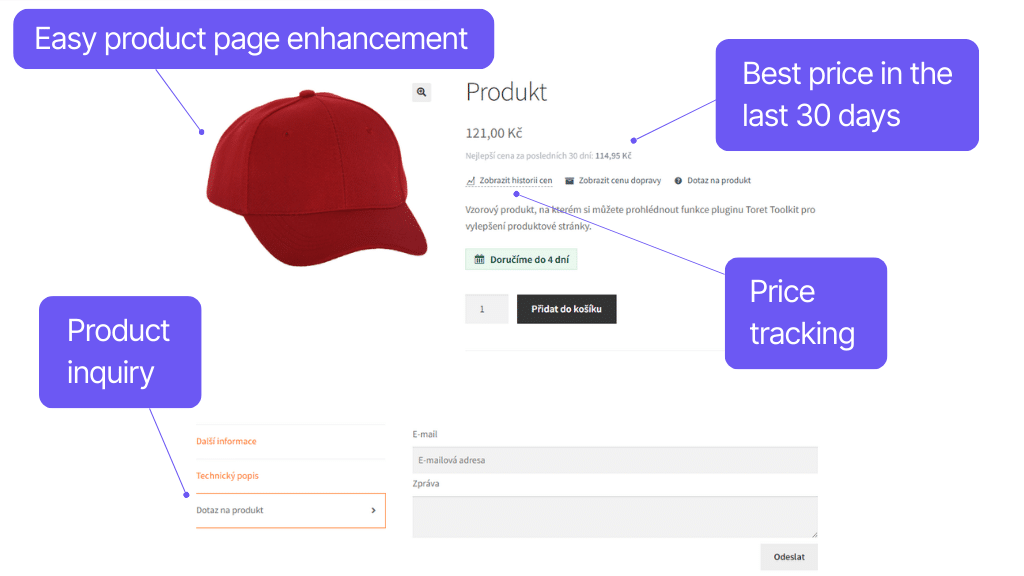
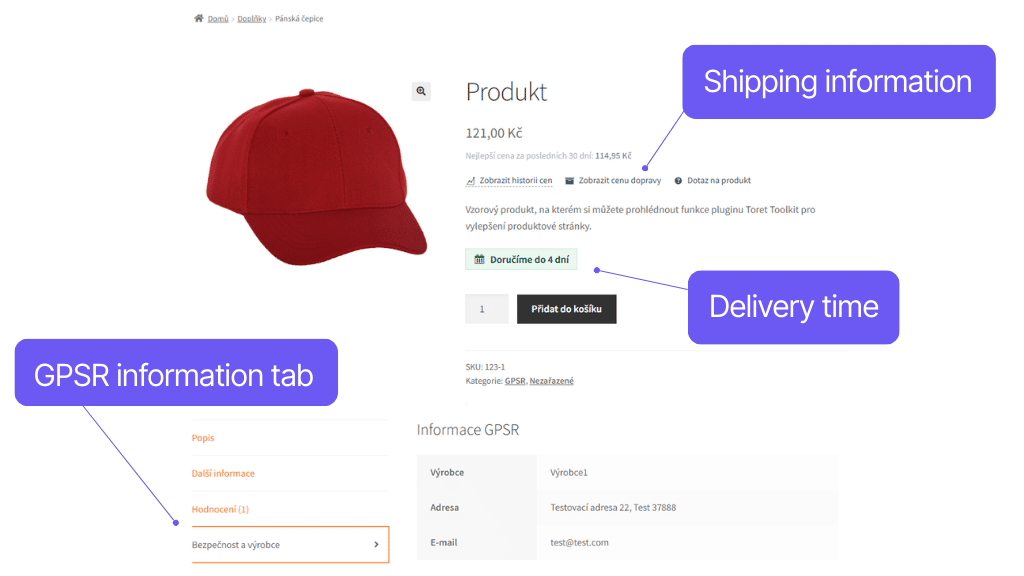
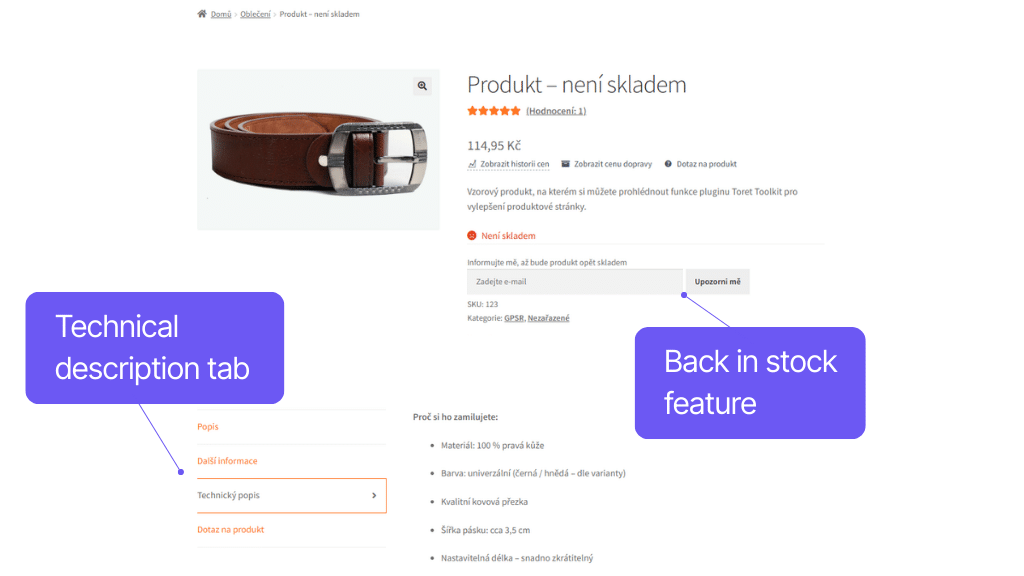
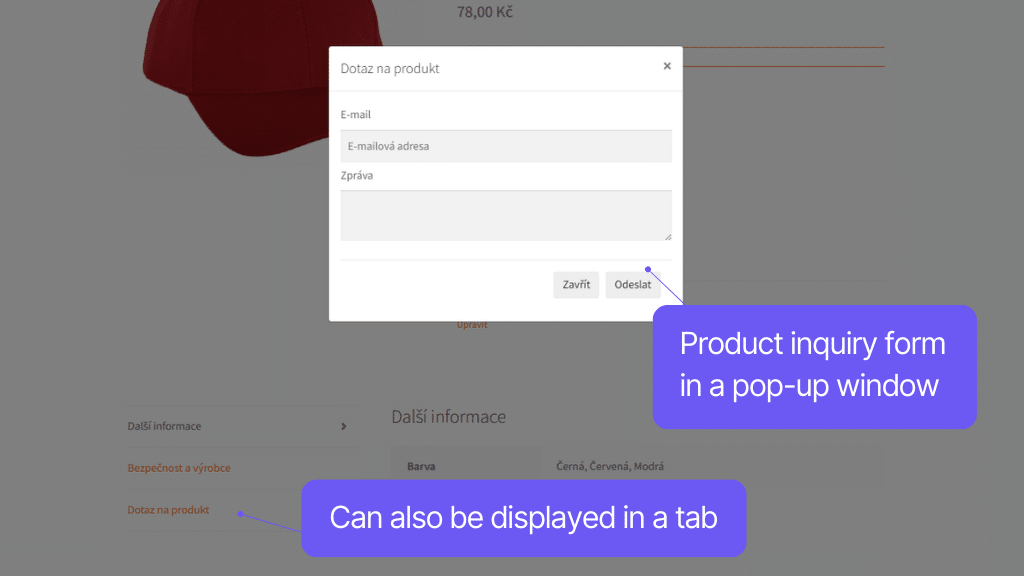
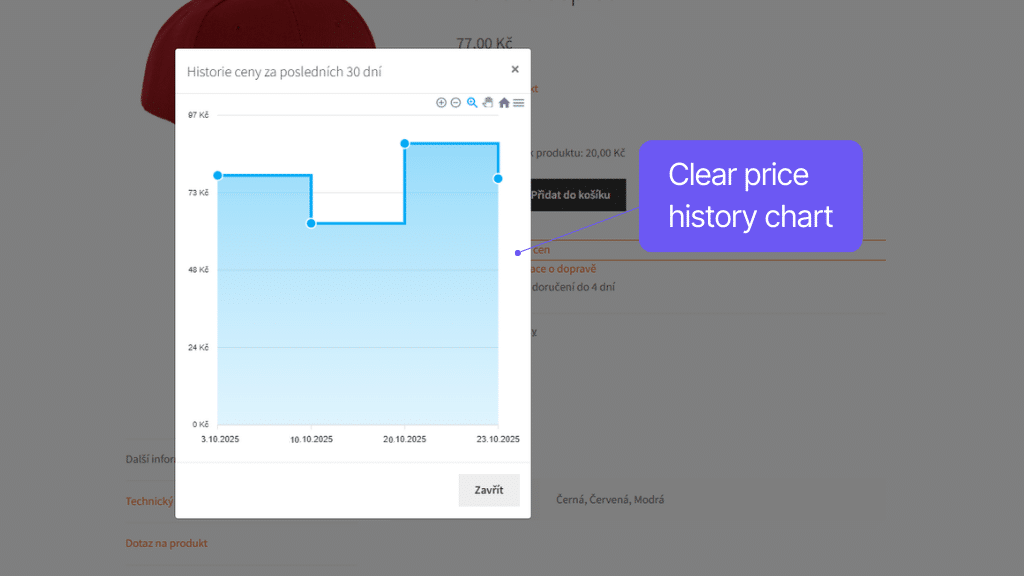
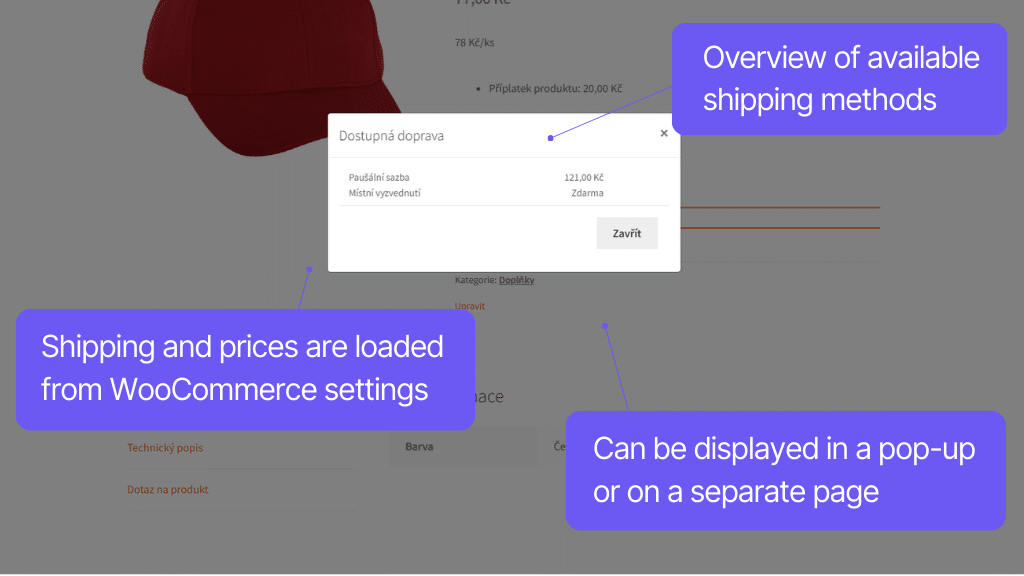
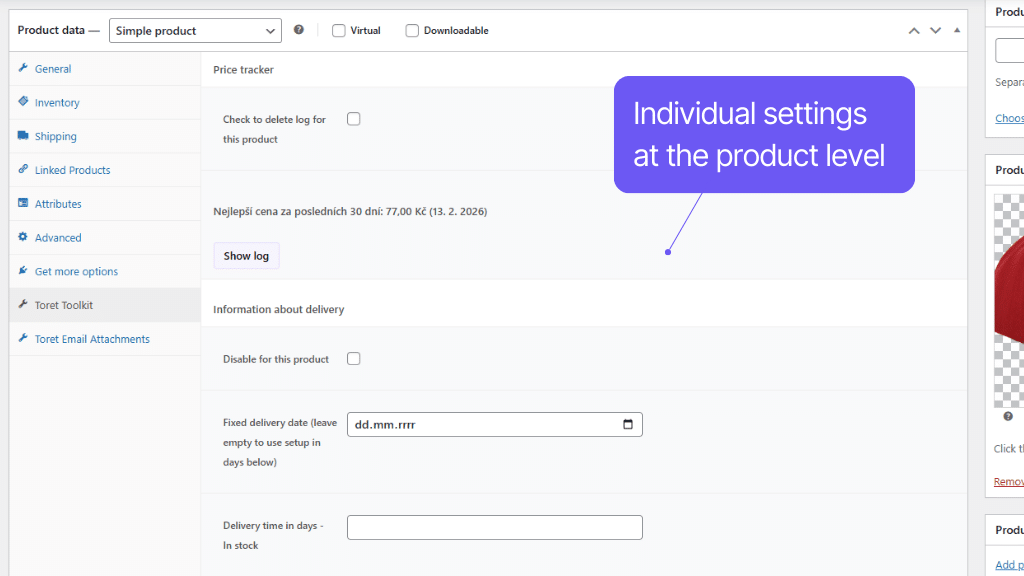
Make product selection more pleasant for customers while meeting legal requirements. Toret Toolkit allows customers to view a price history chart and alerts to the lowest price in the last 30 days. Displaying unit prices is also no problem with Toolkit.
The plugin can display delivery time and shipping cost directly at the product. For better clarity, you have the option to add a custom tab for technical description to the product or hide it if not needed.
Another new tab that Toolkit adds to products is the tab for publishing information according to GPSR. You simply fill these in in the form at a specific product or in the category detail.
Watchdog and inquiry form for your products
If a product is out of stock, the customer can use the new watchdog (Back in stock) function and receive a notification about restocking to their email.
Furthermore, you can add a product inquiry form to product pages, either as a pop-up window or as a tab in the product description. Customers will thus be able to send inquiries about specific products immediately while viewing them.
Automatic generation of shipping price information
You can display shipping information at products and on a special page. The plugin automatically generates a shipping price overview for individual countries from the plugin settings. No more manual updates needed.
The plugin contains a function that, when enabled, allows adding a link to a product for a pop-up window where the price development of the product over time is visible. The time axis of the graph is the same as the maximum period for calculating the discount (30 days).
The location of the price history chart link can be adjusted in the settings using hook selections into which the information is hooked.
The plugin logs price adjustments and alerts to the lowest set price in the last 30 days.
At the same time, you can set up automatic display of an informational message at the product in case the lowest price in the last 30 days is lower than the current selling price.
In the plugin, you can enable the function to display the lowest price of the product in the last 30 days. This price can be calculated from the regular price, the sale price, or the lowest of both.
The notification will only appear if two conditions are met:
- the product has a sale price entered and
- in the last 30 days, a sale price/regular price lower than the current selling price was entered.
The location of the lowest price information display can be adjusted in the settings using hook selections into which the information is hooked.
In the plugin, you can enable the Back in Stock function, which works as a watchdog. For products that are out of stock, a form for entering the customer’s email will be displayed. The form can also be placed using a shortcode.
Once the product is restocked, the system automatically sends a notification email to the entered address.
Logged-in users who want to be notified about restocking can be found in the WooCommerce administration, where you can manage them. At the same time, you can see which product they are interested in and whether they have already been notified about potential restocking.
Part of the subscription is also email verification using a sent link, which is generated immediately after subscription. The user is truly subscribed only after confirming this link. The plugin thus meets GDPR requirements.
Emails sent by the plugin are based on the WooCommerce design and can also be edited in the respective section.
Thanks to the plugin, it is possible to display a product inquiry form to customers on product pages. You can display it as a pop-up window that appears after clicking a link, or in a custom tab in the product description.
The form contains fields for entering the customer’s email, phone number, and the inquiry itself.
The plugin includes a function that allows you to automatically list a clear display of shipping prices for individual countries either on the shipping information page. The price is obtained directly from the shipping settings or Toret shipping plugins. Everything is automatically updated upon any change.
Alternatively, you can display a pop-up window at the product with a tabular display of available shipping for the specific product. The price is exactly according to the product, so it is also displayed in the table according to weight and dimension conditions.
The plugin allows setting a global delivery time, which is automatically written to all products. You can also set the delivery time for each product individually or at the category level.
A decisive time can be set for the delivery time, upon exceeding which an extra day is automatically added to the period.
For different stock statuses, you can also set a different delivery time (in stock, out of stock, on order) and possibly hide the displayed delivery information in the selected stock status.
The delivery time can also be added to the customer’s email, where the latest delivery time based on the ordered products will automatically be filled in, and displayed in the shopping cart, at checkout, and on the thank-you page.
The location of the delivery time information display can be adjusted in the settings using hook selections into which the information is hooked.
The plugin allows setting a global unit price, which is automatically written to all products. Alternatively, you can set the unit price for each product individually.
The location of the unit price information display can be adjusted in the settings using hook selections into which the information is hooked.
In the plugin settings, you will find review settings control. WooCommerce itself can be set to meet review addition requirements without any intervention. In case you set that only customers who purchased the product can review, you don’t need to solve anything more.
But if you want to have open reviews, it is necessary to display whether it is a review:
verified
unverified
sponsored
Using the plugin, you can add their origin to reviews and this information is also written to the product rating.
For a product, you can activate the display of a custom tab where you can write a technical description of the product.
For selected products, the display of the custom tab can be hidden.
For a product, you can activate the display of a tab where you can list mandatory manufacturer information according to GPSR. Information can be filled in the product or category detail.
Improved WooCommerce checkout
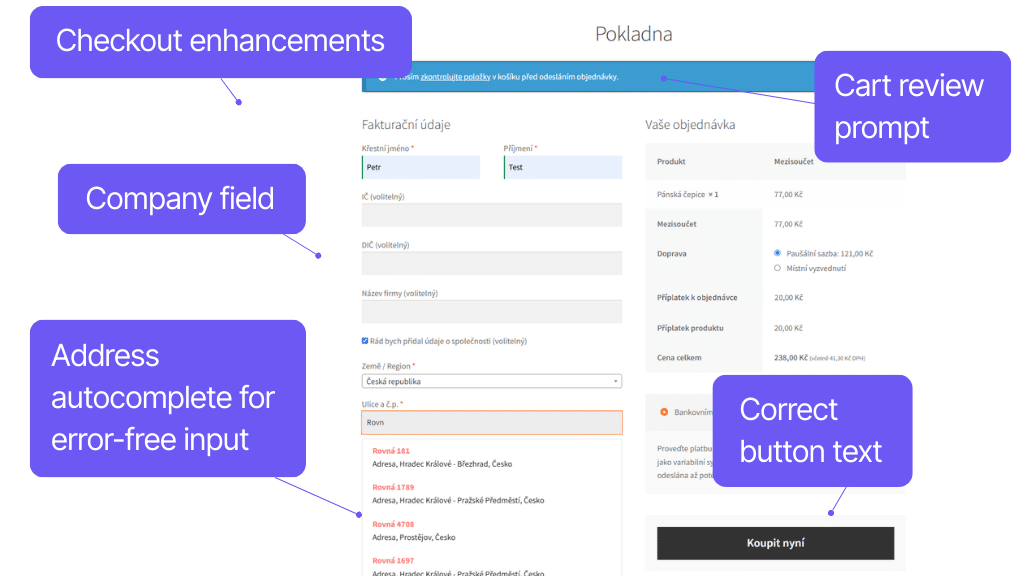
When you simplify payment as much as possible, more customers will complete the purchase process. And what’s more, they’ll be happy to return next time. That’s why Toolkit brings a number of improvements to your checkout.
In the checkout, a new address whisperer helps customers fill in fields by automatically completing data. For entrepreneurs, there is an option to use company fields with data completion based on the entered Company ID (IČ). The plugin automatically loads this data from ARES.
Using the plugin, you can add a cart check notification before sending the order to the checkout and also edit the submit button text. The plugin contains preset button wordings that comply with the consumer law amendment.
The plugin allows using an address whisperer from the mapy.cz database. When typing an address, the customer sees a menu of filtered addresses based on the entered text.
When clicking on a offered complete address, the following are automatically filled in based on the selected option:
- Street and house number
- City
- ZIP code
Thanks to this function, the error rate of the entered customer address is reduced.
The plugin allows adding Company ID (IČ), VAT ID (DIČ), and IČ DPH fields to the checkout.
Fields are always displayed only relevant ones, based on the selected customer country.
At the same time, when entering the Company ID (IČ), a button appears allowing information about the company to be loaded from ARES (for IČ registered in the Czech Republic) or RÚZ (for IČ registered in Slovakia).
The following can be automatically filled in:
- VAT ID (DIČ)
- Company name
- Street and house number
- City
- ZIP code
It is also possible to add a checkbox to the checkout for showing/hiding company fields by the customer.
The plugin contains several pre-prepared variations of the order submission button wording. The pre-prepared button wordings were consulted with lawyers and meet the requirements of the consumer amendment 2022.
Alternatively, the plugin also allows entering custom button text.
In the checkout, you can enable a prompt for the customer to double-check their cart before submitting the order.
Extended management of WooCommerce orders
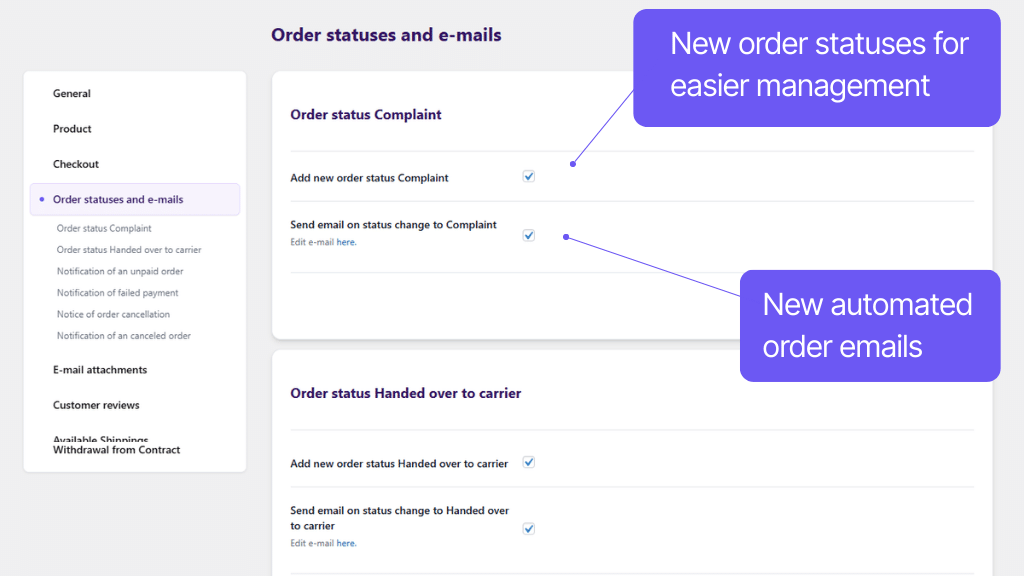
Toolkit adds new features to WooCommerce that save time managing orders, speed up processing, and increase customer satisfaction.
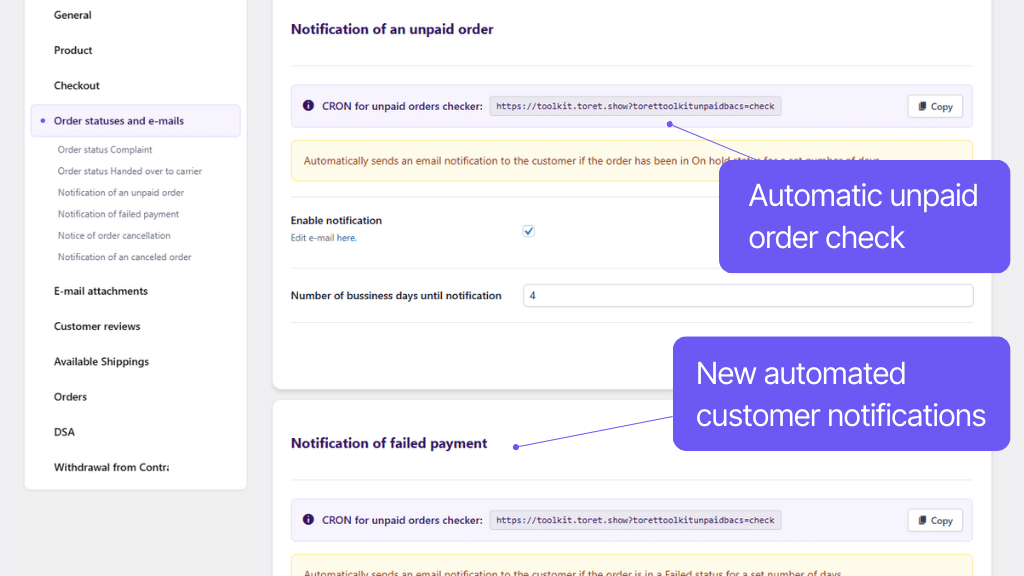
If a customer fails to pay for an order, you can have an automatic notification of unpaid order sent by email (including all payment details). Similarly, you can automate email notifications for new order statuses added by Toolkit – handed over to carrier, payment failed, order cancelled, and complaint.
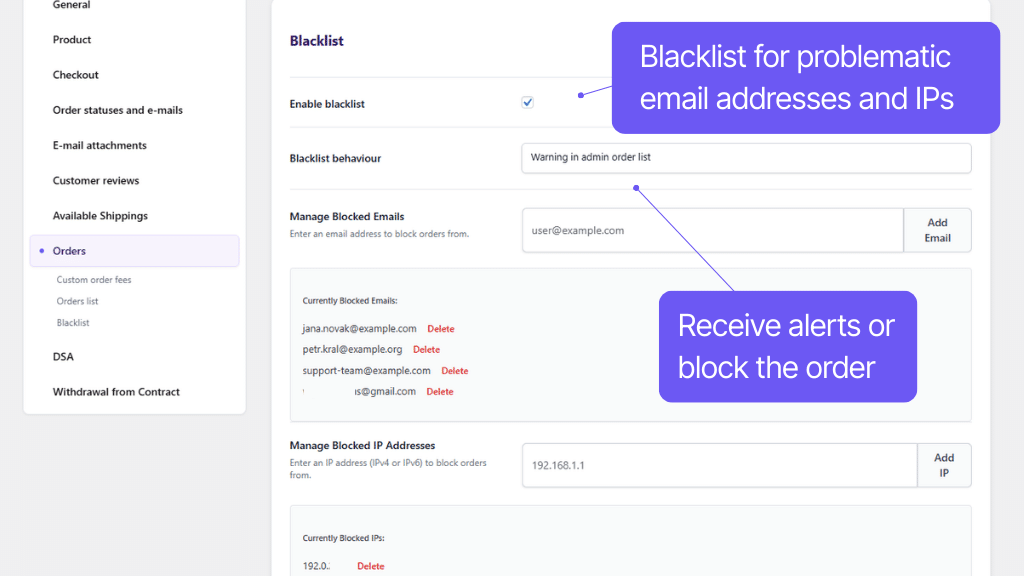
If you are troubled by unreliable customers who do not pick up their shipments, you will appreciate the Blacklist function. In the plugin settings, simply enter problematic email or IP addresses. You can either completely block ordering from these addresses or be notified of such orders in the administration.
Attachments to WooCommerce emails easily and quickly
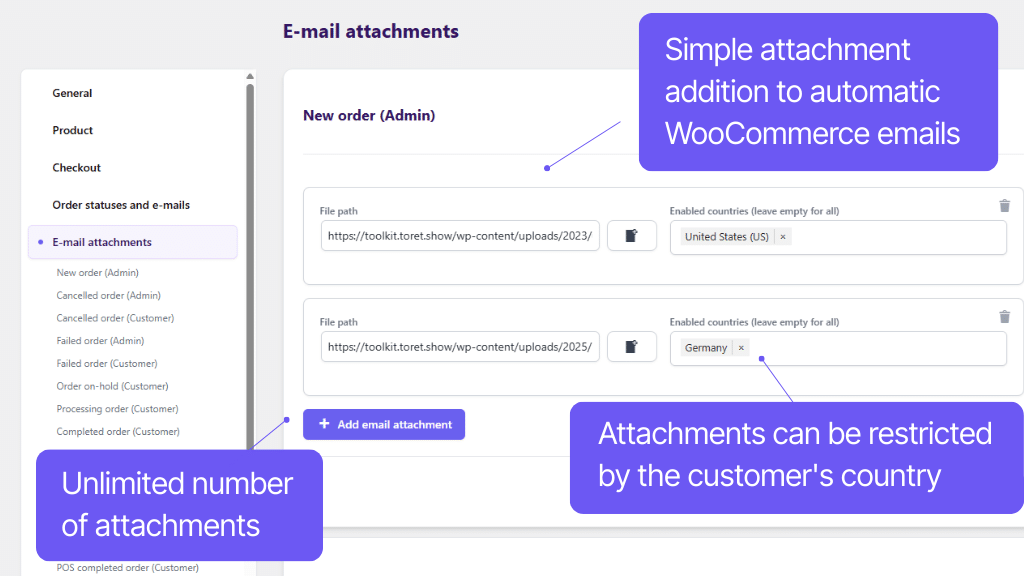
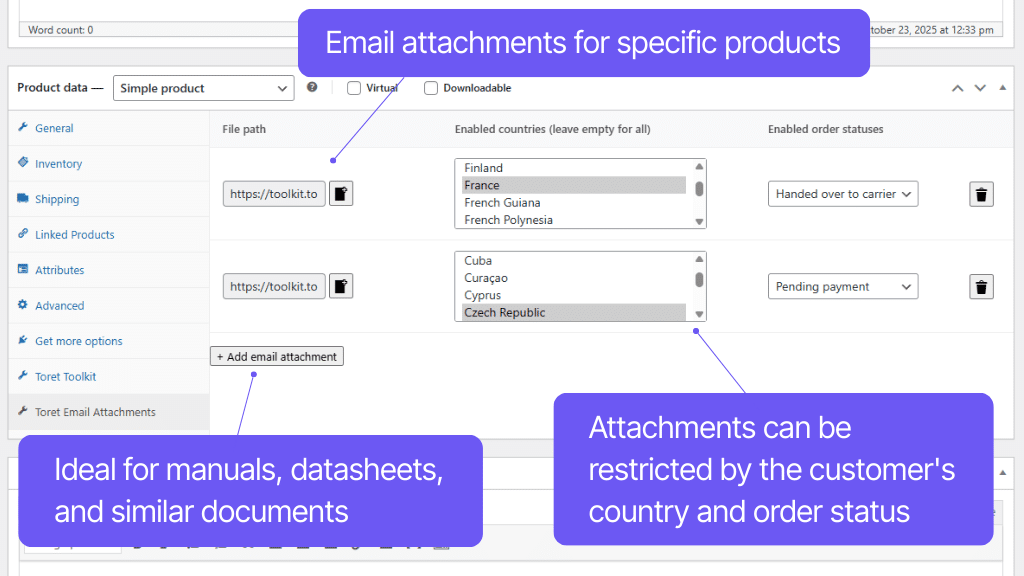
The plugin can attach files to any WooCommerce email and condition them by customer country. This is ideal for sending e.g. manuals, terms and conditions, or technical sheets. You can also link attachments to specific products.
The plugin lets you enable an automatic notification for unpaid orders. By default, WooCommerce only sends payment information when the order is created, and the customer may simply forget about it. Toret Toolkit adds the option to send the customer an automatic reminder X days after the order is created.
Unpaid order notification
The notification is sent only to customers whose order is in the On-hold status. The email includes a call to pay, and if you use the Toret QR platby plugin, it also includes a QR code for quick payment.
Failed payment notification
You can also enable this notification for orders in the Failed status. For these orders, the email includes a link to repeat the payment through the WooCommerce payment process. Again, you can set the number of days or hours after which the notification is sent automatically, as well as the payment methods for which this email is sent.
Order cancellation notice
Another feature you can enable is automatic order cancellation after a set period of time. The email includes information about why the order was cancelled and an invitation to place a new order. Order cancellation applies only to orders in the On-hold status.
In the order detail, you will always find information about whether and which notification was sent.
All emails can be customized via the email settings in WooCommerce.
The plugin adds a new order status Complaint (Reklamace) to WooCommerce. At the same time, it allows adding the complaint result to the order as a note.
When changing the status to Complaint and when entering the complaint result, an informative email in the style of WooCommerce emails is automatically sent to the customer.
The plugin adds the missing order status Handed over to carrier (Předáno dopravci) to WooCommerce. This represents the time when the package is packed and waiting to be handed over to the customer. WooCommerce currently only has the Processing status, which the order enters after payment, and Completed, which the order switches to after completion.
After changing the order to the Handed over to carrier status, an informational email notifying about shipment dispatch is sent to the customer.
If using Toret shipping plugins Packeta (Zásilkovna), PPL, GLS, DPD, FOFR, One by Allegro, Czech Post (Česká pošta) and Slovak Post (Slovenská pošta) or TOPTRANS and submitting the shipment to the carrier’s system before changing the order to the Handed over to carrier state, a shipment tracking link is also added to the customer’s email.
In the plugin settings, you can assign any number of attachments to any WooCommerce email.
You can condition sending the attachment by customer country. So you can have, for example, different attachments set for customers in CZ or SK.
For a product, you can assign any attachment to any WooCommerce email. You can thus easily send, for example, manuals or technical sheets.
You can condition sending the attachment by customer country. So you can have, for example, different attachments set for customers in CZ or SK.
In the basic settings, WooCommerce does not send information about a canceled order to the customer. Only an email is sent to the e-shop administrator.
The plugin allows enabling sending an informational email to the customer as well and adds the option to edit this email using WooCommerce.
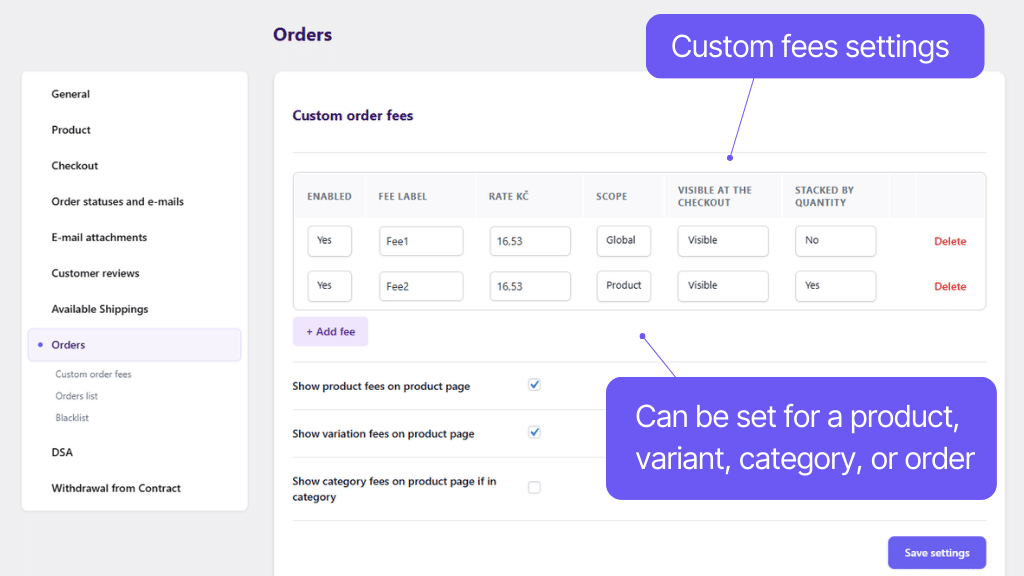
In the plugin, you can set custom surcharges for all orders or for orders containing specific products.
You can thus easily add, for example, a recycling fee or perhaps higher packaging costs for a product.
In the plugin settings, you can enter email and IP addresses, for which ordering can be blocked or notifications about orders from these addresses can be set.
Fulfilling Digital services act (DSA) requirements
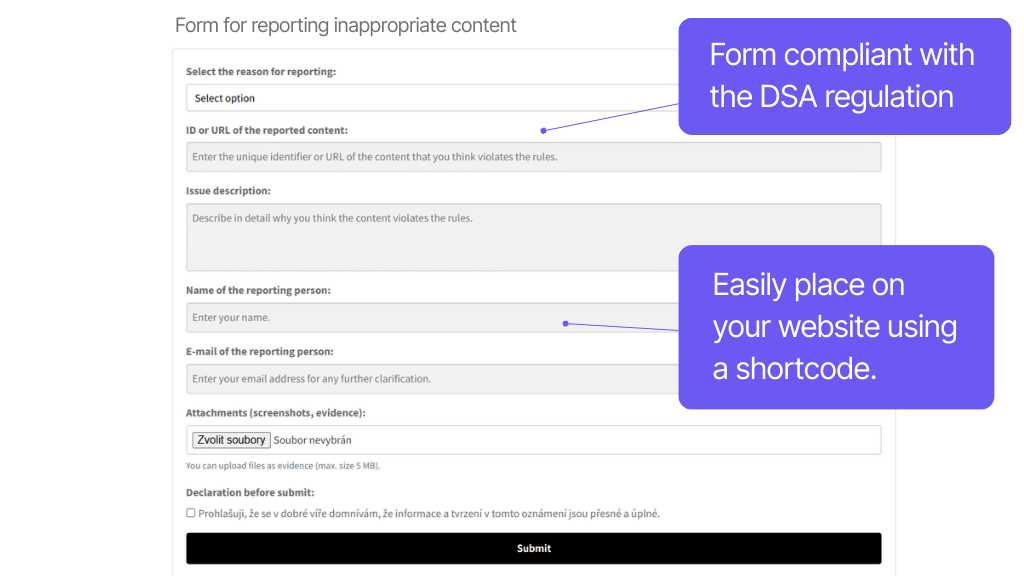
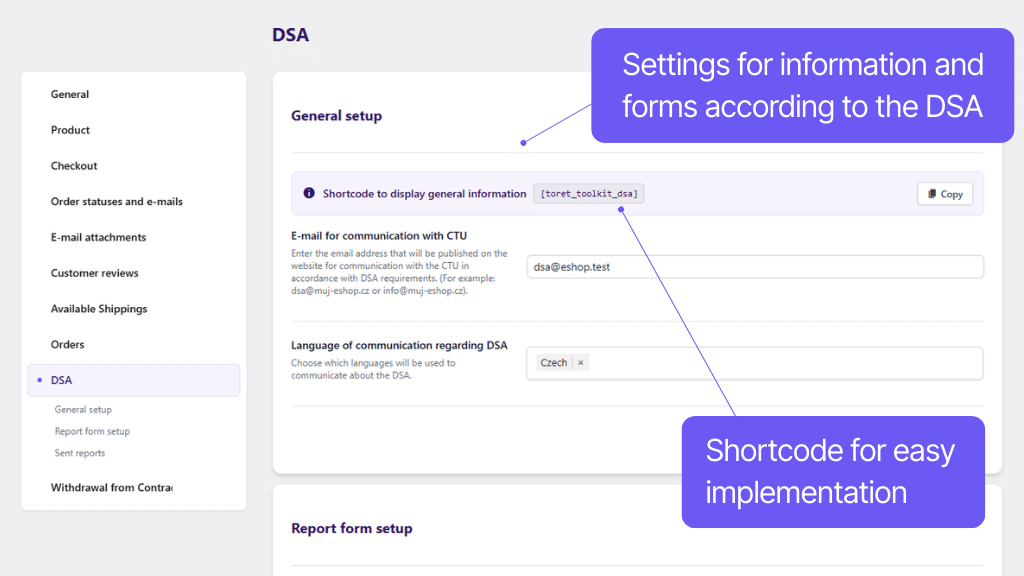
The plugin also allows meeting the requirements of the Digital Services Act (DSA), which regulates user content management. Toolkit adds a form for reporting illegal content with all legal requirements to the e-shop, as well as a shortcode for displaying information that you must have on the website according to DSA.
The plugin adds a shortcode to the e-shop for simple publication of mandatory data according to the Digital Services Act (DSA).
The plugin adds a form for reporting illegal content according to the Digital Services Act (DSA) to the e-shop. You can simply place the form on pages using a shortcode.
You will see received reports of illegal content in the plugin and can also have them sent to email.
Form and button for withdrawal from contract
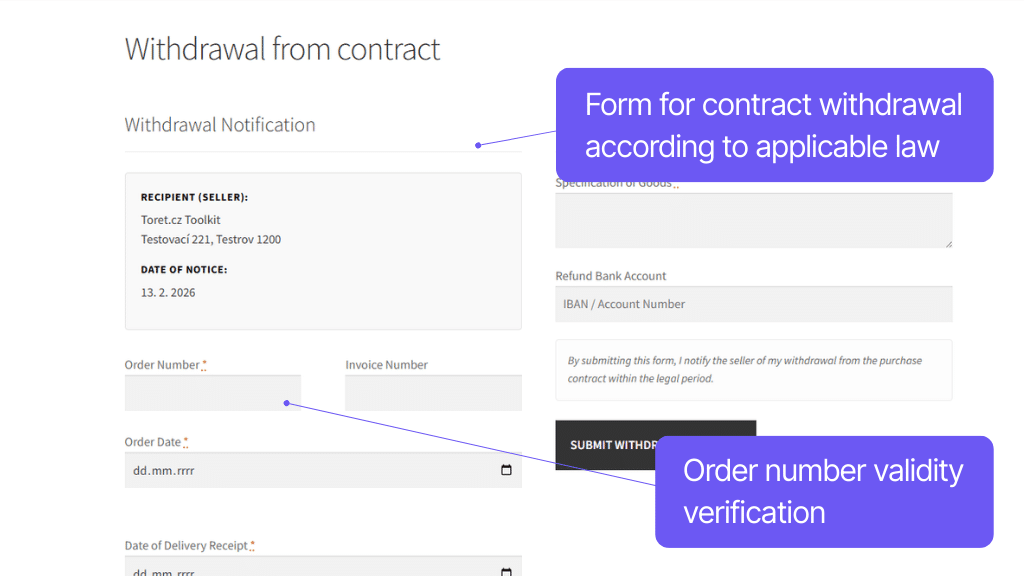
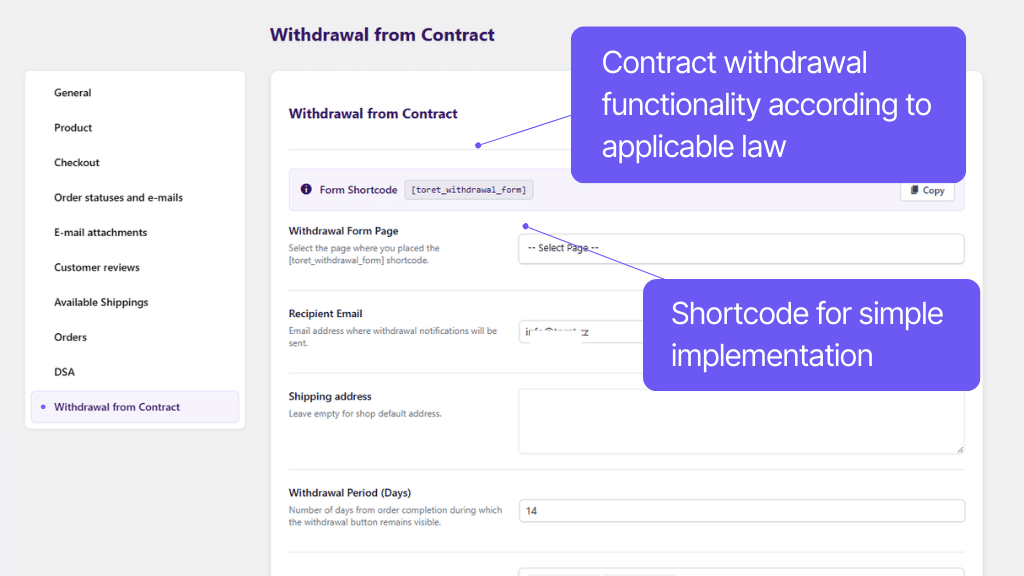
With the Toolkit plugin, you will also meet the legal requirement for easy withdrawal from the purchase contract. The plugin allows adding a withdrawal form to a page of your choice, displaying a button for withdrawal from contract in the order detail in the customer account, and easily managing customer requests.
The plugin adds a form for withdrawal from contract to the e-shop, which you insert on a page of your choice using a shortcode. When entering the order number, its correctness is automatically verified.
You will see received withdrawal requests in the administration and can also have them sent to email.
After sending the request, a confirmation with a summary of the entered data will be sent to the customer’s email.
You can edit the form items:
- fields can be set as required, optional, or hidden
- the legal text (declaration) can be edited
Logged-in customers will see a button for easy withdrawal from contract in the detail of their orders. After clicking the button, they will be redirected to a pre-filled withdrawal form.
Button display for orders can be limited by number of days, order status, and category of contained goods.
A link to the withdrawal form can also be added to automated order emails.
For every withdrawal from contract, a PDF summarizing the relevant information is automatically generated and attached to the email sent to the customer. You can also find this PDF in the e-shop’s admin panel.
Right within the WooCommerce admin panel, you’ll find a clear overview of all submitted contract cancellations, where you can mark them as processed, pending, or rejected.
Carefree management and regular maintenance
You don’t have to worry about implementing Toret Toolkit into your e-shop. It is fully compatible with WPML, with other Toret plugins and block website builders, such as Elementor and Divi. You don’t have to worry that the plugin implementation would negatively affect the appearance or functionality of the website.
We are constantly improving and updating the plugin to be compatible with the latest versions of WooCommerce. Extensive documentation is available for quick and easy plugin setup. In case of problems, there is customer support with which you can solve everything reliably.
All our plugins are mutually compatible and can be used on a single WooCommerce e-shop.
Usage example:
In the checkout, the customer can select delivery to an address or pick-up point via the shipping plugin, pay using a payment gateway, and finally, an invoice is automatically generated and sent in the order confirmation email.
The plugin fully supports WordPress Multisite, where a single license is sufficient for all managed sites. Each Multisite web can have its own plugin settings.
The plugin supports use alongside popular block page builders Gutenberg, Elementor, and Divi.
The plugin is compatible with the Cloudflare Turnstile service for preventing spam from forms.
The plugin is compatible with WPML and texts at products can be translated using String translations.
High-Performance Order Storage (HPOS), formerly known as Custom Order Tables, is a solution that provides an easy-to-understand and solid database structure – designed specifically for e-commerce needs. It uses the WooCommerce CRUD design to store order data in custom tables – optimized for WooCommerce queries with minimal impact on store performance.
We are constantly improving the plugin and updating compatibility with WooCommerce. We guarantee compatibility with WooCommerce 6.7 and higher.
Extensive documentation is prepared for the plugin. It helps you easily configure the plugin and quickly get oriented with its features.
€69,00 / year
+FREE: 3-month subscription to Toret WooCommerce Manager
Need help?
[email protected]Do you need advice on choosing a product or have a question about a feature?
What’s included?
- 1 year of updates
- 1 year support (beware of resellers)
- 14-day money-back guarantee
14-day money-back guarantee
We want to ensure that you are 100% satisfied with your purchase. That’s why we offer a 14-day money-back guarantee.