
Slovenská pošta (Slovak Post) for WooCommerce
The Slovenská pošta for WooCommerce WordPress plugin connects your e-shop with the carrier’s system. Thanks to a direct API connection, you can use a wide range of Slovenská pošta services and ship to an address, to a post office, and to BalíkoBoxes with just a few clicks. The plugin adds a branch selection map widget to the checkout, allows you to automate order processing, print labels, and track shipments directly from WooCommerce. Rich configuration options help you customize delivery exactly as you need.

- Automation saves your time and speeds up order processing.
- Direct integration minimizes errors and reduces costs.
- Increases customer convenience when selecting shipping, thereby increasing conversions.
- Sending, label printing, and shipment tracking directly from the e-shop administration.
- Extensive options for setting shipping prices and surcharges.
- Wide support for Slovenská pošta delivery methods.
Worldwide delivery with Slovenská pošta
Deliver from Slovakia to the whole world. The Slovenská pošta WooCommerce plugin connects your e-shop with the postal system, allowing you to use its full range of services directly in the administration. The plugin supports delivery to addresses, Slovenská pošta branches, and BalíkoBOXes with submission from Slovakia.
A major advantage is the ability to send various types of shipments – from letters, small and standard parcels, to insured, express, or business shipments. The plugin supports all these services. You can set additional services for shipments, such as fragile, personal delivery, etc.
The plugin enables parcel delivery to Slovenská pošta pick-up points, including over 1800 post office branches, BalíkoBOXes, PoštaPOINTs, and regional hubs throughout Slovakia.
In the plugin, you can set the shipping method separately for boxes and separately for branches.
The plugin supports the Package to Address delivery service worldwide – according to the carrier’s offer.
The plugin supports express delivery to an address, to a post office branch, and to a BalíkoBOX. Delivery time varies by destination country.
The plugin also allows sending letter shipments, specifically the following services:
- Registered letter
- Letter
- Insured letter
The plugin supports the EMS service – express shipment abroad. The Easy Express service is used for express transport of shipments up to 1 kg.
The plugin supports the EPG service, which is used for delivering business parcels abroad.
You can also use additional services for shipments:
- delivery by 10 AM
- delivery notification
- fragile
- delivery information
- do not forward
- do not store
- do not return
- bulky
- repeated delivery
- authorization excluded
- return of confirmed documentation
- personal delivery only
- exchange of goods
These services can be set as default for all shipments or set individually when creating a shipment.
Convenient delivery selection at checkout
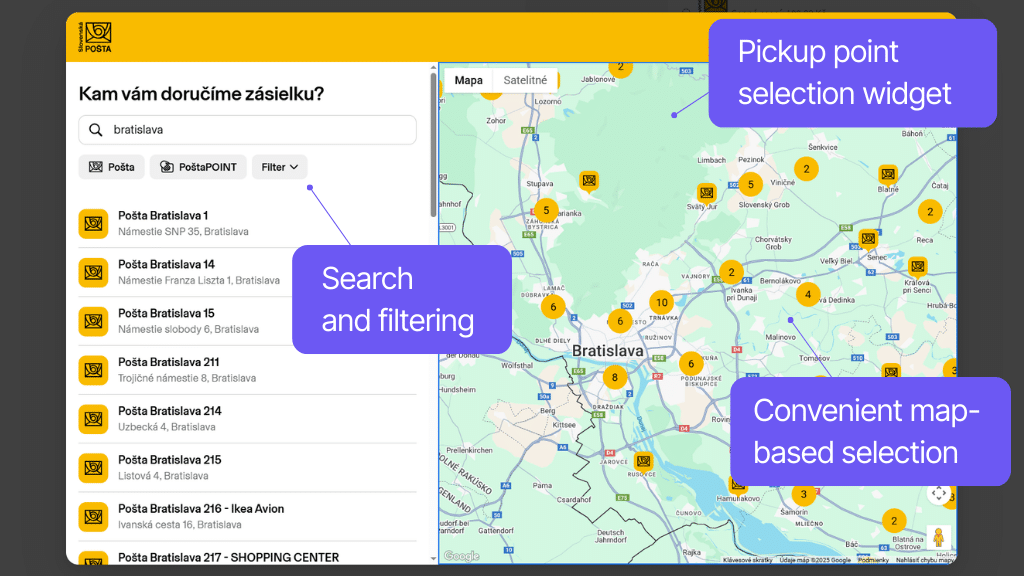
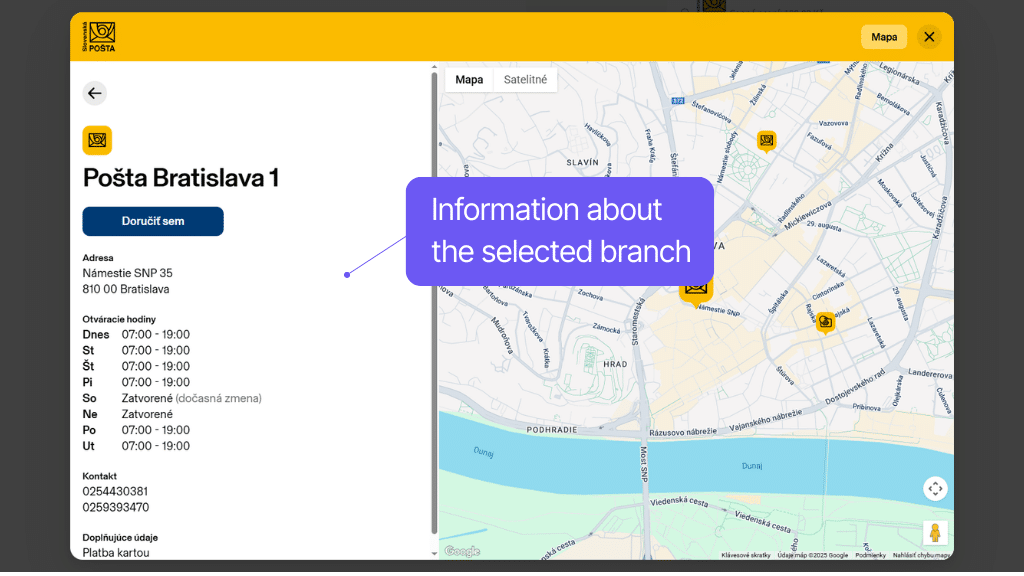
A seamless branch selection at checkout is ensured by the map widget in the checkout, which also allows text search, filtering, and displaying information about branches.
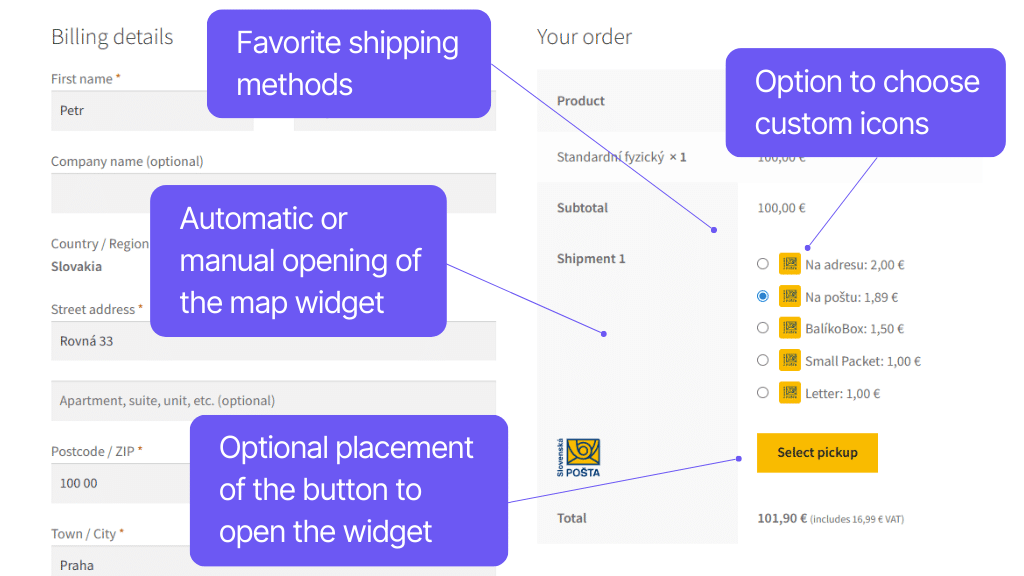
The plugin also offers other features for the checkout. Optional automatic widget opening when selecting a pick-up point speeds up customer flow, as does automatic filling of the delivery address based on the selected branch. You can also choose custom icons and adjust the button placement for opening the widget.
The plugin adds a widget to the checkout for selecting a branch or box for pickup. The widget automatically loads available branches and displays information about them (opening hours, exact address, payment options, capacity). Customers can select branches from a list or map, search, and filter.
The widget behavior can also be customized in the plugin settings. You can set:
- automatic opening of the widget when selecting the shipping method
- placement of the button to open the widget
- use pick-up point address as delivery address
- selection restriction based on cart weight
In the plugin, you can enable a function that saves the customer a step when opening the pick-up point selection map. The function for automatically opening the map with pick-up point selection automatically displays the map widget when the shipping method is chosen.
However, the button remains visible in case the customer changes their mind and wants to change the pick-up point.
In the plugin settings, you can enable the function to automatically use the pick-up point address as the delivery address for the order. If active, the delivery address will be automatically filled according to the selected branch for orders to a pick-up point.
You can upload custom logos for individual shipping methods to have a unified checkout appearance.
Rich shipping configuration options
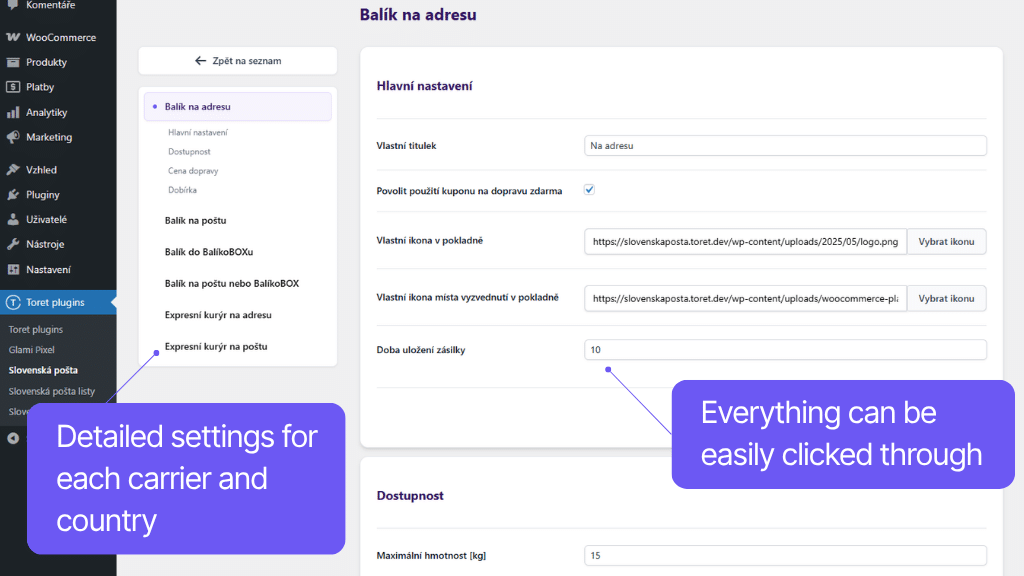
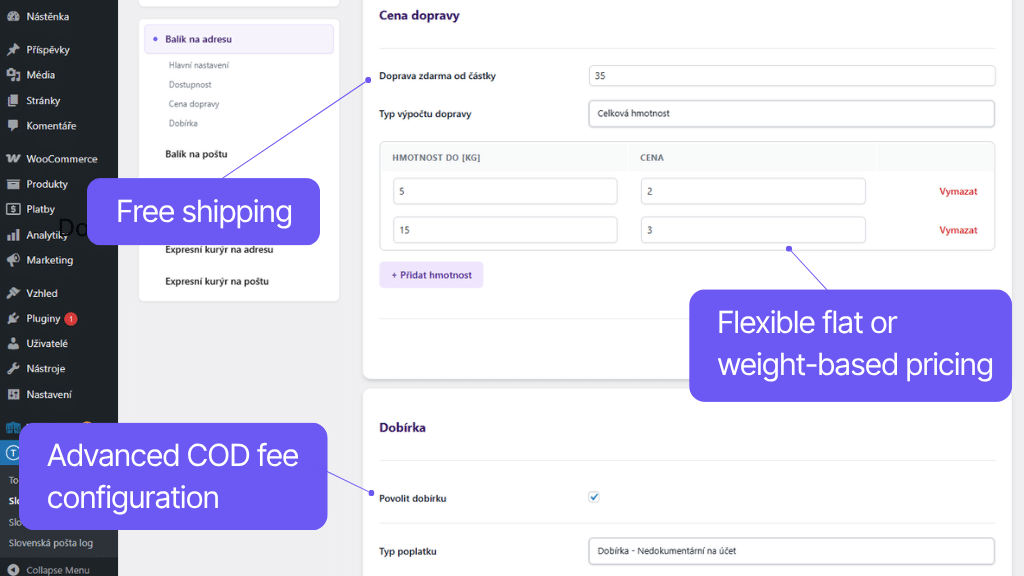
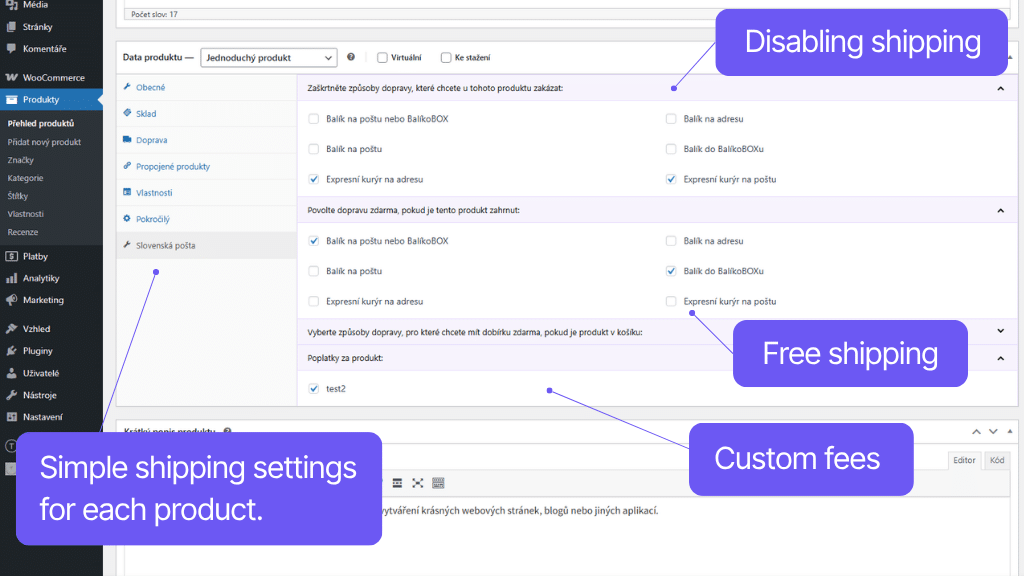
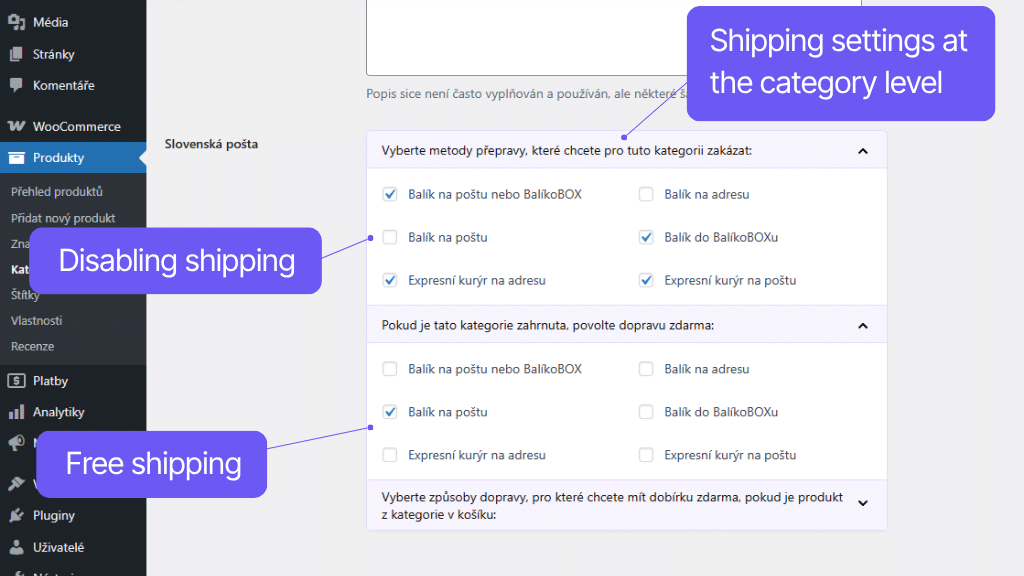
The plugin offers rich configuration options, so you can fine-tune shipping in your e-shop to fit your assortment and customers.
You can set the shipping price separately for individual delivery methods. You can enter a flat rate or scale the price based on the order’s weight or value. Of course, you can set free shipping from a certain order value, for a specific product, or product category. You can also use coupons for free shipping.
The plugin also supports shipping via Cash on delivery (COD). You can set a COD surcharge, free COD from a certain order value, or a maximum COD value.
The plugin offers other useful features, such as custom surcharges, automatic shipment price conversion to another currency, shipping availability settings, and many others that will make your daily work with shipments easier.
You can set a custom price for each shipping method. This can be either a fixed rate or scaled based on weight or order value. The order value for price scaling can be calculated with or without VAT.
For each carrier and country, you can set a custom threshold for when free shipping becomes available.
Furthermore, you can set free shipping if a certain product, variation, or product from a selected category is in the cart.
The plugin supports free shipping coupons. Also for coupons, you can set whether shipping will be free for all or only for specific delivery methods (e.g., you can create a coupon for free shipping to a post office branch, while delivery to an address remains charged).
The plugin supports Cash on delivery (COD) payment. COD rules can be set individually for each shipping method and country:
- COD price (uniform or scaled by order value)
- free COD over a certain amount
- COD payout (cashless, by money order)
- maximum allowed COD value (COD will not be available above this limit)
For COD, you can also choose the tax rate and hide the COD fee in the checkout if it is free.
When sending a parcel abroad, its value must be converted to the given currency. The plugin performs this conversion automatically.
The plugin can automatically retrieve rates from the Czech National Bank (cnb.cz), the National Bank of Slovakia (nbs.sk), or allow you to enter your own rates.
You can select your preferred method in settings.
In the plugin, you can set custom surcharges:
- per product or variation
- per category
- per shipping method
- global
For all surcharges, you can choose whether they will be visible or hidden and whether they will be multiplied by quantity.
The plugin allows detailed settings for the circumstances under which each shipping method will appear in the checkout for a given country. You can restrict the display by:
- maximum and minimum product price
- maximum and minimum cart weight
- maximum product dimensions
- maximum product volume
- maximum and minimum cart value
- maximum and minimum product quantity in cart
The plugin supports shipping zones in WooCommerce. You can easily set these methods only for selected countries.
Complete shipment management directly from administration
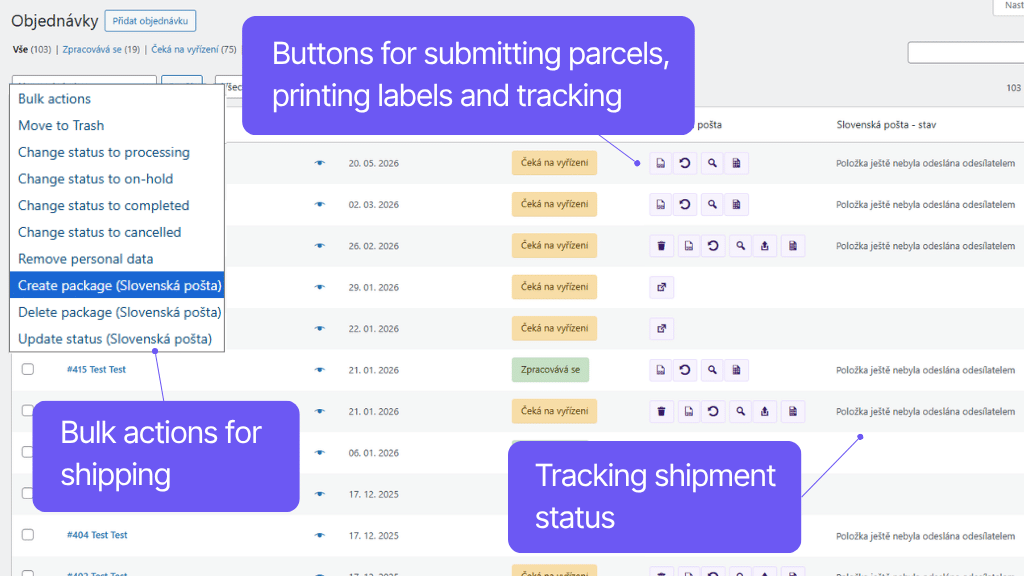
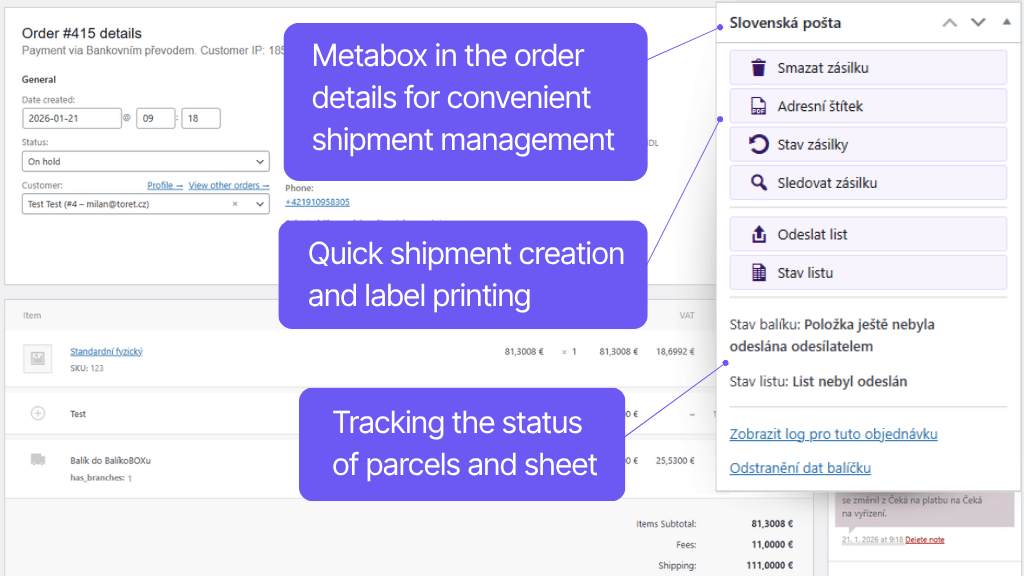
You can handle complete shipment management for Slovenská pošta quickly and easily directly from the e-shop administration. Creating a shipment is a matter of a click. Thanks to the plugin, you don’t have to manually transcribe data, but they are automatically written to the shipment list. Then just send this list to the postal system. One click is enough for that too. This entire process can also be automated or handled via bulk actions.
By sending the list, you can automatically order parcel pickup. You can download the necessary parcel labels from the overview or order detail. You can write custom text on labels or use variables to enter, for example, the order number or customer note.
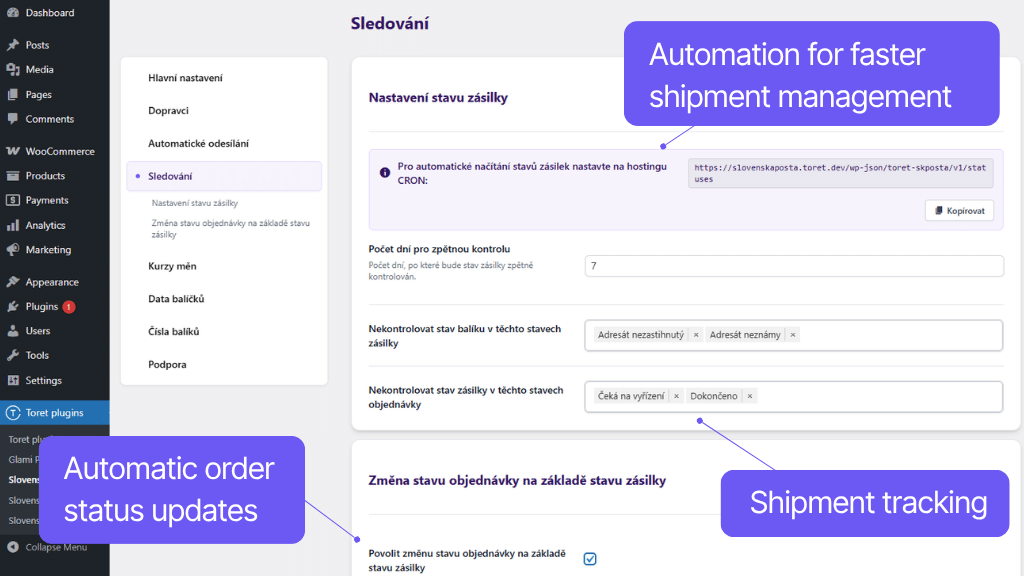
The shipment status in transit can be tracked directly in the e-shop administration, and you can also simply click through to the delivery record in the postal system. The tracking link for customers is automatically attached to the order email. Similarly, the plugin can automatically change the order status for you based on what is currently happening with the shipment in transit.
Thanks to the connection to the Slovenská pošta API, it is possible to fully manage the shipment in WooCommerce. You can send the order to the system, delete it from the system, print the parcel label, get a tracking link, or order parcel pickup. Everything simply and with one click from the order overview or order detail.
Once you have the shipment ready for the customer, you write it to the shipment list with one click and send the list to the Slovenská pošta system via API service with a second click. You don’t have to transcribe anything.
You can also use automatic shipment creation based on order status change or bulk creation in the order overview in WooCommerce. Shipment lists can be automatically sent at given time intervals using CRON.
For orders sent to the Slovenská pošta system, you can download the shipment label directly in WooCommerce from the order overview or order detail.
You can write a reference and note on the label. It can be regular text or you can use variables for:
- Order ID
- Order number
- Customer note
- iDoklad document number
- iDoklad invoice ID
- iDoklad proforma document number
- iDoklad proforma ID
- iDoklad proforma variable symbol
- Fakturoid proforma ID
- Fakturoid invoice ID
- Fakturoid variable symbol
Reference and note can be set as default for all shipments or customized individually.
The plugin supports bulk actions in the order overview in WooCommerce.
Via bulk actions you can:
- Update shipment status
- Create shipments
- Delete shipments
Ordering parcel pickup is possible by sending a shipment list with shipment pickup set. Courier pickup can be set as default for all shipments or set individually when creating each shipment.
The plugin contains its own CRON, which allows loading the shipment status during transport. This CRON needs to be set up on your hosting.
Shipment statuses can also be updated manually, by clicking a button in the overview or order detail or via bulk actions.
In the order overview, you can use a link to go to the Slovenská pošta system page for shipment tracking with an automatically pre-filled number and immediately know what is happening with the parcel.
You can also automatically attach the tracking link to the order email for customers. The link placement in the email can be customized by selecting a hook in the plugin settings.
The plugin allows you to set an automatic order status change based on the shipment status. You simply pair shipment statuses with order statuses. For example, in case of successful delivery, the order status automatically changes to Completed.
Carefree management and regular maintenance
The Toret Slovenská pošta plugin is fully compatible with other Toret plugins as well as popular block page builders (Gutenberg, Elementor, Divi) and multi-currency plugins. You do not have to worry that its implementation would disrupt the design or function of your e-shop.
The subscription includes access to updates, which ensure compatibility and add new features, and customer support in case of issues.
All our plugins are mutually compatible and can be used on a single WooCommerce e-shop.
Usage example:
In the checkout, the customer can select delivery to an address or pick-up point via the shipping plugin, pay using a payment gateway, and finally, an invoice is automatically generated and sent in the order confirmation email.
The plugin fully supports WordPress Multisite, where a single license is sufficient for all managed sites. Each Multisite web can have its own plugin settings.
The plugin supports use alongside popular block page builders Gutenberg, Elementor, and Divi.
High-Performance Order Storage (HPOS), formerly known as Custom Order Tables, is a solution that provides an easy-to-understand and solid database structure – designed specifically for e-commerce needs. It uses the WooCommerce CRUD design to store order data in custom tables – optimized for WooCommerce queries with minimal impact on store performance.
We are constantly improving the plugin and updating compatibility with WooCommerce. We guarantee compatibility with WooCommerce 6.7 and higher.
Extensive documentation is prepared for the plugin. It helps you easily configure the plugin and quickly get oriented with its features.
€79,00 / year
+FREE: 3-month subscription to Toret WooCommerce Manager
Need help?
[email protected]Do you need advice on choosing a product or have a question about a feature?
What’s included?
- 1 year of updates
- 1 year support (beware of resellers)
- 14-day money-back guarantee
14-day money-back guarantee
We want to ensure that you are 100% satisfied with your purchase. That’s why we offer a 14-day money-back guarantee.