
Packeta (Zásilkovna) for WooCommerce
The Packeta for WooCommerce WordPress plugin connects your e-shop with the Packeta system. Deliver to addresses, boxes, and pickup points in more than 30 countries, offer customers a map widget at checkout, and manage shipments completely from the e-shop administration. Automated sending, shipment tracking, label printing, and other useful functions will make your daily shipping work easier.

- Automation saves your time and speeds up order processing.
- Direct connection minimizes error rates and reduces costs.
- Increases customer comfort when selecting shipping and thus conversions.
- Sending, printing labels, and tracking shipments directly from the e-shop administration.
- Rich options for setting shipping prices and surcharges.
- Support for all delivery types, including external partners.
Delivery across Europe and the whole world
You can have the popular Packeta in your e-shop too – thanks to our Packeta for WooCommerce implementation plugin. Offer customers delivery to pickup points, boxes, and addresses not only in Czechia, but also in more than 30 countries worldwide.
The plugin allows you to use the shipping services of Packeta and its external partners.
The plugin supports sending packages to addresses using the Packeta carrier for CZ, SK, HU, PL, and RO.
The plugin further allows the use of 60+ external carriers in more than 30 countries worldwide. If Packeta adds a carrier, it will be immediately available for you to use.
Available countries include:
United Arab Emirates, Austria, Belgium, Bulgaria, Czechia, Germany, Denmark, Estonia, Spain, Finland, France, Great Britain, Croatia, Hungary, Italy, Lithuania, Luxembourg, Netherlands, Poland, Portugal, Romania, Sweden, Switzerland, Ireland, Israel, Slovenia, Slovakia, Turkey, USA, and Ukraine.
Using the plugin, customers can select a pickup point from all countries offered by Packeta at checkout.
Currently, it is possible to use pickup points in Czechia, Slovakia, Hungary, and Romania.
The plugin also allows the use of external pickup points of more than 40 carriers from over 20 European countries. If Packeta adds a carrier, it will be immediately available for you to use.
Available countries include:
Belgium, Bulgaria, Czechia, Germany, Denmark, Estonia, Spain, Finland, France, Great Britain, Croatia, Hungary, Italy, Lithuania, Netherlands, Poland, Portugal, Romania, Sweden, Slovenia, Slovakia, and Ukraine.
The plugin supports the use of the evening delivery service for the Czech and Slovak Republics in the cities of Prague, Brno, and Bratislava.
Comfortable delivery selection at checkout
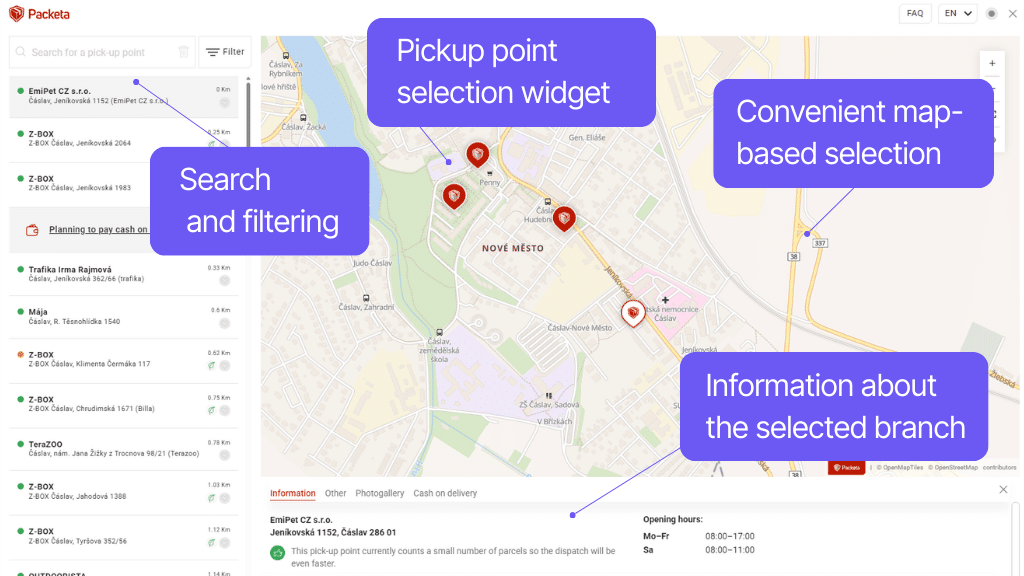
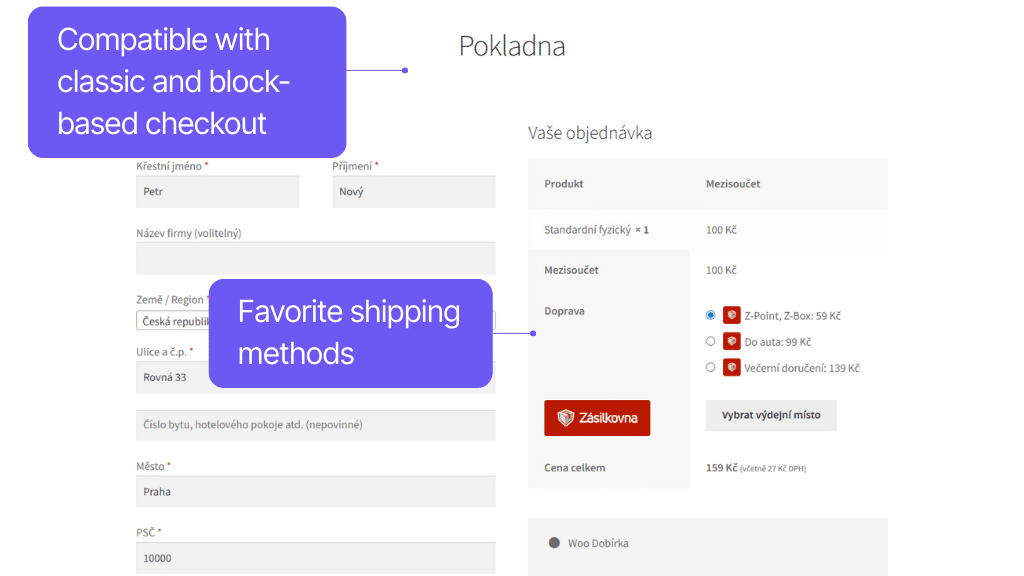
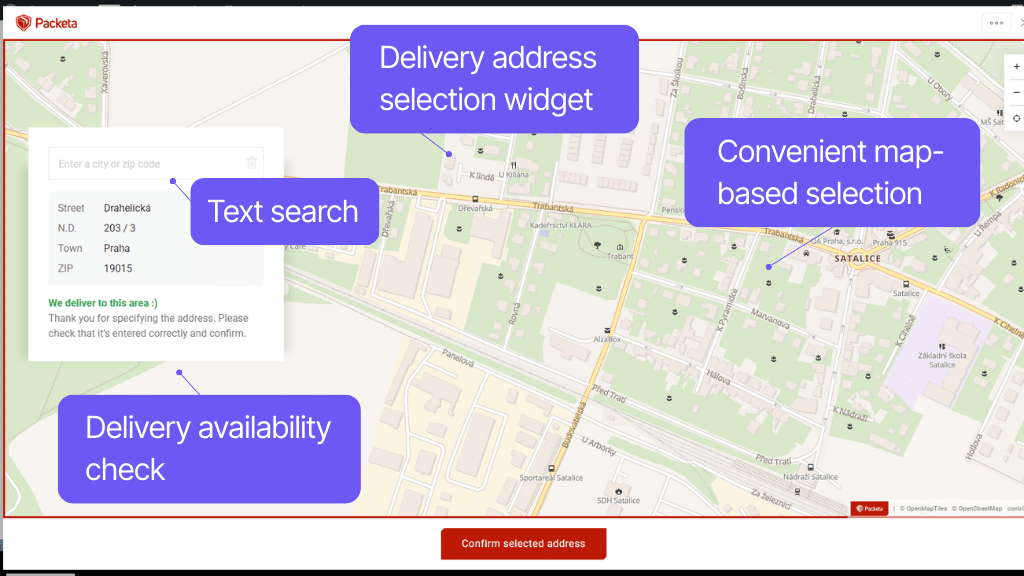
An uncomplicated checkout process is the key to happier customers and higher sales. With the Toret Packeta plugin, you add a clear widget for selecting a pickup point to the checkout, which always shows currently available branches with pickup information. Avoid entering the wrong address thanks to the widget for delivery to address.
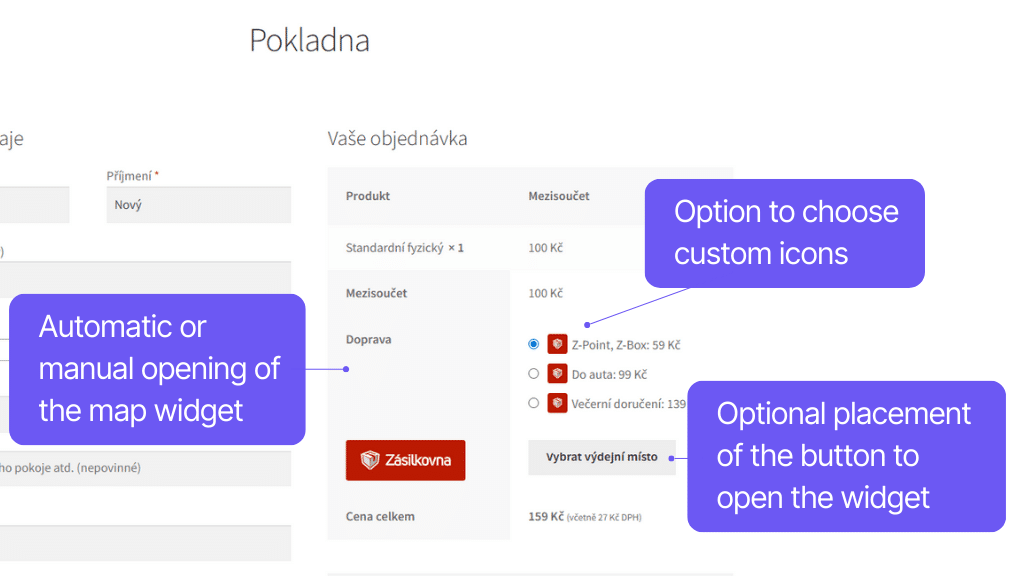
The plugin also offers other features for the checkout, with which you can fine-tune it to the last detail, such as automatic widget opening, adopting the pickup point address as the delivery address, or customizing icons for shipping methods.
Users can select Packeta branches in a pop-up window, which offers text search, filtering, or selection from a map.
In the selection of pickup points, you will find all Z-Boxes, standard Z-Points, and AlzaBoxes, including information about payment options, opening hours, etc.
Button placement for opening the widget can be adjusted in the plugin settings.
In the delivery to address widget, you can select a location from the map using a pin. The widget automatically displays the location address and delivery information.
The selected address in the widget is pre-filled into the WooCommerce checkout form. This function reduces delivery error rates due to incorrectly entered addresses.
Selecting an address from the widget can be set as mandatory.
Button placement for opening the widget can be adjusted in the plugin settings.
Using the Packeta API, the plugin automatically downloads and displays available branches of Packeta and other carriers with pickup points. These are then displayed to the customer at checkout, where they can choose from them.
The plugin supports the latest Packeta widget v6 and the widget for selecting an address from the map for delivery to address for CZ and SK.
The automatic map opening function automatically displays the map widget when a shipping method is selected. This means one less click for the customer and a faster checkout process.
However, the button remains visible in case the customer changes their mind and wants to change the pickup point.
In the plugin settings, you can enable automatic filling of the address of the pickup point as the delivery address for the order.
You can upload your own logo for each carrier in the plugin and thus have a unified website appearance.
Rich settings options for custom shipping
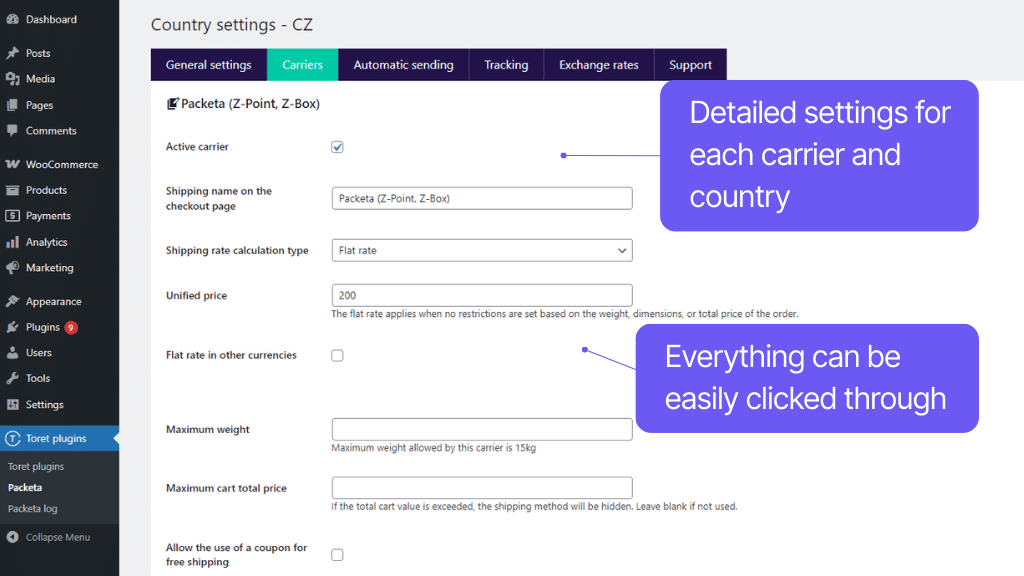
With the Packeta plugin, you set up shipping exactly as you need. Prices, conditions, COD, and free shipping can be easily clicked in the administration.
The plugin allows advanced price scaling, so you can set them according to package weight, order price, or dimensions. COD fees can also be scaled.
Customer-favorite free shipping can also be used in many ways. From free shipping based on order value, through coupons, or free shipping for a given carrier, product, variant, or product category.
For each shipping type, you can set a uniform or scaled shipping price. Scaling is possible by:
- weight
- order price
- maximum dimension
For each shipping type and country, it is possible to set a custom threshold from which free shipping will be available.
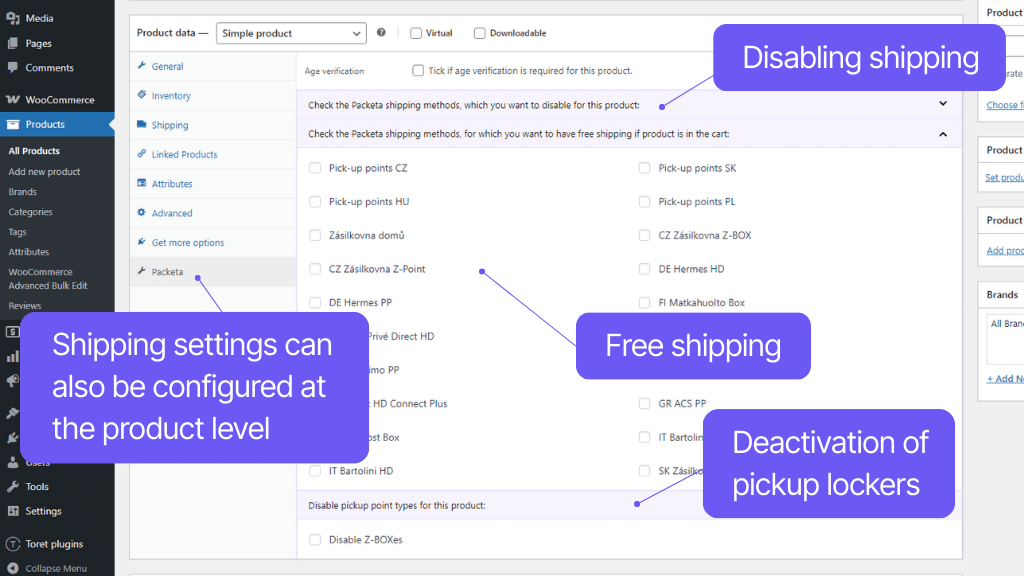
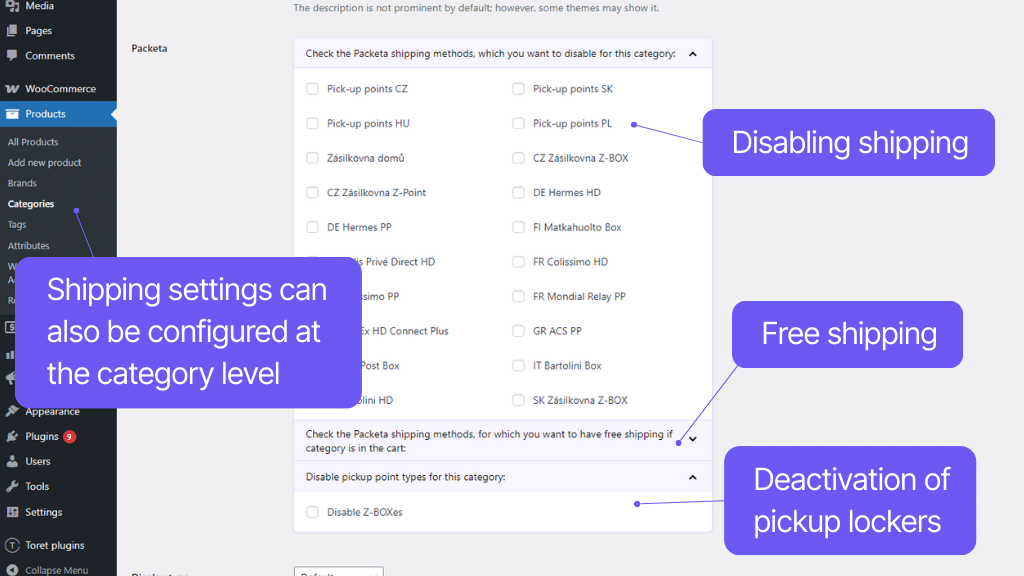
It is also possible to check a carrier for a product, variant, or product category that will be available for free if the product is present in the order.
The plugin also supports coupons for free shipping, which can be disabled, enabled for all, or only for specific carriers.
The plugin can work with the WooCommerce Cash on Delivery payment method. It allows a number of useful settings for this payment method.
In the plugin, you can determine the COD surcharge. It can be uniform or scaled according to the order value. If you use multiple currencies in the e-shop, you can set an individual fixed surcharge for each separately.
COD can be limited by a maximum order value, above which it will no longer be available.
For COD, you can determine the fee tax class – according to items in the cart or a fixed rate, and set whether with free shipping, COD will also be free or the surcharge will be kept.
You can also disable COD for pickup points where it is not available. In case the customer selects such a pickup point, they will not be able to choose COD payment in the checkout.
For delivery to Hungary via COD, the plugin allows rounding the COD value to multiples of five.
It is possible to activate the Age verification service for individual WooCommerce products. The customer’s age will then be verified when handing over the package at the pickup point.
In the product detail in WooCommerce, you can deactivate a carrier for Packeta that you do not want to be available for the given product.
Likewise, you can use the same disable function to exclude a carrier for a selected category or product variant or when exceeding a certain cart value.
For a product, variant, or category, you can disable delivery to Packeta pickup boxes (Z-box).
Packeta requires its value in a certain currency (e.g., EUR) when sending a package via COD abroad.
You can easily enter rates against the default currency in the plugin, and the order value will be automatically recalculated when sent to the carrier’s system.
The plugin supports shipping zones in WooCommerce. You can easily set this method only for selected countries.
You can set a custom tax status (taxable or tax-free) for the shipping method.
Complete shipment management directly from administration
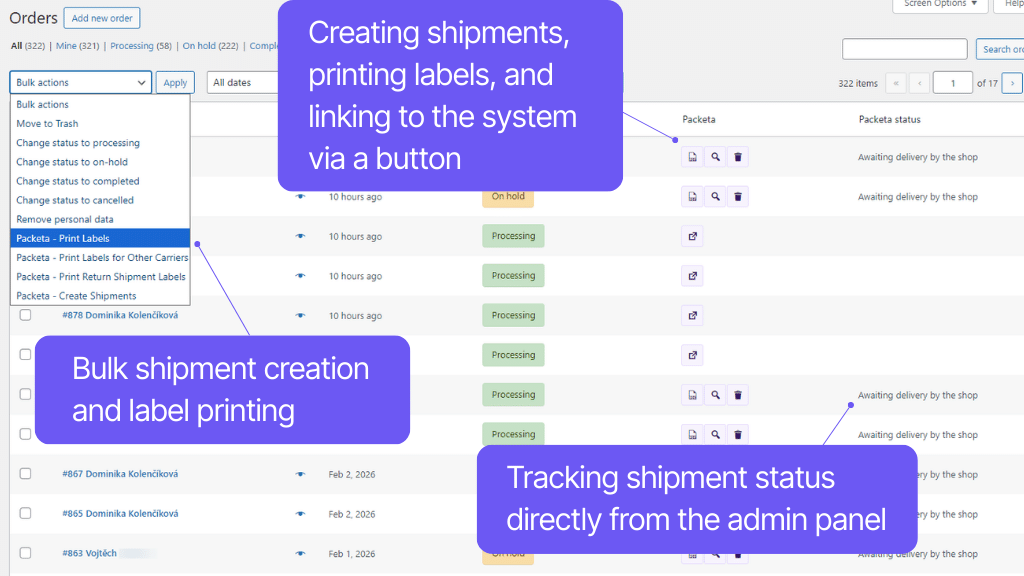
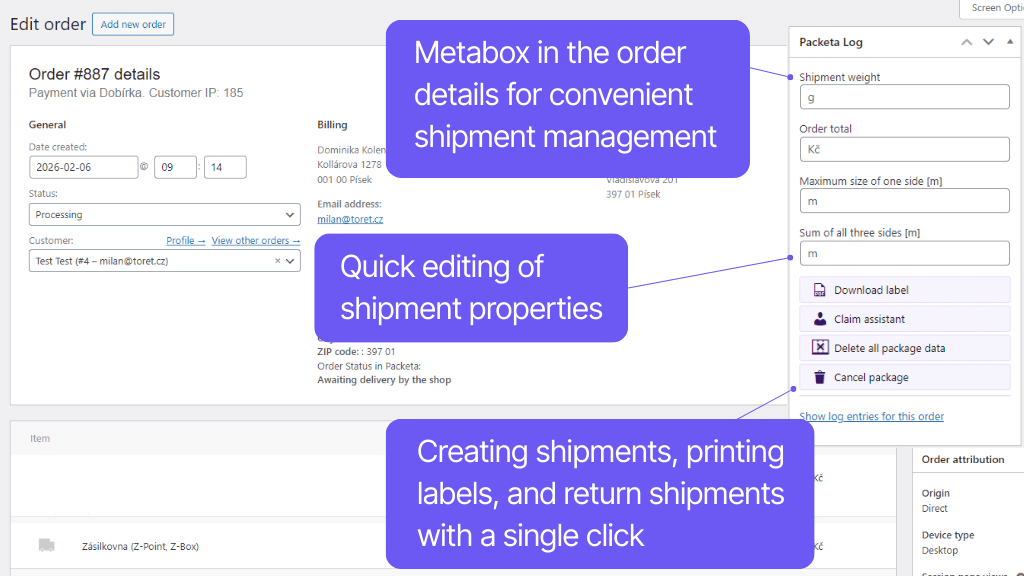
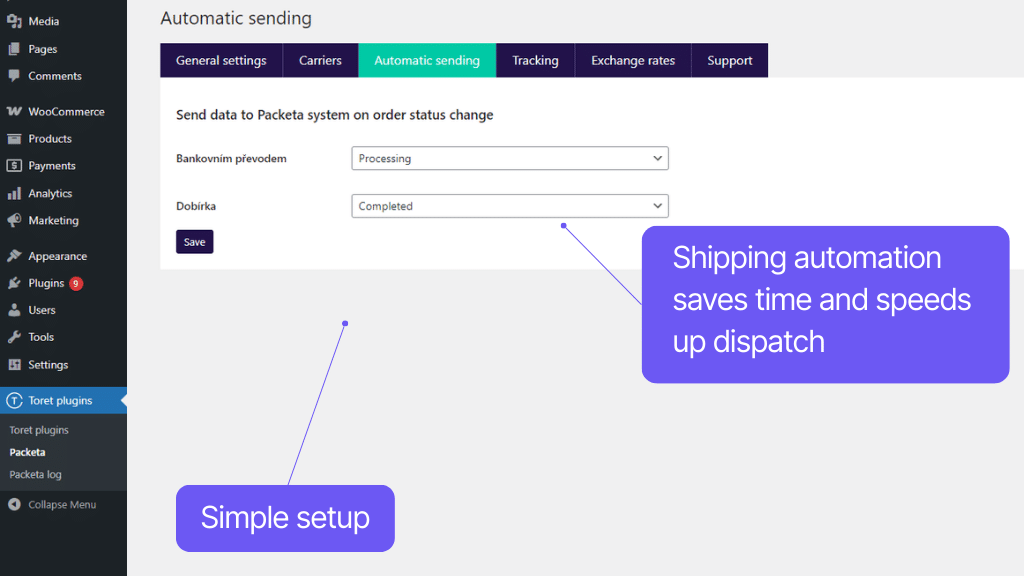
No more switching between orders and the carrier’s system. With the Toret Packeta plugin, you can handle orders in a few clicks directly from the e-shop or even automate the entire sending process. Just print the labels. Thanks to this, the entire dispatch is very convenient and fast.
Printing labels is a matter of a click. You can print individually and in bulk directly from the e-shop administration, including determining the position of the first label on the sheet. You can also add a custom note to the label.
The plugin also allows shipment tracking. You can load the status of shipments manually or automatically and see it directly in the order overview and detail. A tracking link is automatically added to the order email for customers.
To prevent your shipments from being too large or heavy, you can enable weight and dimension checking, automatic addition of packaging weight, or splitting into multiple shipments in the plugin. Sending with Packeta has never been easier.
Thanks to the connection to the Packeta API, it is possible to fully manage the shipment in WooCommerce. You can send the order to the system, get a tracking link, or order a package pickup.
Once you have the shipment ready for the customer, send it to the Packeta system via the API service with one click. You don’t have to rewrite anything. Orders can be sent to the system individually or in bulk.
You can also use automatic sending to the system based on an order status change. In that case, data is sent to the system automatically when the order is switched to the selected status.
For each Packeta shipping service, it is possible to activate a maximum weight and dimensions check for the product.
This ensures that a situation where the carrier refuses to accept the package due to excessive weight or dimensions will not occur.
In the plugin settings, you can set a default packaging weight. This weight will be automatically added to the weight of products in the order when sent to the carrier’s system. This prevents the carrier from refusing to accept the package due to exceeding weight limits.
The plugin allows automatic splitting of an order into multiple shipments based on several criteria. Splitting can be set by:
- weight (kg)
- longest product side (m)
- sum of product sides (m)
- combination of the above
For each criterion, a custom threshold can be set, above which multiple shipments will be created.
Example: With a splitting threshold of 10kg, an order totaling 24 kg will be split into 3 packages weighing 10 kg, 10 kg, and 4 kg.
The weight of the packaging material is also counted in the order weight if set in the plugin.
For a received order, you can additionally change the shipping method in the administration according to your choice.
For orders sent to Packeta, you can download the shipment label directly in WooCommerce – individually and in bulk. This applies to both packages to Packeta and other carriers.
In the case of generating a label on a format where there are more of them on one paper, you can choose the starting position of the first label.
Supported formats:
1/4 A4, direct print, 4pcs/page
1/4 A4, direct print, 1pcs/page
1/8 A4, print on A4, 1pcs/page
1/8 A4, print on A4, 8pcs/page
1/16 A4, print on A4, 1pcs/page
105x35mm A4, print on A4, 16pcs/page
You can also add a custom note to the label – plain text or use variables, e.g., for order number, invoice number, or note entered by the customer.
The plugin contains its own CRONs, using which it is possible to load the status of the shipment during transport. You will thus see the current status of the shipment directly in the order overview.
From the overview and detail of orders, you can also easily go directly to the “Shipment Tracking” page in the carrier’s system using a link.
You can automatically add a link for shipment tracking to the order email for customers and set its placement in the email.
In the plugin, you can set the automatic change of order status when the status changes at the carrier.
Usage example:
If the package status in transport is Successfully delivered, the order status in WooCommerce will change to Completed.
Return shipments in an instant
Complaint or return? No problem. The plugin supports the Packeta Complaint assistant function, with which you can create return shipments as easily as regular ones – with a click or fully automatically.
The plugin supports the Packeta Complaint assistant service, which serves to ensure the transport of claimed goods back to the e-shop. Thanks to this function, you can:
- create a complaint assistant already when creating a package or additionally
- create a complaint assistant individually or in bulk for multiple shipments
- print complaint labels together with the label for the package (and immediately attach the complaint label to the shipment) or additionally
- track the status of the return shipment and change the order status based on it
Quick Connection with Packeta
Launching the Toret Packeta plugin is easy and you can do it even without programming knowledge. Detailed documentation including a video tutorial is available for the plugin, or you can have the plugin installed and configured by us without worry.
See how simple the plugin implementation is.
Carefree management and regular maintenance
The Toret Packeta plugin is fully compatible with other Toret plugins as well as popular block website builders (Elementor, Divi, and Gutenberg) and multi-currency plugins. You don’t have to worry about its implementation disrupting the look or function of the e-shop.
The subscription includes access to updates that ensure compatibility and add new functions, and customer support in case of problems.
All our plugins are compatible with each other and can be used on one WooCommerce e-shop.
Usage example:
In the checkout, the customer can choose shipping to an address or a pickup point via a shipping plugin, pay using a payment gateway, and finally, an invoice is automatically issued and sent in an email with the order confirmation.
The plugin fully supports WordPress Multisite, where one license is sufficient for all managed sites. Custom plugin settings are possible on each Multisite website.
The plugin is compatible with popular solutions for multilingual and multi-currency e-shops WPML and WOOCS – Currency Switcher for WooCommerce, Booster Multi-Currency Switcher, Aelia Currency Switcher.
The plugin supports use together with popular block website builders Elementor, Divi, and Gutenberg.
High-Performance Order Storage (HPOS), formerly also known as Custom Order Tables, is a solution that provides an easy-to-understand and solid database structure – specifically designed for e-commerce needs. It uses WooCommerce CRUD design to store order data in custom tables – optimized for WooCommerce queries with minimal impact on store performance.
We are constantly improving the plugin and updating compatibility with WooCommerce. We guarantee compatibility with WooCommerce 6.7 and higher.
Extensive documentation is prepared for the plugin. Thanks to it, you can easily set up the plugin and quickly orient yourself in its functions.
1 690,00 Kč / year
+FREE: 3 months subscription to Toret WooCommerce Manager
Co je součástí?
- 1 rok aktualizace
- 1 rok podpora (pozor na přeprodejce)
- 14 dnů záruka vrácení peněz
14 dnů záruka vrácení peněz
Chceme zajistit, abyste byli s nákupem stoprocentně spokojeni. Proto nabízíme 14 denní záruku vrácení peněz.