
Toret Invoice for WooCommerce
Complete invoicing directly in WooCommerce
With the Toret Invoice plugin, you can handle all documents directly from the WordPress administration. Whether you are a small business owner (non-VAT payer) or a larger company (VAT payer), the plugin will fully adapt to your needs. Automatically – or manually with a single click – it will issue and send invoices, proforma invoices, credit notes, tax documents, and delivery notes. Support for invoicing in all currencies (CZK, EUR, USD, GBP, and others) is a matter of course. Thanks to compatibility with QR payments, the reverse charge mechanism, and bulk document export, you get a tool that perfectly fits the needs of your business.
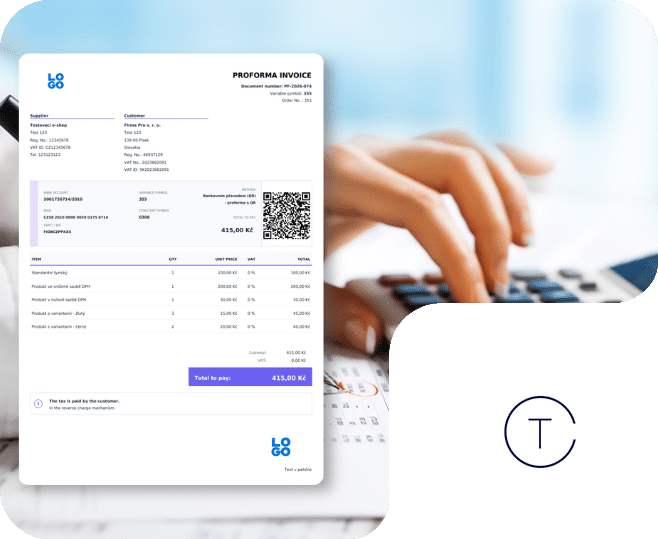
- 5 types of documents under one roof Supports invoices, proforma invoices, credit notes, tax documents, and delivery notes. You can handle everything from one place.
- Full automation (or one-click control) Let the plugin issue and send PDF documents automatically based on the order status. Or keep control and generate them manually with a single click.
- Invoicing directly from the e-shop administration Everything runs natively directly in your WordPress. You don’t need any connection to external invoicing systems, and you don’t have to deal with API limits or monthly fees.
- Documents in your corporate style Customize the appearance and content of documents to match your brand and set up variable number series exactly as your accounting requires.
- Ready for corporate customers WooCommerce doesn’t handle corporate data by default. Our plugin automatically adds the missing fields for Company ID, Tax ID, and VAT ID to the checkout.
- Bulk export to accounting software Bulk export of documents will save hours of manual rewriting and facilitate data transfer to professional accounting programs.
Fast and reliable invoicing directly in the e-shop
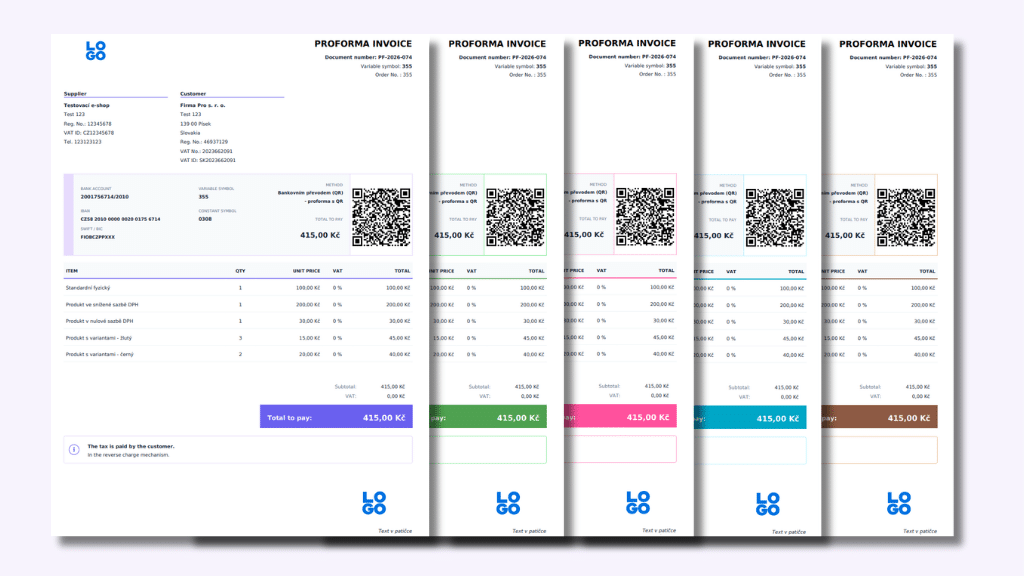
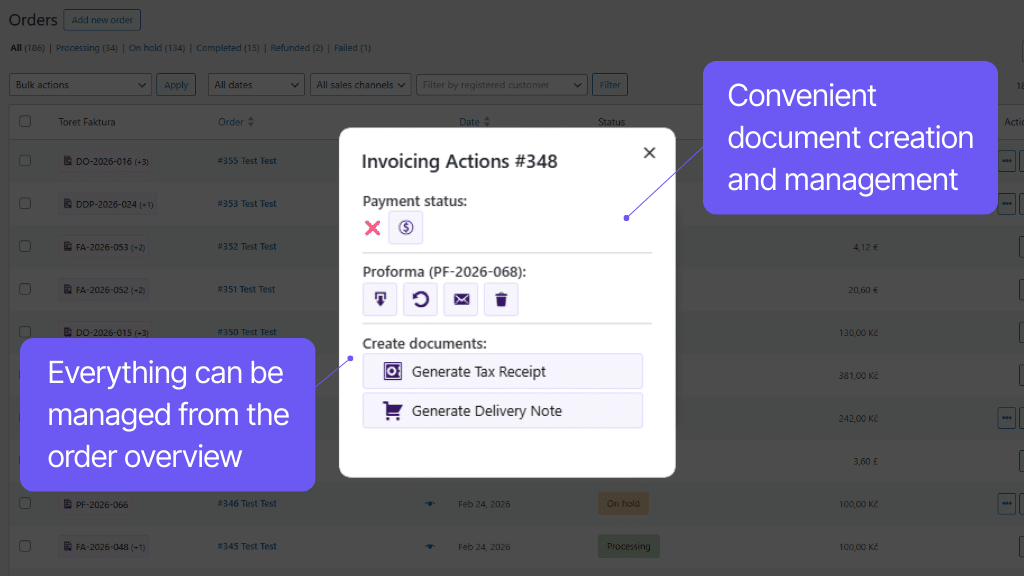
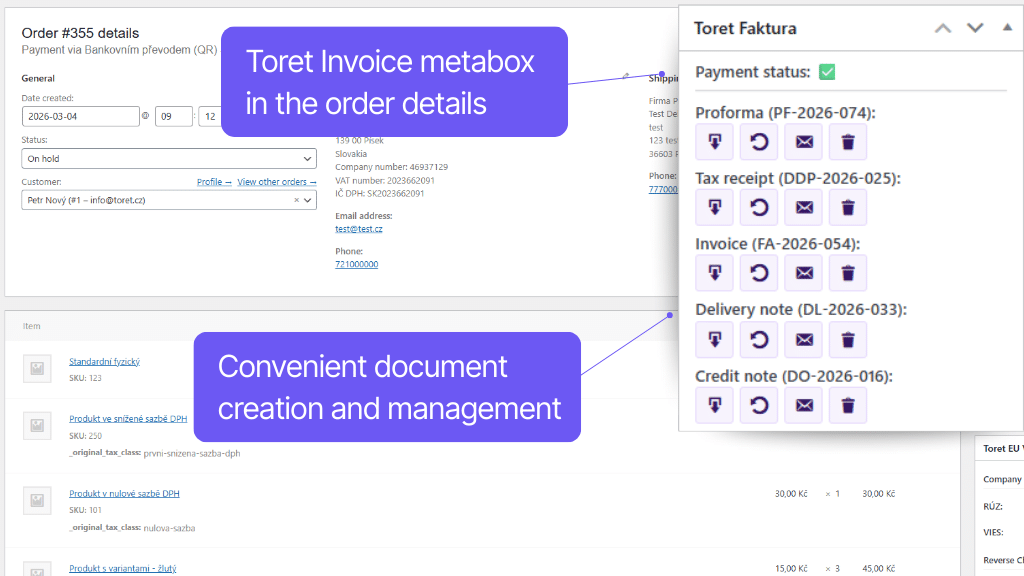
Toret Invoice moves the complete management of documents to where you spend the most time – directly to the administration of your e-shop. Even without an external invoicing system, you can easily issue and send 5 types of documents: invoice, proforma invoice, credit note, tax document, and delivery note. You can manage the entire process manually with a few clicks, or fully automate it. This saves you time, eliminates errors, and you pay no extra fees.
The plugin generates PDF documents, which can be automatically attached as an attachment to WooCommerce order emails or sent manually in a separate email. Your customers will also find a download link in their customer account or on the thank you page.
The Toret Invoice plugin allows you to generate these PDF documents:
- proforma invoice
- standard invoice
- credit note
- tax document
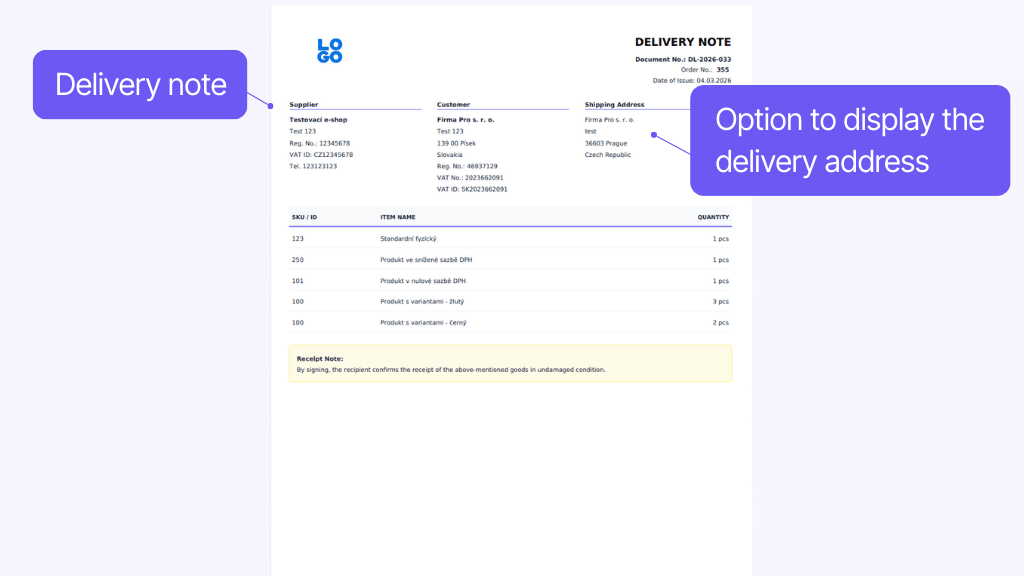
- delivery note
All types of documents can be issued:
- manually from the orders overview
- manually from the order details
- via bulk action from the orders overview
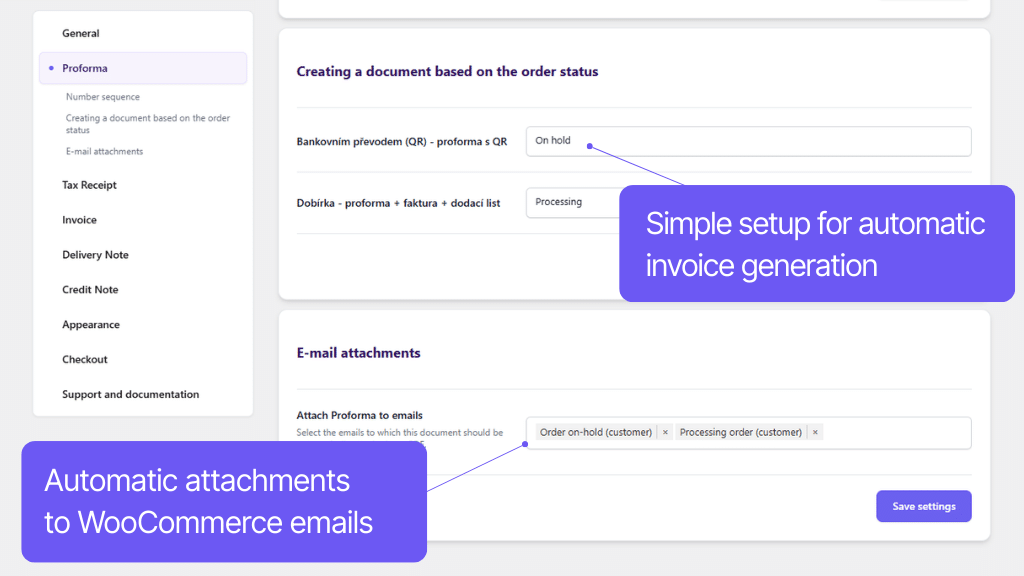
- automatically based on order status change
Automatic issuing works based on changes in order status.
In the plugin settings, you simply assign an order status to each document and each payment method, triggering the issuance.
Issued documents can be sent as PDF email attachments:
- Manually with a click in a separate email. The appearance and content of the email with the invoice can be edited.
- Automatically attached to WooCommerce order emails. For automatic attachment, you can select any WooCommerce email (for both customer and administrator) without limit.
Customers will find a link to the issued documents next to the respective order in their customer account, and it is also displayed on the thank you page if the document has been issued.
Invoices and proforma invoices can be marked as paid:
- manually – by clicking a button in the order overview or detail
- automatically – by setting the order statuses at which invoices are automatically paid
Setup according to the needs of the e-shop
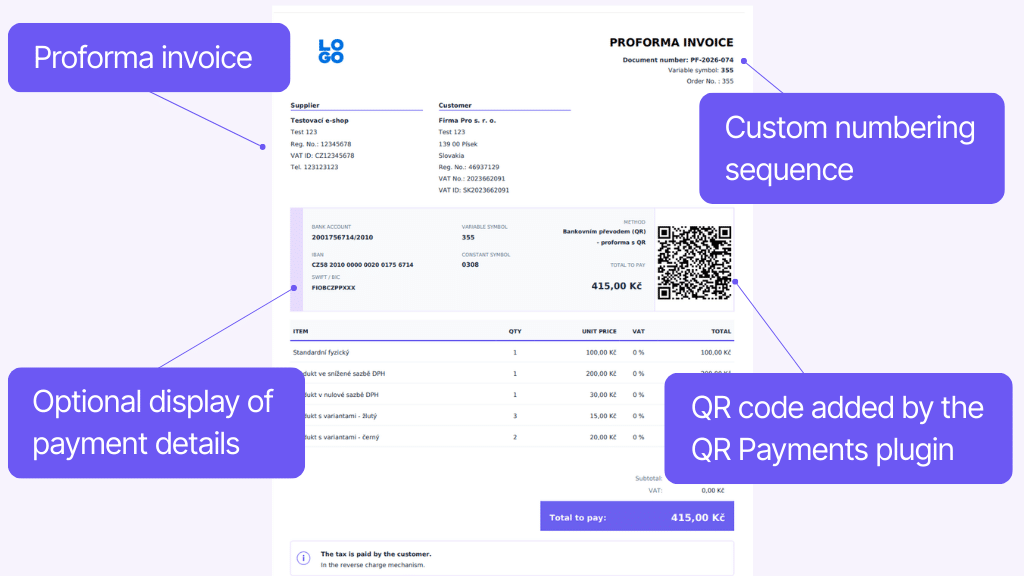
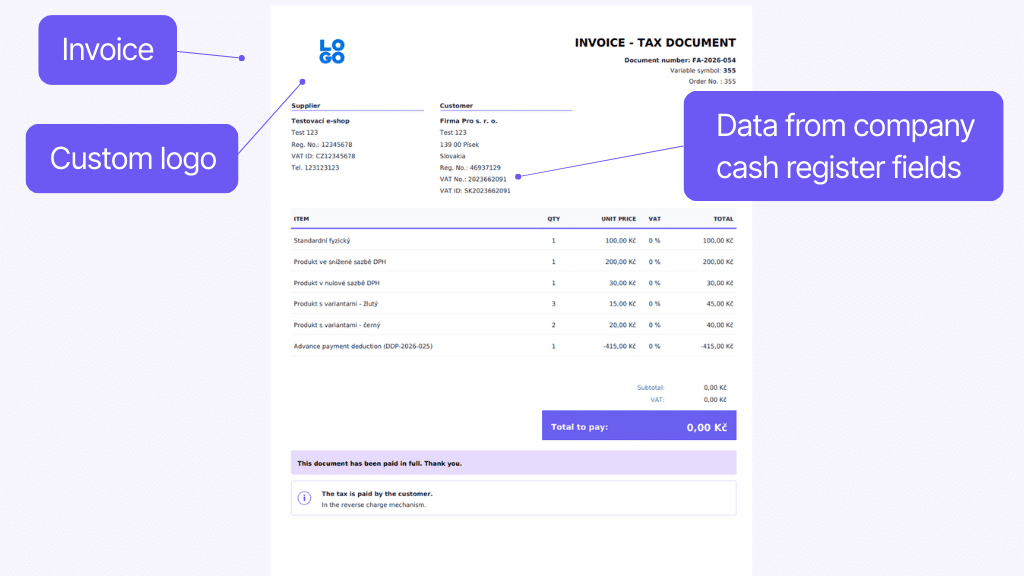
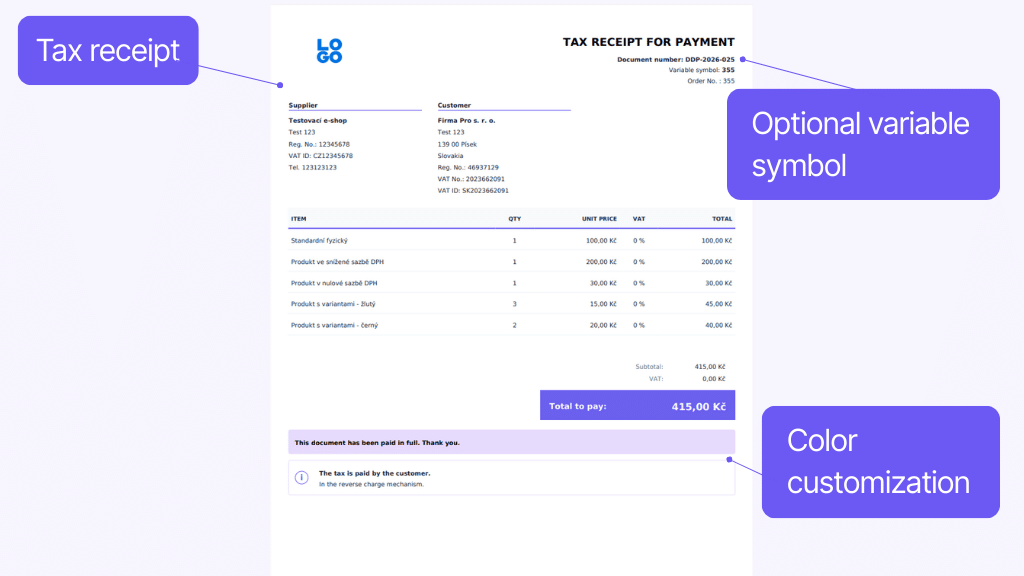
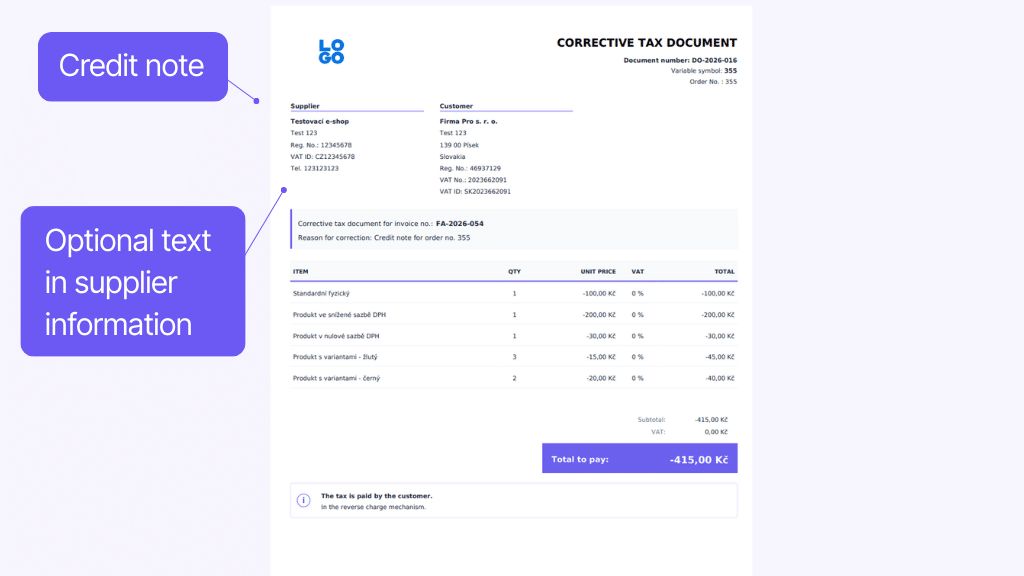
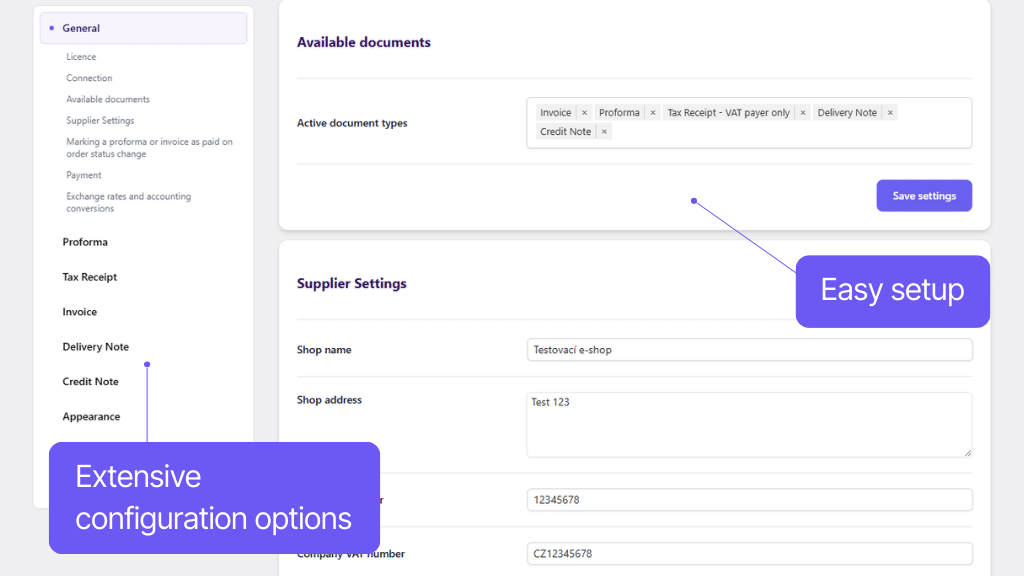
You set everything exactly as your business requires. From the format of number series and variable symbols to adjusting the appearance and content of the PDF documents themselves. In addition, the plugin directly handles B2B sales – it automatically adds the missing fields for Company ID, Tax ID, and VAT ID to the checkout, so companies can buy from you without obstacles.
Invoicing in world currencies with automatic exchange rates
Whether you sell in crowns, euros, dollars, or any other of the hundreds of supported world currencies, the plugin handles it with ease. It can automatically display the conversion of the total amount into your target currency on the document. The plugin downloads current exchange rates entirely on its own – you can choose a source from the Czech National Bank (CNB), the European Central Bank (ECB), or the National Bank of Slovakia (NBS).
Perfect synergy in the Toret ecosystem
Are you using other plugins from Toret? Toret Invoice fully cooperates with them. In combination with the QR payments plugin, it can automatically insert a QR code directly on the invoice for faster payment. And if you sell abroad with the Toret EU VAT plugin, the plugin easily handles issuing an invoice in the reverse charge mechanism.

Easy export for accountants
Whether you hand over the documents to an external accountant or upload them to the accounting software yourself (Pohoda, Money S3, Abra, and others), Toret Invoice will save you hours of time. With a few clicks, you can generate a bulk export in the modern electronic format ISDOC, in classic CSV, or as a bulk ZIP with PDF files.
For each type of document, you create a custom number series in the plugin settings. You can use text and variables for:
- year
- month
- sequential number
- WooCommerce order number
You can also set the starting point for each series.
The plugin allows you to set the source for the variable symbol:
- Order ID
- Order number
- Document number
For documents, the plugin allows you to set:
- document colors
- header logo
- footer logo
- footer text
More advanced customization can be done by editing the template.
In the plugin, you can set custom supplier details that will be automatically populated on documents.
Additionally, you can optionally display:
- payment details
- customer delivery address
- custom text in the Supplier section
- custom text before invoice items
- custom text after invoice items
- SKU/EAN column
- product variant display format
A QR code can be added to invoices using the Toret QR payments plugin.
The plugin allows you to enable the display of corporate fields at checkout:
- Company ID
- Tax ID
- VAT ID
These fields can be set as mandatory or optional.
The plugin supports issuing invoices in the reverse charge mechanism in combination with the Toret EU VAT plugin.
The invoice currency setting is automatic based on the order currency. Thus, it is no problem for the plugin to accept any currency you use in the e-shop, including the use of multi-currency plugins.
If the order is in another currency, the plugin allows automatic conversion to the set accounting currency.
The plugin supports automatic loading of exchange rates from:
- Czech National Bank
- European Central Bank
- National Bank of Slovakia
When the feature is turned on, it automatically displays the conversion to the selected accounting currency and the current exchange rate on the documents.
The plugin supports issuing documents in Czech, Slovak, and English. The language of the invoice is automatically selected according to the language of the website.
The plugin supports export in the most common formats:
- ISDOC (XML)
- Pohoda (XML)
- CSV
- ZIP (PDF)
When creating exports, it is possible to use filtering by the date of issue and type of document, or to search by order number.
Carefree management and regular maintenance
Toret Invoice fits perfectly with your e-shop. The plugin is fine-tuned for seamless operation with website builders like Elementor, Divi, or Gutenberg, as well as with all other Toret plugins. So you don’t have to worry about any conflicts or a “broken” look.
And what if you need advice? As part of the subscription, you get not only regular updates (we are constantly developing and improving the plugin) but mainly support. Stuck with the setup? We are here for you.
All our plugins are compatible with each other and can be used on a single WooCommerce e-shop.
Example of use: The customer can choose delivery to an address or a pick-up point at checkout via a transport plugin, pay using a payment gateway, and finally, an invoice is automatically issued and sent in an email with the order confirmation.
The plugin fully supports WordPress Multisite, where one license is sufficient for all managed sites.
Each Multisite has its own payment gateway settings, meaning different payment methods or gateway conditions can now be set for each site.
The plugin supports use together with the popular block website builders Elementor, Divi, and Gutenberg.
The plugin can be used in conjunction with common multi-currency plugins.
High-Performance Order Storage (HPOS), previously known as Custom Order Tables, is a solution that provides an easy-to-understand and robust database structure—specially designed for e-commerce needs. It uses WooCommerce CRUD design to store order data in custom tables—optimized for WooCommerce queries with minimal impact on store performance.
We constantly improve the plugin and update compatibility with WooCommerce. We guarantee compatibility with WooCommerce 6.7 and higher.
Extensive documentation has been created for the plugin. Thanks to it, you can easily set up the plugin and quickly orient yourself in its functions.
€79,00 / year
+FREE: 3 months subscription to Toret WooCommerce Manager
Need help?
[email protected]Do you need advice on choosing a product or have a question about a feature?
What’s included?
- 1 year of updates
- 1 year support (beware of resellers)
- 14-day money-back guarantee
14-day money-back guarantee
We want to ensure that you are 100% satisfied with your purchase. That’s why we offer a 14-day money-back guarantee.