
GO balík for WooCommerce
The GO balík for WooCommerce WordPress plugin is the official integration of this online shipping service. The plugin allows you to use the wide range of carriers mediated by GO balík, including the Best price shipping method for advantageous delivery. Map widgets are available for pick-up point selection at checkout. You can handle complete shipment management directly from the e-shop administration with just a few clicks – from creating a shipment to printing labels and tracking. The plugin also offers advanced options for setting shipping availability and prices, Cash on delivery and free shipping settings, or automated sending.

- Automation saves your time and speeds up order processing.
- Direct integration minimizes errors and reduces costs.
- Increases customer convenience when selecting shipping, thereby increasing conversions.
- Sending, label printing, and shipment tracking directly from the e-shop administration.
- Extensive options for setting shipping prices and surcharges.
- Choice from a wide range of carriers.
Delivery with GO balík – wide range of carriers and methods
Connect your WooCommerce e-shop with the GO balík online shipping service and ship advantageously. The GO balík service allows shipping to customer addresses, pick-up points, and boxes with a range of carriers operating in the Czech Republic and other European countries.
Thanks to the wide range of carriers, you can easily send various types of shipments. From standard ones handled by carriers like Zásilkovna, PPL, or DPD, through express (Messenger), to oversized ones (FOFR, TOPTRANS). It is not necessary to have individual contracts for all these carriers; GO balík solves this for you.
It is up to you whether you choose a specific carrier or use the Best Price shipping method, with which GO balík selects the carrier for you based on the delivery price.
The GO balík plugin allows shipping to customer addresses with the following carriers:
- Zásilkovna
- DPD
- PPL
- DHL
- GEIS
- FedEx
- Emons
- GLS
- One by Allegro
- Balíkovna
- FOFR
- Messenger
In the e-shop, you can set up shipping with a specific carrier or leave the carrier selection to the GO balík system.
Shipping with carriers can proceed either without a contract with them (at GO balík prices) or under your contract number (at your individual prices). The shipping method depends on the agreement with the GO balík service.
The GO balík plugin allows sending to customer addresses in the following countries:
Czech Republic, Slovakia, Germany, Austria, Poland
Other countries may be available upon individual agreement with GO balík.
The plugin includes the Best Price shipping method. When used, the carrier capable of delivering the shipment most cheaply is automatically selected. Thanks to this, you send the shipment for the lowest possible price.
Convenient delivery selection at checkout
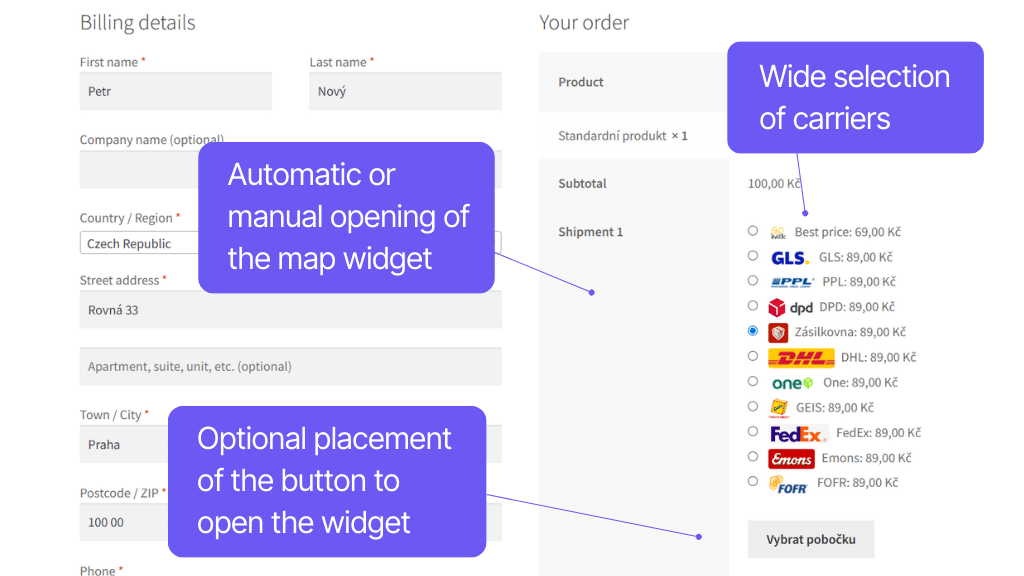
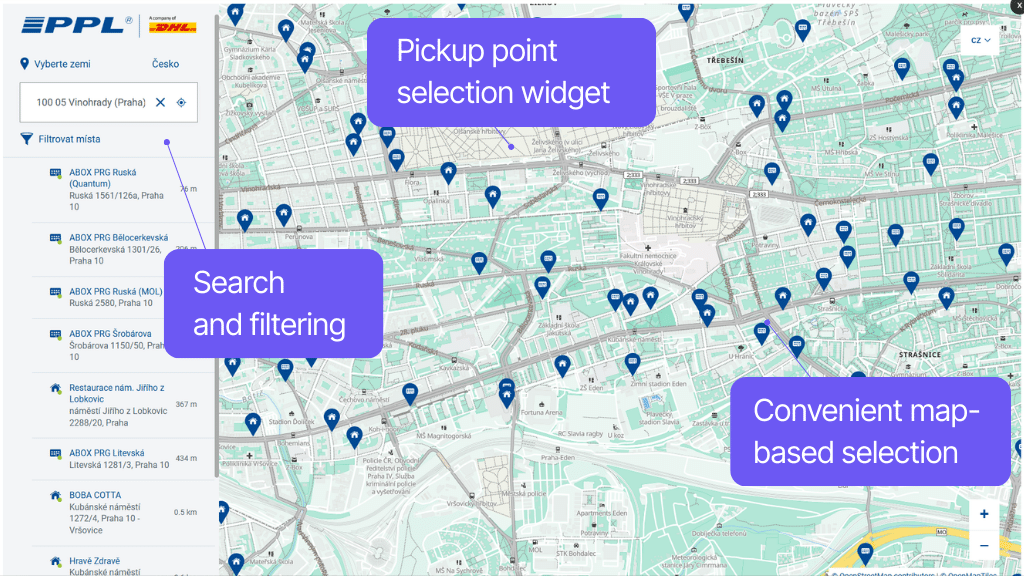
Convenient pick-up point selection at checkout is ensured by map widgets of the given carriers, which you simply assign to the respective methods.
The plugin also offers other features for the checkout. Optional automatic widget opening when selecting a pick-up point speeds up customer flow, as does automatic filling of the delivery address based on the selected branch. For individual shipping methods, it is possible to choose custom or default icons.
The plugin allows displaying a map widget for branch selection by the customer at checkout. This widget is always specific to the given carrier and their pick-up points and boxes. Widgets are available for carriers:
- Zásilkovna
- GLS
- PPL
- Balíkovna
- DPD
- One by Allegro
In the plugin, you can enable a function that saves the customer a step when opening the pick-up point selection map. The function for automatically opening the map with pick-up point selection automatically displays the map widget when the shipping method is chosen.
However, the button remains visible in case the customer changes their mind and wants to change the pick-up point.
In the plugin settings, you can enable the function to automatically use the pick-up point address as the delivery address for the order. If active, the delivery address will be automatically filled according to the selected branch for orders to a pick-up point (PPL Parcelshop).
You can upload custom icons for individual carriers, which will be displayed to customers at checkout, matching your e-shop’s design.
Icon display can also be completely disabled or set to show default icons.
Rich shipping configuration options
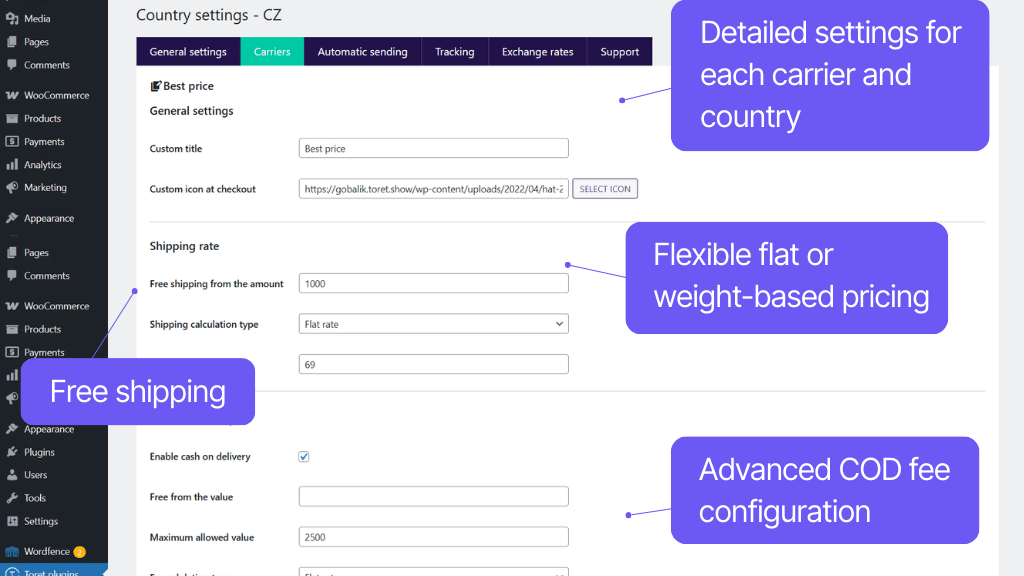
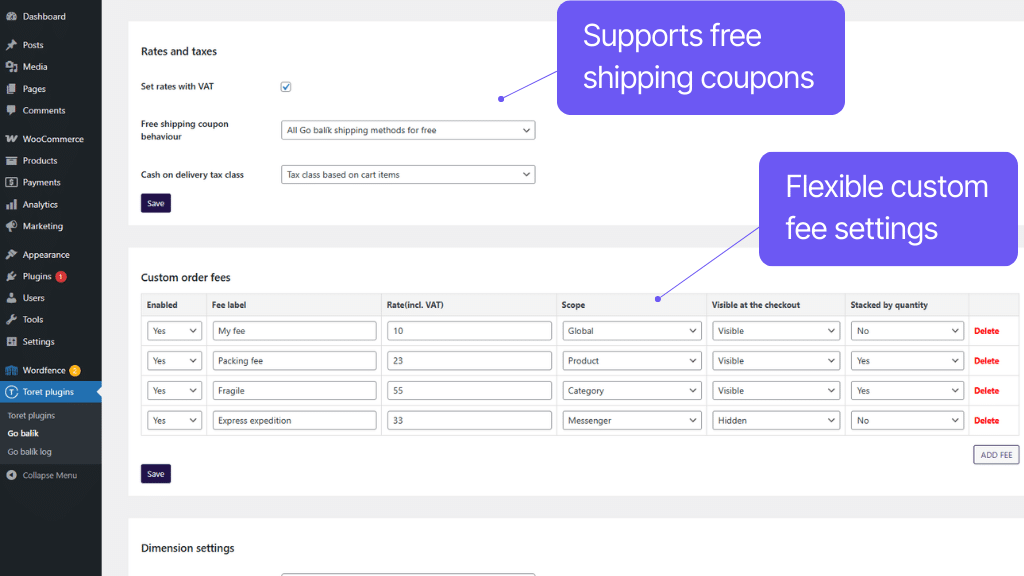
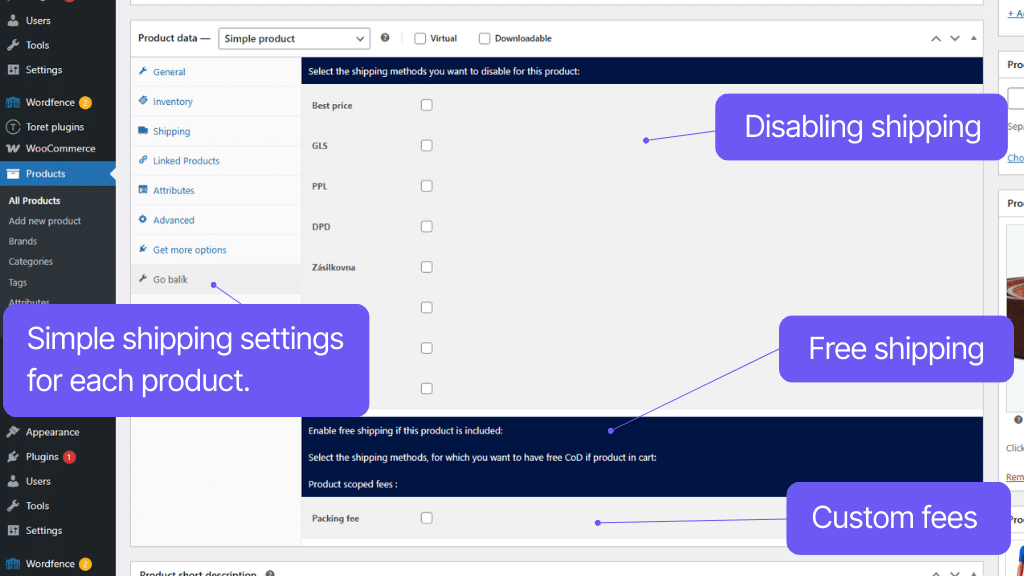
To ensure your shipping offer is tuned exactly as you need, the plugin offers rich configuration options. You set the conditions under which GO balík shipping will be available to customers yourself, select prices (fixed or scaled), and custom surcharges.
The plugin allows setting free shipping from a given amount, for specific products or categories, or using coupons. You can also easily set up Cash on delivery (COD) – price (uniform or scaled), conditions, and free COD. You configure everything simply by clicking in the administration.
For each shipping type, you can set conditions under which it will be available to customers at checkout:
- minimum/maximum order value (incl. VAT)
- minimum/maximum product quantity in cart
- minimum/maximum product price (incl. VAT)
- minimum/maximum cart weight
- by maximum dimension
- by maximum volume
You can also disable individual shipping types for specific products or product categories.
For each shipping type, you can set the price in the plugin:
- as a flat rate
- scaled based on order value
You can also assign surcharges or set free shipping.
For each shipping type, it is possible to set a custom threshold for when free shipping becomes available.
You can also set free shipping for specific products or product categories.
The plugin can work with the WooCommerce Cash on delivery (COD) payment method.
For this payment method, you can set a surcharge, either flat or scaled based on order value.
At the same time, you can set an amount above which COD will be surcharge-free, and also enable free COD for a specific product or category.
The plugin also allows setting the VAT rate for the COD fee (fixed or based on products in the cart) or the maximum allowed COD value.
The plugin allows you to set custom surcharges:
- for all carriers
- for specific carriers
- for a product or product variation
- for a product category
Surcharges can be visible at checkout or hidden. They can also be multiplied by count or counted only once.
When sending a COD parcel abroad, it is necessary to convert its value into the local currency (e.g., EUR).
The plugin can automatically retrieve rates from the Czech National Bank (cnb.cz), National Bank of Slovakia (nbs.sk), ČSOB servers, or allow entering custom rates.
You can select your preferred method in settings.
The GO balík plugin supports shipping zones in WooCommerce. You can easily set this method only for selected countries.
Complete shipment management directly from administration
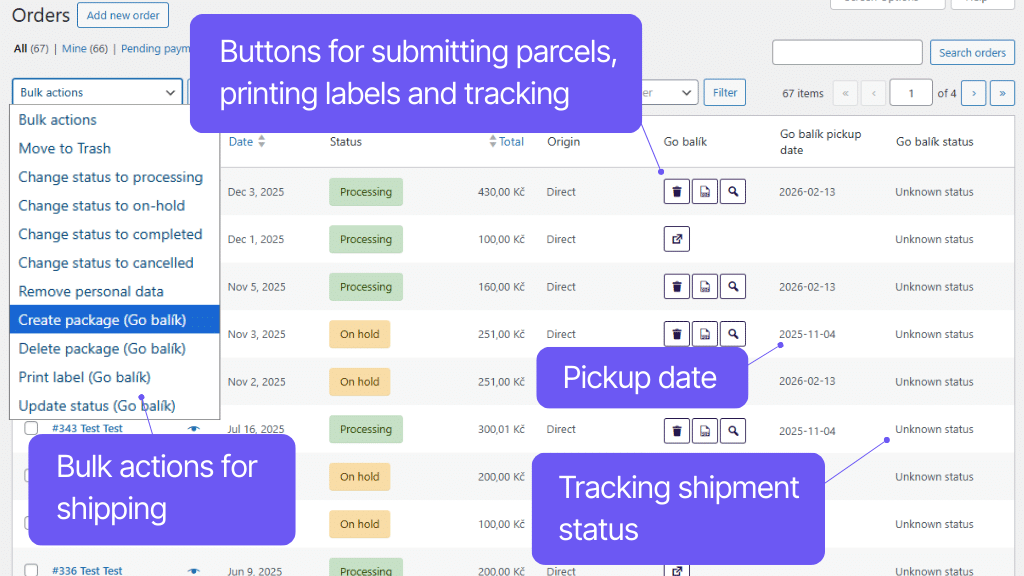
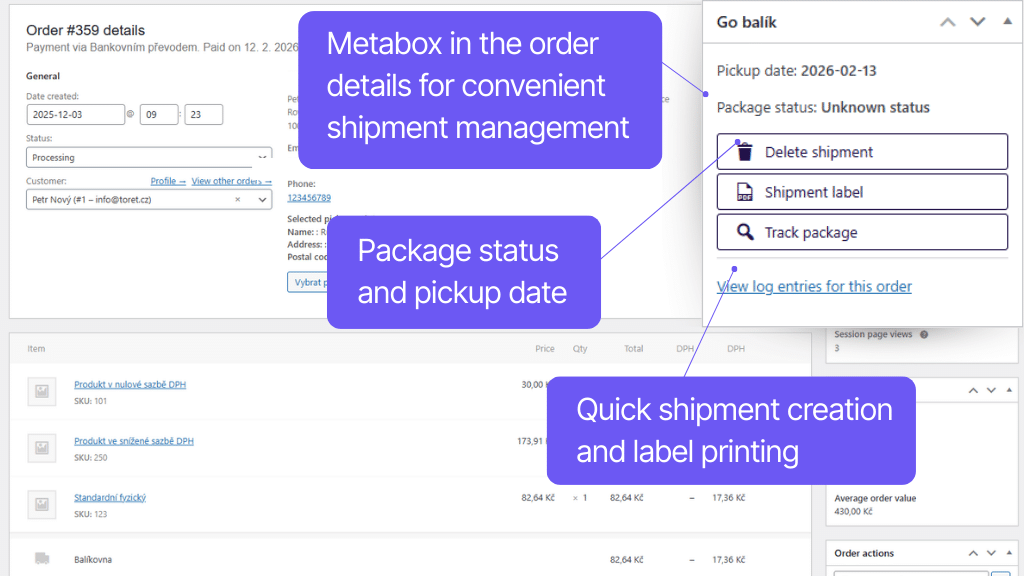
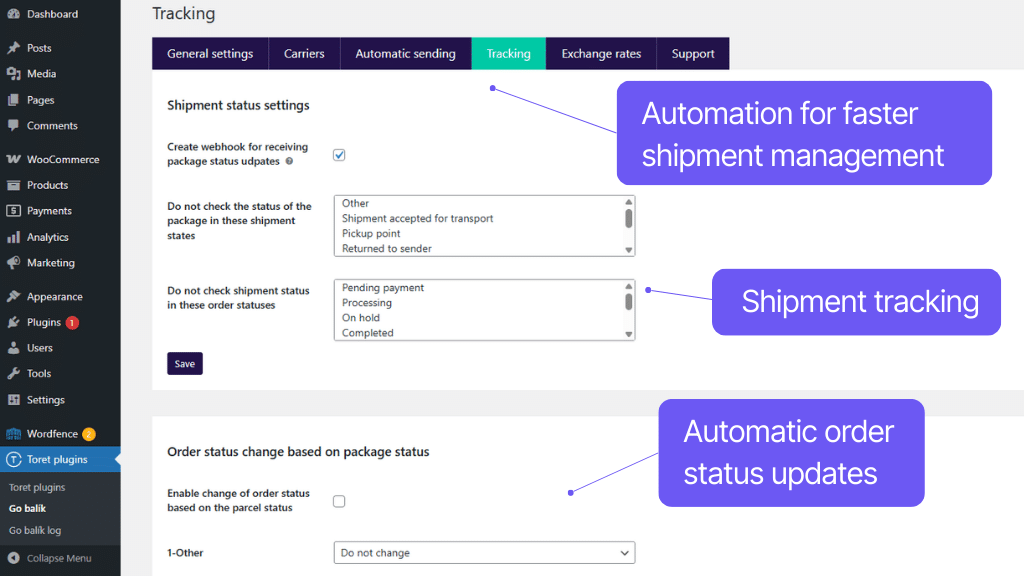
Thanks to the connection to the GO balík API, you can handle the entire shipment sending process directly from the e-shop administration, which is very fast and convenient.
With a single click, you can send shipment data to the system, print labels, and order pickup. You can see the status of the parcel in transit directly in the order overview or detail, and you will also have a tracking link available in the carrier’s system. This link is automatically added to the customer email as well.
To speed up work, the plugin supports bulk actions, automatic shipment sending, and automatic order status change based on shipment status.
Thanks to the connection to the GO balík API, it is possible to fully manage the shipment in WooCommerce. You can send the order to the system, delete it from the system, view shipment status, click through to the carrier system, or print a label.
Once you have the shipment ready for the customer, send it to the GO balík system via the API service with a single click. You don’t have to rewrite any data.
You can also use automatic submission to the system based on an order status change. This automatic submission can be set separately for each payment method.
For orders sent to GO balík, you can download the shipment label directly in WooCommerce from the order overview or order detail and print it straight away. The default label position for printing can also be set.
Ordering pickup happens right along with sending the parcel to the GO balík system. It is therefore important to send shipment data at the moment you are ready for dispatch.
In the order overview, you can simply use a link to go to the Shipment Tracking page with an automatically pre-filled number and immediately know what is happening with the parcel.
You will also see the shipment status directly in the order overview thanks to loading via webhook.
For customers, the tracking link can be automatically attached to the order email.
Based on the shipment status loaded from the GO balík system, you can also set an order status change in WooCommerce, e.g., to Completed status in case of successful delivery.
To speed up work, the plugin allows the use of bulk actions in the order overview. Through them, you can:
- print labels
- send shipments to the system
- delete created shipments
- update shipment status in transit

Carefree management and regular maintenance
The Toret GO balík plugin is fully compatible with other Toret plugins as well as popular block page builders (Elementor, Divi) and multi-currency plugins. You do not have to worry that its implementation would disrupt the design or function of your e-shop.
The subscription includes access to updates, which ensure compatibility and add new features, and customer support in case of issues.
All our plugins are mutually compatible and can be used on a single WooCommerce e-shop.
Usage example:
In the checkout, the customer can select delivery to an address or pick-up point via the shipping plugin, pay using a payment gateway, and finally, an invoice is automatically generated and sent in the order confirmation email.
The plugin fully supports WordPress Multisite, where a single license is sufficient for all managed sites. Each Multisite web can have its own plugin settings.
The plugin is compatible with popular solutions for multilingual and multi-currency e-shops WPML and WOOCS – Currency Switcher for WooCommerce.
The plugin supports use alongside popular block page builders Elementor and Divi.
High-Performance Order Storage (HPOS), formerly known as Custom Order Tables, is a solution that provides an easy-to-understand and solid database structure – designed specifically for e-commerce needs. It uses the WooCommerce CRUD design to store order data in custom tables – optimized for WooCommerce queries with minimal impact on store performance.
We are constantly improving the plugin and updating compatibility with WooCommerce. We guarantee compatibility with WooCommerce 6.7 and higher.
Extensive documentation is prepared for the plugin. It helps you easily configure the plugin and quickly get oriented with its features.
€69,00 / year
+FREE: 3-month subscription to Toret WooCommerce Manager
Need help?
[email protected]Do you need advice on choosing a product or have a question about a feature?
What’s included?
- 1 year of updates
- 1 year support (beware of resellers)
- 14-day money-back guarantee
14-day money-back guarantee
We want to ensure that you are 100% satisfied with your purchase. That’s why we offer a 14-day money-back guarantee.