
Fio banka for WooCommerce
Payment gateway and automatic payment matching
The Fio banka for WooCommerce WordPress plugin adds the Fio payment gateway to your checkout for card payments or e-wallet payments. At the same time, the plugin allows you to set up automatic matching of bank transfer payments with orders. This is possible for one or more Fio banka accounts. Offer your customers safe and convenient payment via the payment gateway and save time by letting the plugin check order payments for you.

- One plugin for both payment gateway and bank transfer payment matching.
- Customer-popular payment methods – card payment, bank buttons, and QR code.
- Supports Google Pay and Apple Pay.
- Automatic payment matching saves time and prevents errors in order management.
- Support for 4 currencies and 26 languages.
- Simple and fast setup.
Fio payment gateway for Woocommerce
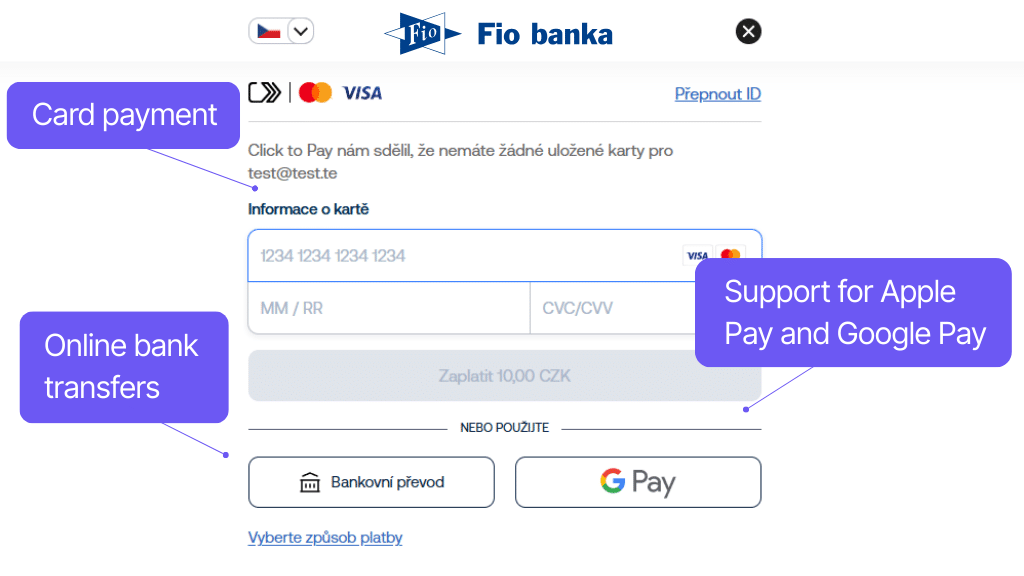
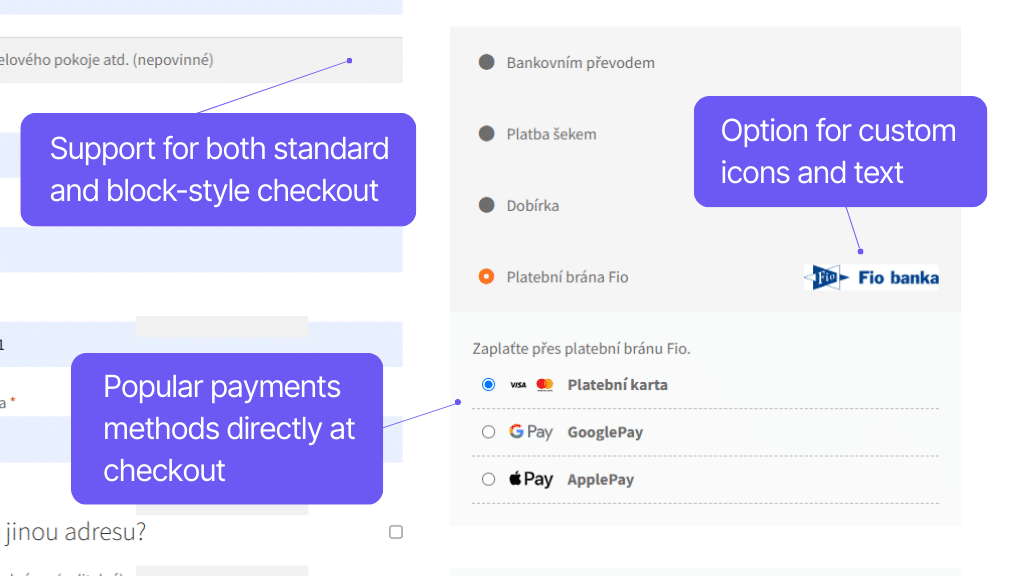
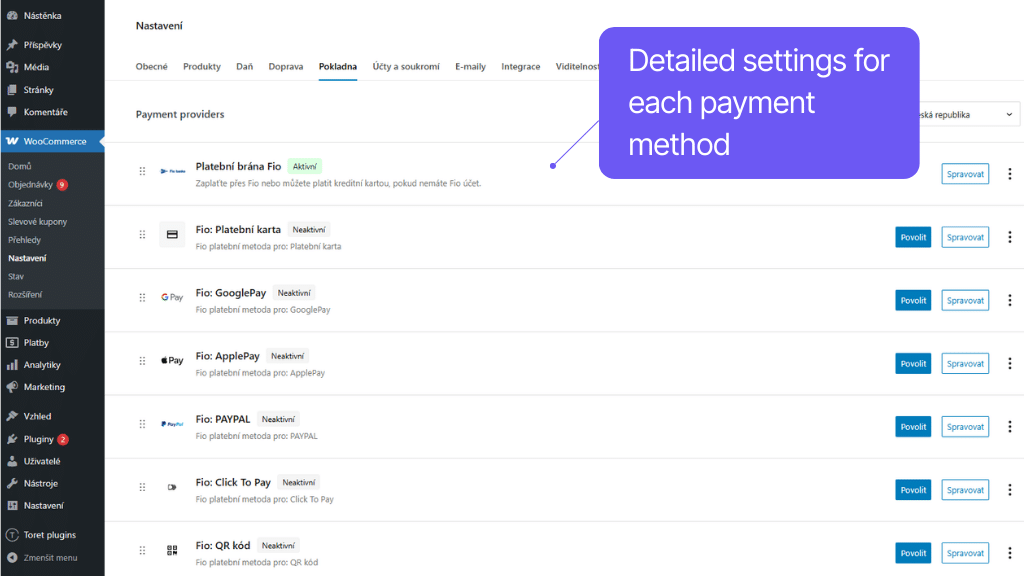
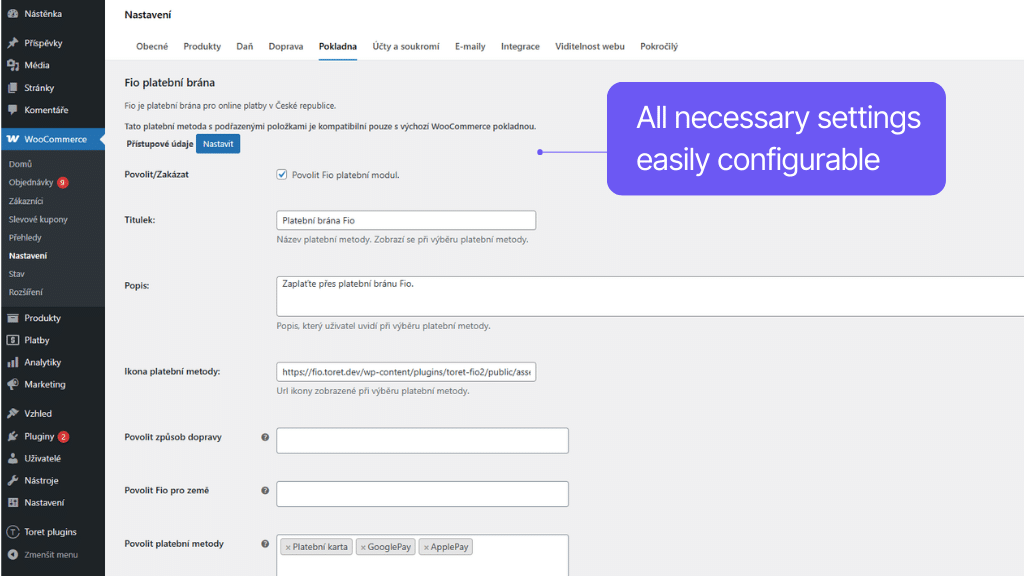
Let your customers pay conveniently and securely via the Fio payment gateway. The Toret plugin for Fio banka adds the option of card payment (Visa, Mastercard, Maestro) or e-wallets Google Pay, Apple Pay, and Pay Pal to WooCommerce.
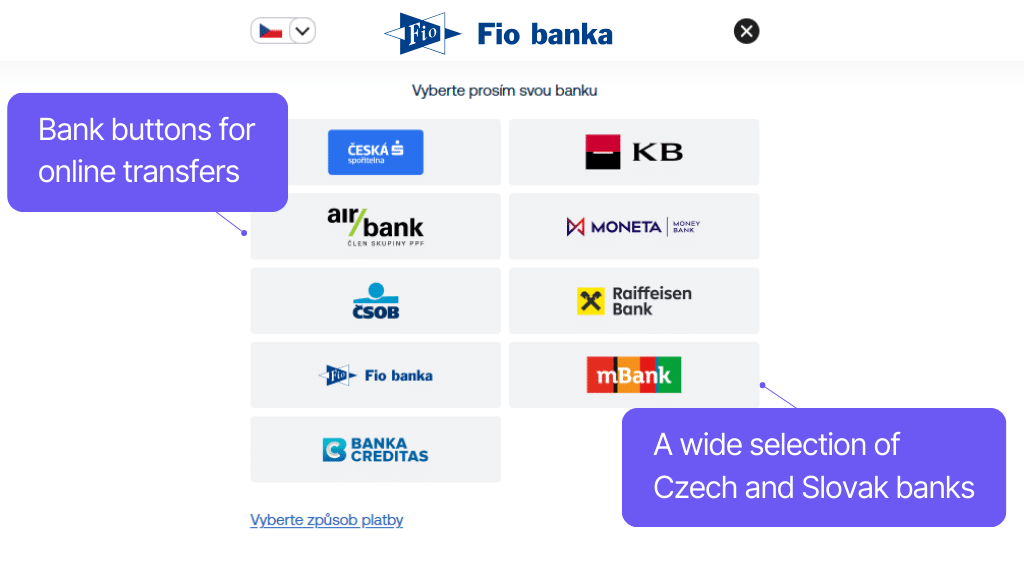
The plugin supports bank buttons of Czech and Slovak banks for online bank transfer and the Click to Pay function for saving card details for subsequent one-click payments.
Customers can pay in 4 currencies (CZK, EUR, USD, GBP) and use 26 languages of the payment gateway.
The payment gateway allows customers to pay conveniently with Visa, Visa Electron, Mastercard, Mastercard Electronic, and Maestro cards.
Using the plugin, you can use very popular e-wallets Google Pay, Apple Pay, and Pay Pal on your e-shop.
Through the Fio payment gateway, the customer can pay by online bank transfer via a payment button. If the customer selects it, they will be redirected to the bank’s interface with a pre-filled payment order.
A bank button is available for the following Czech and Slovak banks:
Česká spořitelna, Komerční banka, ČSOB, Raiffensenbank, mBank, Fio banka, Moneta, Air Bank, Slovenská sporitelňa, Tatra Banka, VÚB banka, Prima banka
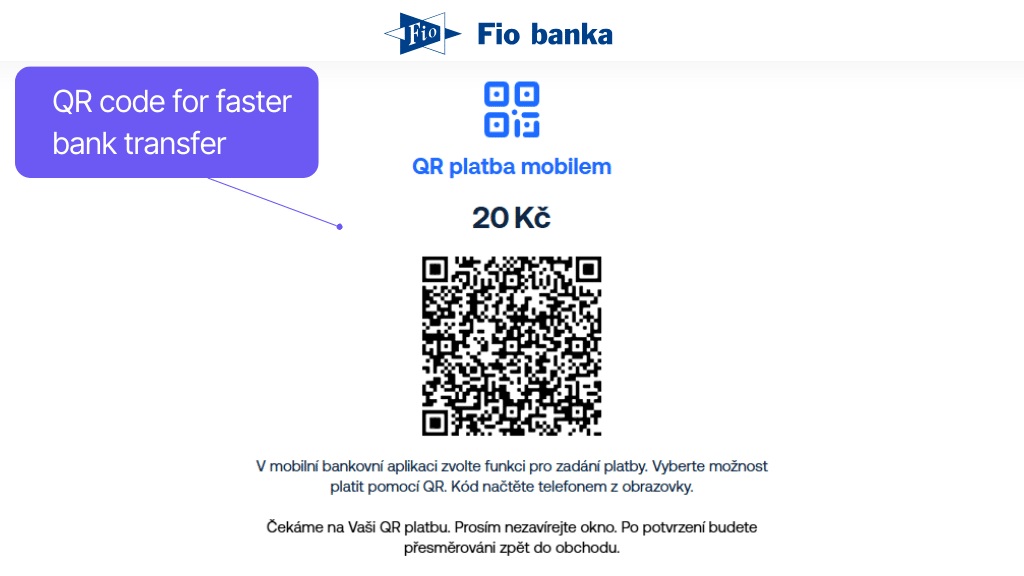
Customers who cannot find their bank’s button for online bank transfer can pay by transfer using a QR code.
The plugin supports the Click to Pay feature, which allows saving card details so subsequent payments can be made with a single click.
The plugin is fully compatible with the payment gateway and supports all currencies available in the gateway.
Supported currencies:
CZK, EUR, USD, and GBP
Toret Fio Bank supports passing payment gateway language information. Like the Fio payment gateway, it supports all 26 languages.
Supported languages:
Czech, Slovak, English, German, Arabic, Bulgarian, Croatian, Danish, Dutch, Finnish, French, Greek, Polish, Hungarian, Italian, Japanese, Lithuanian, Portuguese, Spanish, Slovenian, Romanian, Norwegian, Ukrainian, Vietnamese, and Swedish.
The plugin does not yet support recurring payments using WooCommerce Subscription.
If you are interested, we will be happy to program this feature for you.
Pairing payments of Fio banka accounts
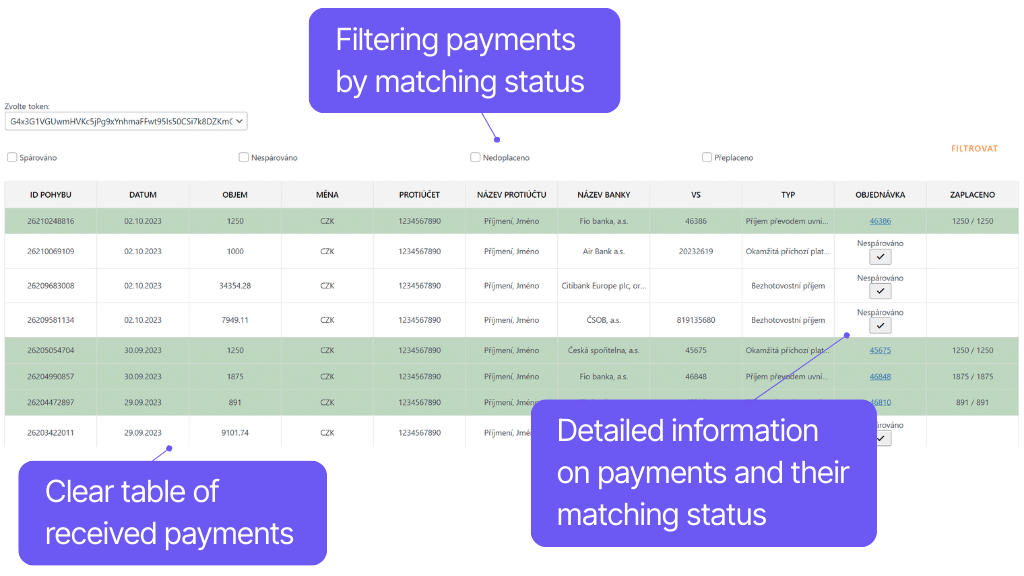
No more wasting time searching for incoming payments and checking order payments. The Fio banka plugin connects Fio banka accounts with WooCommerce. After an order is paid by transfer, the plugin matches the payment with the order. After pairing, the plugin automatically changes the order status according to your choice.
For checking, you can use a clear table of account movements and pairing with orders. Items can be filtered according to requirements. If a payment is not paired (e.g., the paid amount does not match), the plugin automatically sends a notification to your email.
Payment matching is possible in crowns and euros. The pairing variable symbol can be selected according to the e-shop’s needs, and optional payment updates (automatic or CRON) ensure error-free payment confirmation.
The plugin allows adding one or more Fio bank accounts to WordPress, which are authorized using a token.
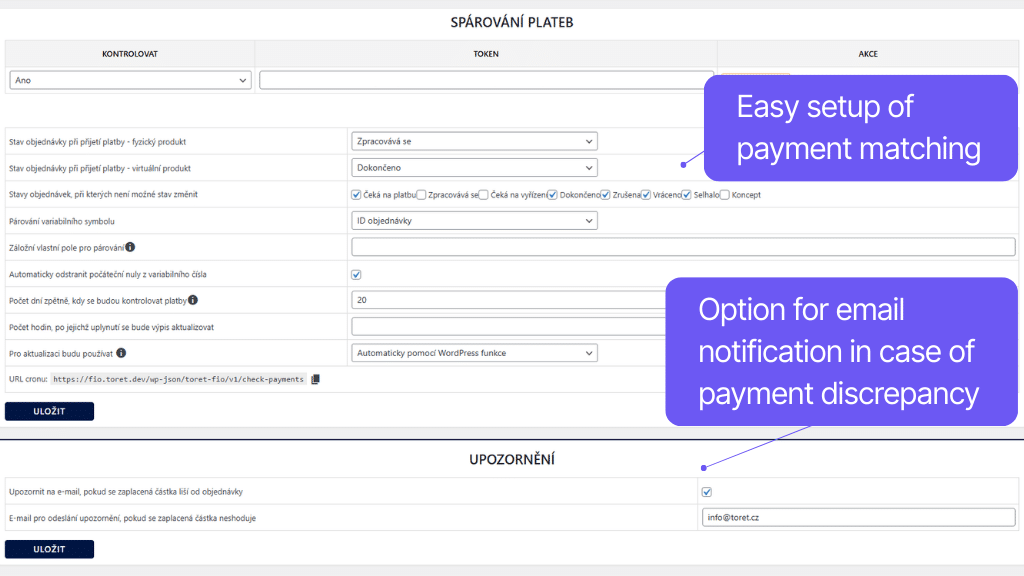
In the plugin settings, you can set which status the order should switch to after payment receipt. You can set a different target status for orders containing physical or virtual products.
In the plugin settings, you can view loaded payments from individual bank accounts and filter required ones. At the same time, individual rows are color-coded so that it is immediately clear how the payment was handled.
Legend:
Orange = variable symbol matches, but amount does not match
White = unpaired payment
Green = paired payment
The plugin includes a built-in notification for the store administrator, where if the variable symbol matches the order but the paid amount does not match, a notification about this unpaired payment is automatically sent.
For pairing bank transfer payments and orders, you can select a variable in the settings that will be used for this.
You can choose from Order ID, Order Number, Toret Order Number, WooCommerce Sequential Order Numbers, or by entering a custom meta field for pairing.
Leading zeros (added by the bank) can be automatically removed from the variable number, which could prevent successful pairing.
The plugin supports pairing orders in CZK, EUR, and a combination in case you have multiple currencies in the store.
For pairing in EUR, the variable symbol is loaded from the transaction note.
For automatic loading of payments to the Fio account, you can use the automatic WordPress function trigger or set up a regular CRON.
Carefree management and regular maintenance
The Toret Fio banka plugin for WordPress and WooCommerce is fully compatible with other Toret plugins and block website builders, such as Elementor, Divi, and Gutenberg. You do not have to worry that the plugin implementation would negatively affect the appearance or functionality of the website.
The subscription includes access to updates, which ensure compatibility and add new features, and to customer support for potential issues.
All our plugins are mutually compatible and can be used on a single WooCommerce e-shop.
Usage example:
In the checkout, the customer can select delivery to an address or pick-up point via the shipping plugin, pay using a payment gateway, and finally, an invoice is automatically generated and sent in the order confirmation email.
The plugin fully supports WordPress Multisite, where a single license is sufficient for all managed sites.
Each Multisite web has its own payment gateway settings, meaning it is now possible to set different payment methods or payment gateway conditions for each web.
The plugin supports use alongside popular block page builders Elementor, Divi, and Gutenberg.
High-Performance Order Storage (HPOS), formerly known as Custom Order Tables, is a solution that provides an easy-to-understand and solid database structure – designed specifically for e-commerce needs. It uses the WooCommerce CRUD design to store order data in custom tables – optimized for WooCommerce queries with minimal impact on store performance.
We are constantly improving the plugin and updating compatibility with WooCommerce. We guarantee compatibility with WooCommerce 6.7 and higher.
Extensive documentation is prepared for the plugin. It helps you easily configure the plugin and quickly get oriented with its features.
€69,00 / year
+FREE: 3-month subscription to Toret WooCommerce Manager
Need help?
[email protected]Do you need advice on choosing a product or have a question about a feature?
What’s included?
- 1 year of updates
- 1 year support (beware of resellers)
- 14-day money-back guarantee
14-day money-back guarantee
We want to ensure that you are 100% satisfied with your purchase. That’s why we offer a 14-day money-back guarantee.