
ybox24 for WooCommerce
The official implementation of ybox24 for WooCommerce. Add delivery to pick-up lockers to your e-shop, where the customer can pay the carrier directly based on storage duration. The plugin connects WooCommerce with the ybox24 system, enables a checkout widget for locker selection, and allows you to manage shipments entirely from the e-shop administration.

- Automation saves your time and speeds up order processing.
- Increases customer convenience during shipping selection and thus conversions.
- Simple and fast setup.
- Attractive delivery method.
- Shipping cost based on locker storage time or a flat rate.
- Easy configuration of free shipping and custom surcharges.
Delivery to ybox24 pick-up lockers
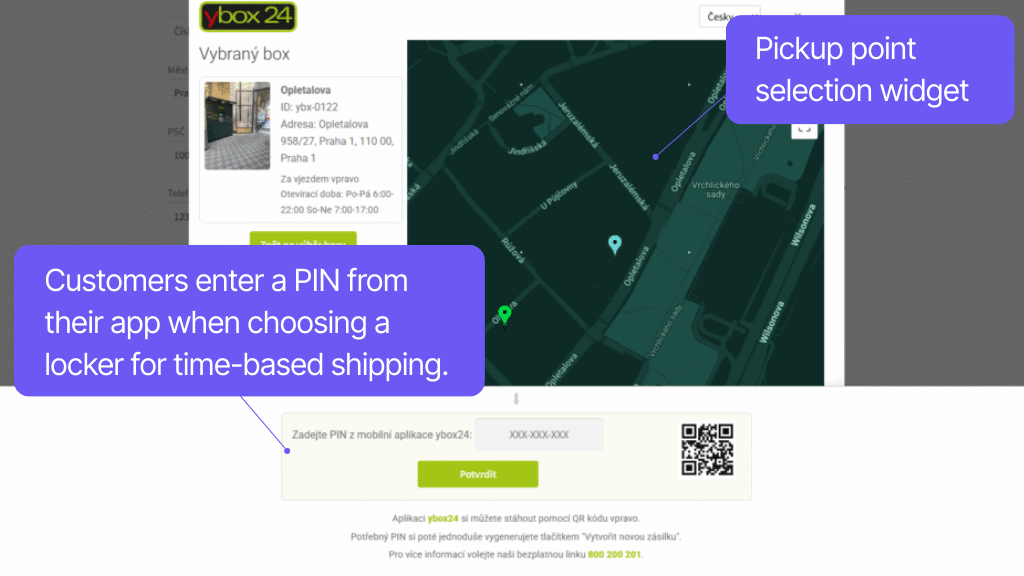
Connect your WooCommerce store with the ybox24 service and offer customers delivery to lockers, where the price can depend on the storage duration.
Thanks to the API connection with ybox24, you can display a map widget at checkout, from which customers can select their locker. They complete the locker selection using a PIN code generated in their ybox24 app account.
The shipping cost is paid by the customer directly to ybox24 upon pickup and depends on how long the parcel was stored in the locker. As a result, there is no need to address shipping costs in the e-shop at all.
Flat rate shipping price
If you do not want to use the dynamic pricing based on storage time, you can use ybox24 as a standard locker delivery service. In the plugin, you set a flat shipping rate that customers pay with their order. You can also specify an order value for free shipping. In both cases, the widget will not ask customers for a PIN, allowing even customers without the app to order to ybox24.
The plugin connects WooCommerce with the ybox24 system and enables delivery to pick-up lockers in the following models:
Shipping cost based on locker storage time
The shipping cost is paid by the customer directly to ybox24 upon pickup. To order, the checkout widget requires a PIN from the ybox24 app.
Flat rate shipping price
The shipping cost is paid by the customer to the e-shop based on the set amount. A PIN from the ybox24 app is not required to order.
More information about shipping can be found on the ybox24 website.
The plugin adds a map widget to the checkout where the customer selects a pick-up locker.
When charging based on storage time, the locker selection must be confirmed with a PIN code generated in the customer’s ybox24 app account. When using a flat rate, no PIN is required.
You can set the widget to open automatically and automatically use the locker address as the delivery address. You can also choose the placement of the button to open the widget.
The plugin allows you to set an order value threshold for free shipping. In this case, entering a PIN in the widget is not required.
Shipment management directly from administration
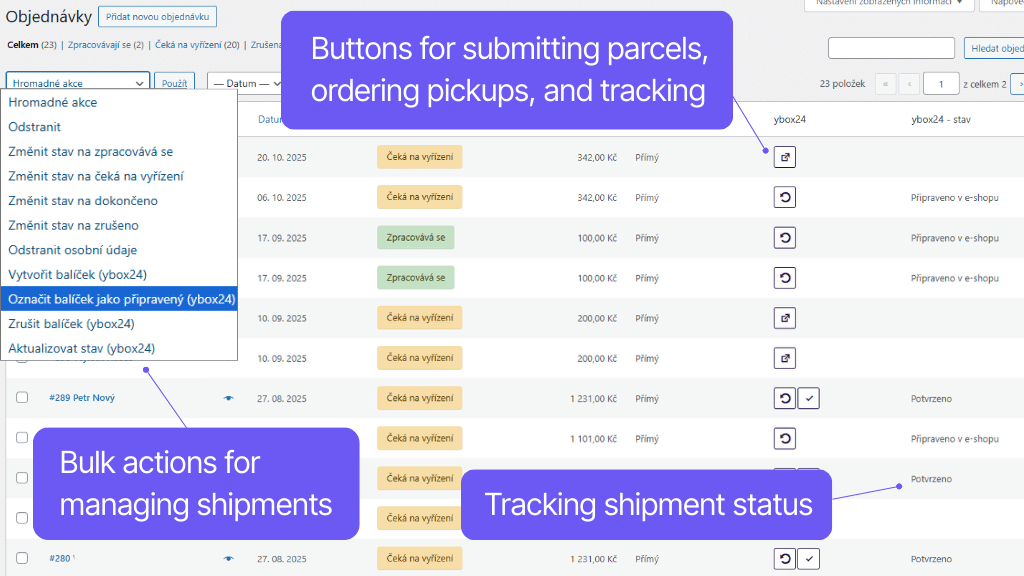
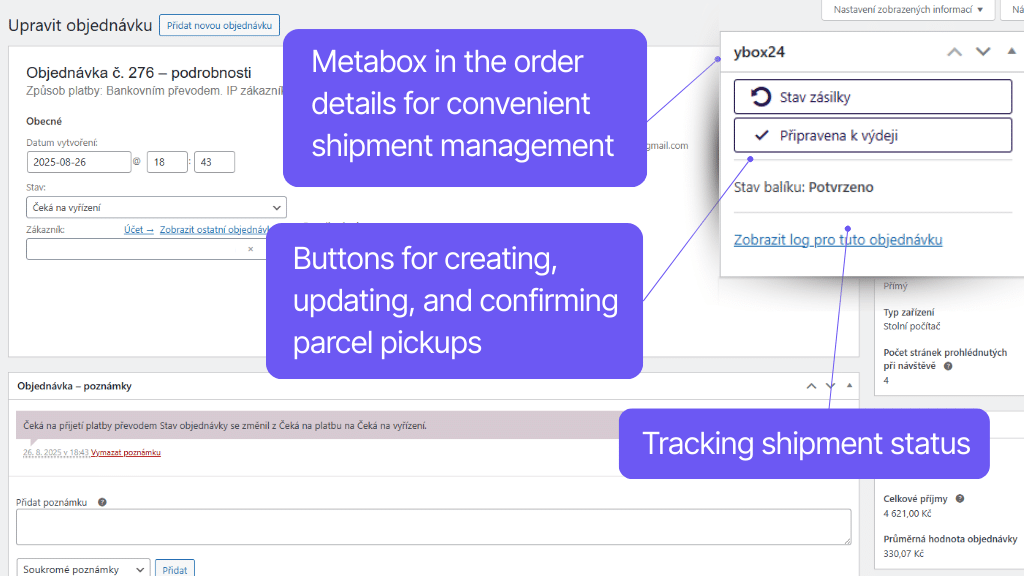
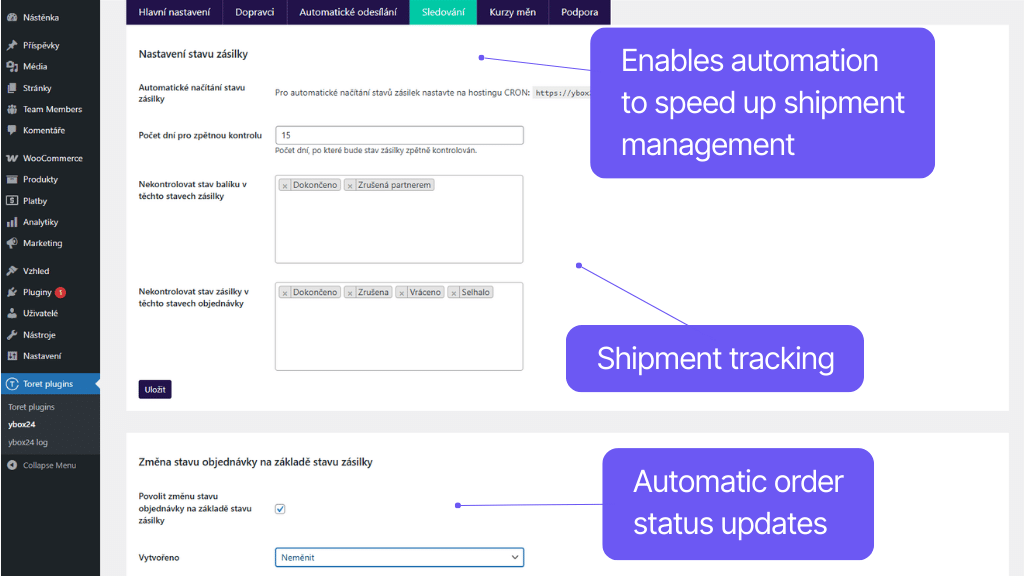
The plugin allows you to create and manage shipments directly from the e-shop administration. This makes shipping fast, convenient, and error-free.
After creating an order, shipment data can be sent to the carrier’s system with a single click or completely automatically. Once the parcel is packed, simply confirm that the shipment is ready to order the pickup. You can also fully automate the pickup request.
You can track the shipment status directly from the e-shop administration. It can be loaded manually with a click or automatically via CRON. The plugin also supports automatic order status change based on the shipment status in transit.
Shipment data can be sent to the ybox24 system with a single click, via bulk action, or set to send automatically based on order status.
The plugin supports pickup requests. A pickup can be ordered with a click – after confirming shipment readiness in the administration – or automatically when the shipment is created in the system.
Shipment status can be tracked in the order administration. The status can be loaded manually – by clicking – or automatically via CRON.
The order status can be changed automatically according to the shipment status in transit. You can configure these changes in the plugin administration exactly as needed.
Easy shipping setup
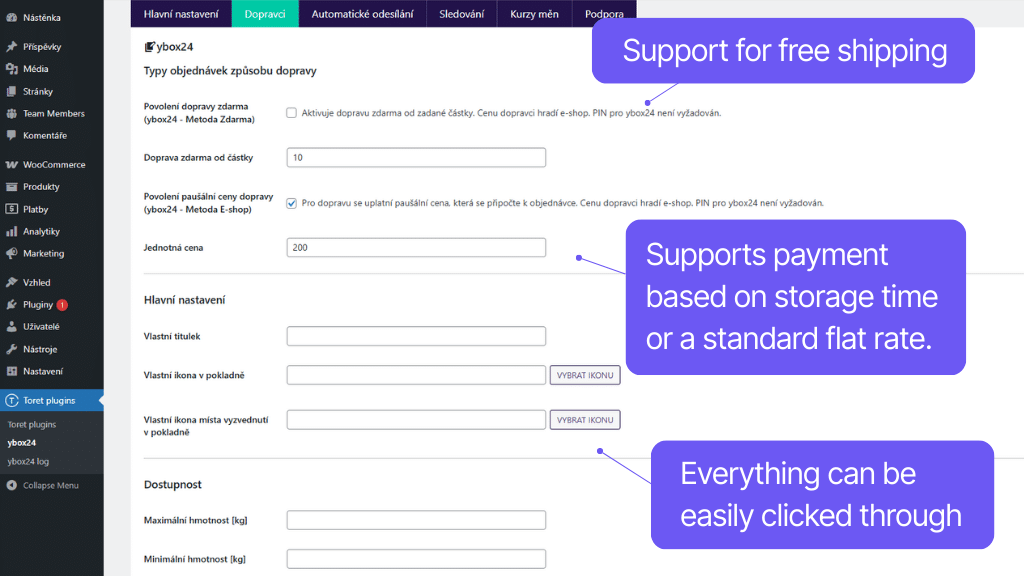
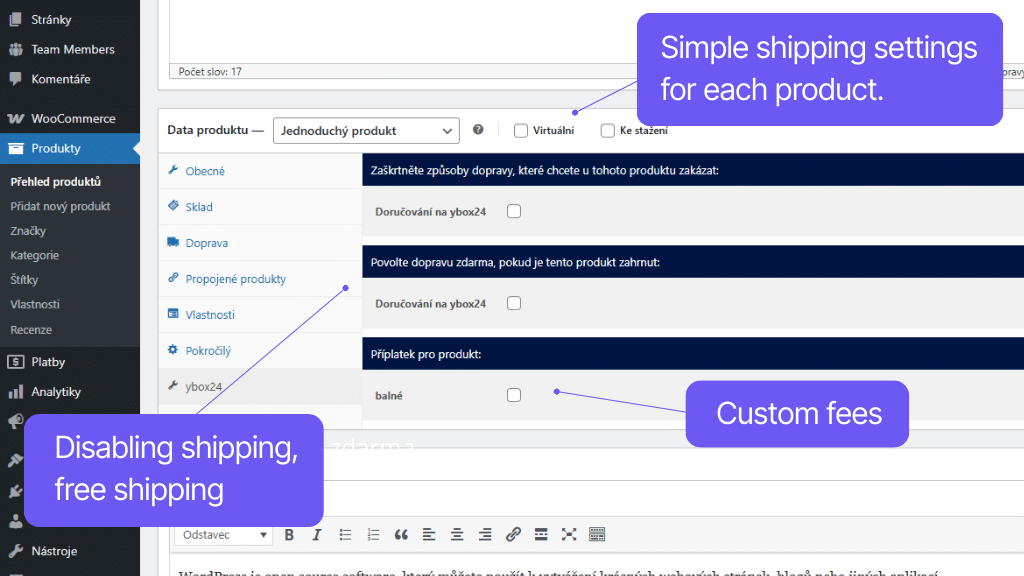
In the plugin administration, you can set everything you need. The plugin allows you to set custom surcharges for shipping, icons, and texts in the checkout. Shipping availability can be conditioned by weight, dimensions, or order/product value. This ensures shipments will not be rejected by the carrier.
The plugin allows you to condition the availability of this shipping method by:
- Maximum and minimum weight [kg]
- Maximum dimension [cm]
- Maximum volume [cm3]
- Minimum and maximum cart value
- Minimum and maximum product quantity in cart
- Minimum and maximum product price
The plugin allows you to set custom icons for the shipping method, including custom CSS.
The plugin allows you to set custom surcharges for this shipping method:
- globally
- per product/variant
- per category
- for delivery to ybox24
Surcharges can be visible or hidden. They can also be multiplied by quantity.
The plugin supports shipping zones in WooCommerce. You can easily set this method only for selected countries.
You can set a specific tax status (taxable or non-taxable) for the shipping method.
Worry-free management and regular maintenance
The ybox24 plugin is fully compatible with other Toret plugins as well as popular block page builders (Gutenberg, Elementor, Divi) and multi-currency plugins. You do not have to worry that its implementation would disrupt the design or function of your e-shop.
The subscription includes access to updates, which ensure compatibility and add new features, and customer support in case of issues.
The plugin fully supports WordPress Multisite, where a single license is sufficient for all managed sites.
The plugin supports use alongside popular block page builders Gutenberg, Elementor, and Divi.
All our plugins are mutually compatible and can be used on a single WooCommerce e-shop.
Usage example:
In the checkout, the customer can select delivery to an address or pick-up point via the shipping plugin, pay using a payment gateway, and finally, an invoice is automatically generated and sent in the order confirmation email.
High-Performance Order Storage (HPOS), formerly known as Custom Order Tables, is a solution that provides an easy-to-understand and solid database structure – designed specifically for e-commerce needs. It uses the WooCommerce CRUD design to store order data in custom tables – optimized for WooCommerce queries with minimal impact on store performance.
We are constantly improving the plugin and updating compatibility with WooCommerce. We guarantee compatibility with WooCommerce 6.7 and higher.
Extensive documentation is prepared for the plugin. It helps you easily configure the plugin and quickly get oriented with its features.
€0,00
+FREE: 3-month subscription to Toret WooCommerce Manager
Need help?
[email protected]Do you need advice on choosing a product or have a question about a feature?
What’s included?
- 1 year of updates
- 1 year support (beware of resellers)
- 14-day money-back guarantee
14-day money-back guarantee
We want to ensure that you are 100% satisfied with your purchase. That’s why we offer a 14-day money-back guarantee.