
DPD for WooCommerce
The DPD for WooCommerce is a WordPress plugin that connects your e-shop with the DPD carrier system. Offer customers delivery to an address, pick-up points, and boxes while saving time thanks to complete shipment management directly from the store administration. Shipment creation, tracking, and label printing can be handled with a few clicks or can be automated. The plugin adds a map widget to the checkout for branch selection and offers wide configuration options, thanks to which you can customize the shipping offer exactly as you need.

- Automation saves your time and speeds up order processing.
- Direct integration minimizes errors and reduces costs.
- Increases customer convenience when selecting shipping, thereby increasing conversions.
- Sending, label printing, and shipment tracking directly from the e-shop administration.
- Rich options for setting shipping prices and surcharges.
- Support for delivery with DPD CZ (GeoAPI / Shipping) and DPD SK (Shipper)
Delivery across Europe with DPD
Offer your customers wide shipping options with the Toret DPD plugin. Customers can choose whether they want the shipment delivered to an address, to a company, or to a pick-up point. Delivery with DPD is possible in the Czech Republic, Slovakia, and 30 other countries worldwide.
The plugin also supports additional DPD shipping methods such as delivery by a certain hour the next day or exchange shipment.
Using the plugin, customers can select DPD Pickup points in the checkout. The carrier supports pick-up points in 15 countries.
Czech Republic, Slovakia, Hungary (only for DPD SK), Belgium, Estonia, France, Lithuania, Latvia, Luxembourg, Germany, Netherlands, Poland, Portugal, Austria, Slovenia, Spain, Switzerland.
The plugin supports the DPD Private service, allowing customers to choose the option of delivery to their own address. DPD Private supports 26 countries.
Czech Republic, Slovakia, Poland, Germany, Austria, Belgium, Estonia, Finland, France, Croatia, Ireland, Italy, Liechtenstein, Lithuania, Latvia, Luxembourg, Hungary, Netherlands, Norway, Portugal, Romania, Slovenia, Spain, Sweden, Switzerland, Greece, Malta, and Great Britain.
The plugin supports the DPD Classic service. This is a shipping method used for delivery to companies.
Czech Republic, Slovakia, Belgium, Bosnia and Herzegovina, Bulgaria, Denmark, Estonia, Finland, France, Croatia, Ireland, Italy, Liechtenstein, Lithuania, Latvia, Luxembourg, Hungary, Germany, Netherlands, Norway, Poland, Portugal, Austria, Romania, Greece, Slovenia, Serbia, Spain, Sweden, Switzerland, Ukraine, and Great Britain.
The plugin supports the DPD Shop2Shop service. This is a shipping method used for delivery from a pick-up point to a pick-up point.
The plugin supports the DPD Shop2Home service. This is a shipping method used for delivery from a pick-up point to an address.
The plugin supports additional shipping methods DPD 10:00, DPD 12:00, and DPD 18:00, which guarantee delivery by a certain hour the next day.
For DPD CZ: Czech Republic
For DPD SK 10:00, 12:00: Slovakia
For DPD SK 18:00: Slovakia, Czech Republic, Poland, Hungary, France, Austria, Germany
You can also offer Exchange Shipments to your customers, which are used for exchanging goods. If the customer checks the Exchange Shipments checkbox in the checkout, an earlier shipment will be picked up from them upon delivery of this shipment and delivered back to the e-shop.
(Applies only to API DPD Shipping CZ)
The plugin allows you to add insurance to shipments based on their value, including setting a maximum limit.
(Applies only to API DPD Shipping CZ)
Convenient delivery selection at checkout
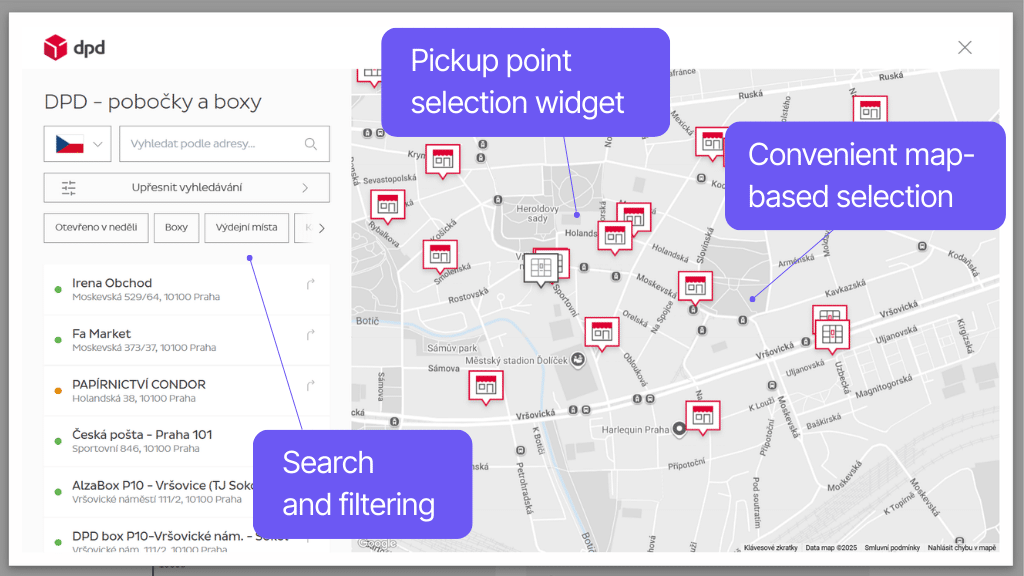
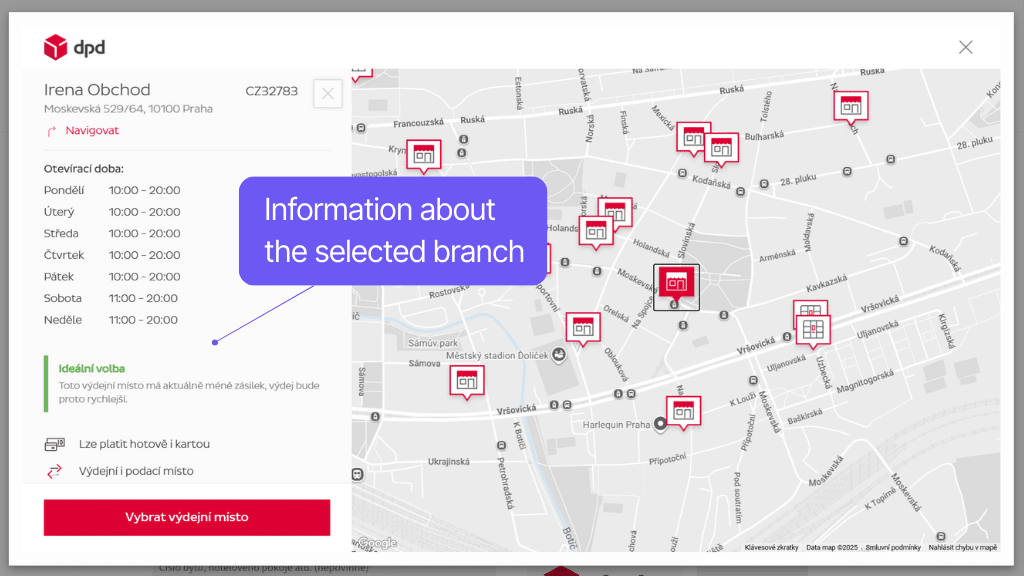
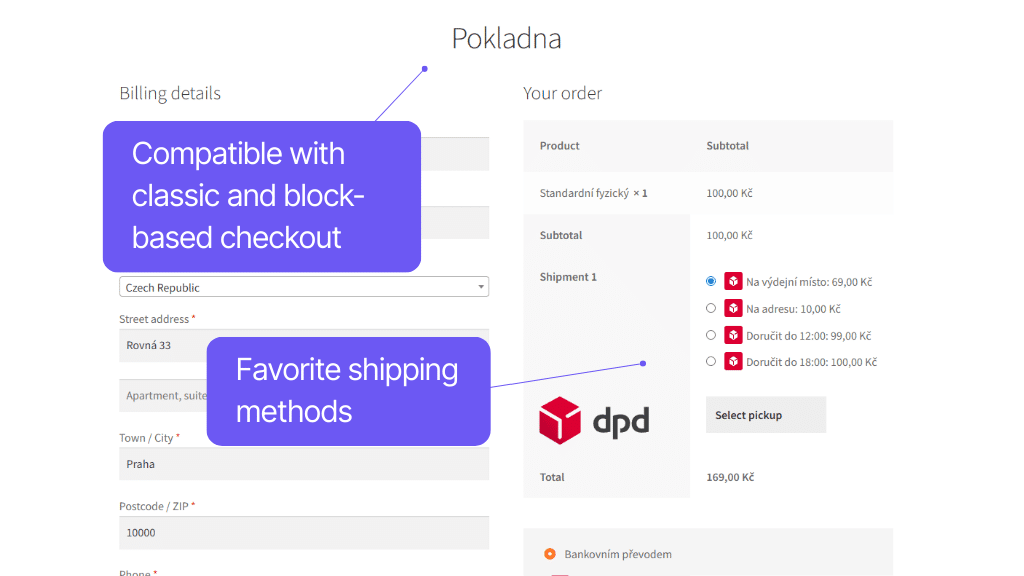
Simple and convenient branch selection in the checkout is ensured by the official DPD map widget. It allows selection from the map, text search, and filtering. It also lists current information for each pick-up point.
The plugin also offers other features for the checkout. Optional automatic widget opening when selecting a pick-up point speeds up customer flow, as does automatic filling of the delivery address based on the selected branch. For individual shipping methods, it is possible to choose custom or default icons.
DPD allows using their widget for branch selection. In the widget, branches can be selected from the map, searched using a text field, or filtered according to required services. For each branch, customers will see current information about opening hours or payment options.
In the plugin, you can enable a function that saves the customer a step when selecting a pick-up point. The automatic map opening function with pick-up point selection automatically displays the map widget when the DPD Pickup shipping method is chosen.
However, the button remains visible in case the customer changes their mind and wants to change the pick-up point.
In the plugin settings, you can enable the function to automatically use the pick-up point address as the delivery address for the order. If active, the delivery address will be automatically filled according to the selected branch for orders to a pick-up point (GLS Parcelshop).
In the plugin settings, you can choose a custom icon for all shipping types (DPD Private, DPD Classic, DPD Pickup DPD 10, DPD 12, DPD 18), which will then be displayed in the checkout.
Furthermore, it is possible to insert custom CSS for individual logos and buttons or disable the logo.
Rich shipping configuration options
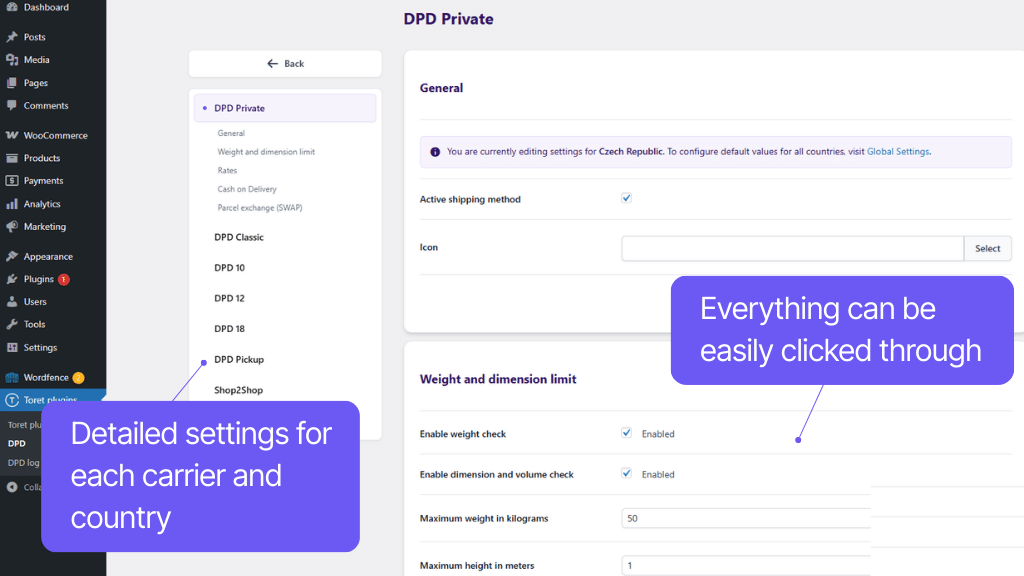
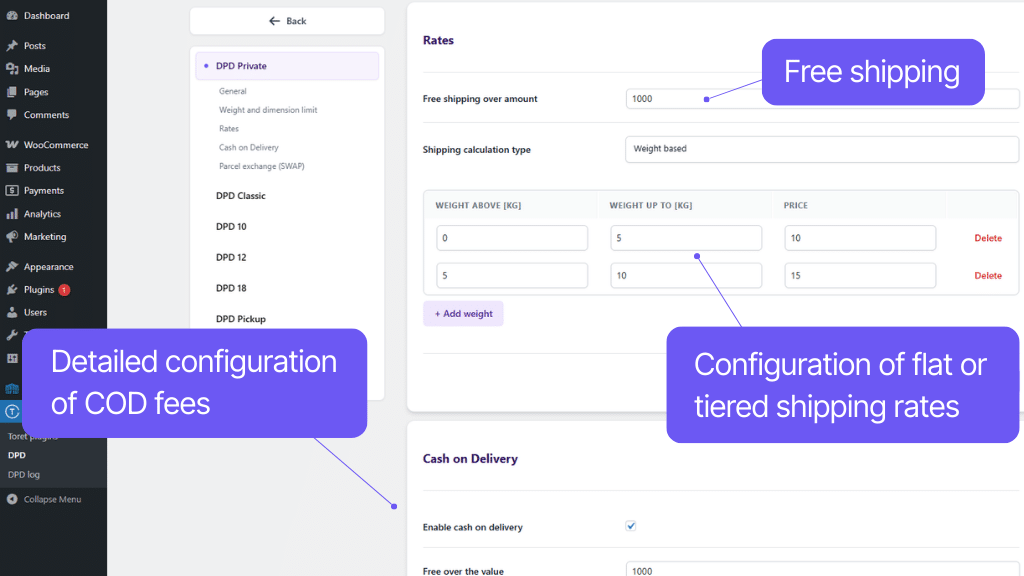
The DPD plugin allows you to customize shipping exactly according to the needs of the store. Prices, conditions, surcharges, Cash on delivery, and free shipping can be simply clicked in the administration.
For each shipping type, it is possible to set a fixed or scaled price according to dimensions or weight. The Cash on delivery surcharge can also be scaled. Free shipping can be conditioned by order value, specific product, or goods from a given category in the order.
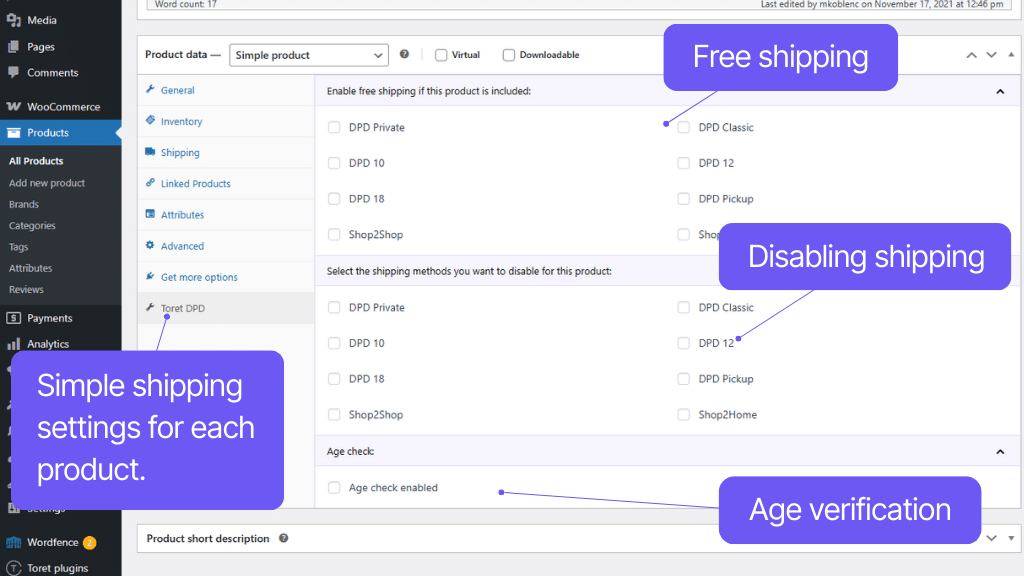
The plugin offers other useful features, such as Age verification, automatic conversion of shipment price to another currency, shipping availability settings, dimension check, and many others that will make your daily work with shipments easier.
For each shipping type, you can set a different shipping price based on the weight or dimension of the shipment. The price can also be set uniformly – as a fixed rate.
For each carrier and country, it is possible to set a custom threshold for when free shipping becomes available.
Furthermore, it is possible to set free shipping if a certain product, variation, or product from a selected category is in the cart.
The plugin can work with the WooCommerce Cash on delivery payment method, which can be configured for supported shipping methods and countries.
For COD, you can set a fixed or tiered surcharge, specify an order value threshold for free COD, or set a maximum allowed value above which it will be unavailable.
If a selected pickup point does not support COD, the payment method is automatically hidden during selection so the customer cannot choose it.
Additionally, if you operate multiple e-shops under a single DPD account, you can enter specific COD payment details for the given e-shop directly in the plugin settings.
In case the given branch does not support COD, the payment method is automatically hidden when selecting the pick-up point, so the customer cannot choose it.
For each DPD shipping service, it is possible to activate maximum product weight and dimension check.
This ensures that a situation where the carrier refuses to accept the parcel due to excessive weight or size does not occur.
For individual WooCommerce products, variations, and categories, the Age Verification service can be activated. If a customer has an item in the cart with age verification enabled, they will be prompted at checkout to enter their ID card number, which will be verified by the carrier upon delivery.
The plugin allows entering a weight threshold for automatic splitting of the shipment into multiple parcels.
Example: With a splitting threshold of 10 kg, an order totaling 24 kg will be split into 3 parcels weighing 10 kg, 10 kg, and 4 kg.
The plugin allows you to set custom surcharges:
- For specific products
- For individual product variations
- For all products in a given category
- For all orders with DPD shipping
All surcharges can be configured to be visible or hidden at checkout. Surcharges can be applied as a one-time fee or multiplied by the number of items in the order.
DPD requires its value in a certain currency (e.g., EUR or HUF) when sending a parcel with COD abroad.
The plugin can automatically retrieve rates from the Czech National Bank (cnb.cz), National Bank of Slovakia (nbs.sk) servers, or allow entering custom rates.
You can select your preferred method in settings.
The DPD plugin supports shipping zones in WooCommerce. You can easily set this method only for selected countries.
You can set a specific tax status (taxable or non-taxable) for the shipping method.
Complete shipment management directly from administration
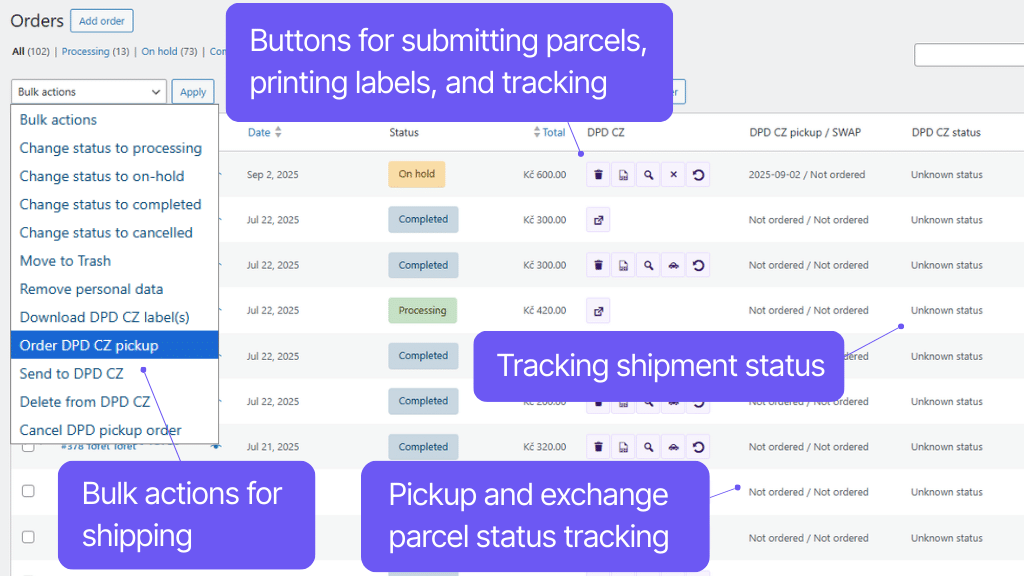
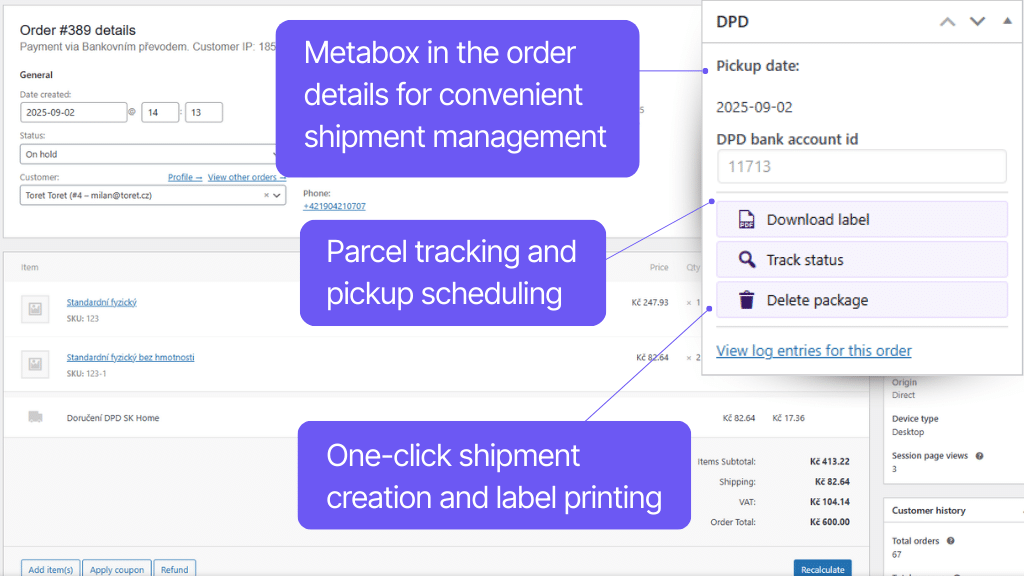
Manage orders directly from WooCommerce, without having to switch to the carrier’s website, and save time. Sending data to the system, label printing, ordering pickup, or shipment tracking, you can handle everything directly from the e-shop interface – simply, quickly, and without errors.
Creating a shipment in the DPD system is a matter of one click, you can also use bulk actions or fully automate the sending. After creating a shipment, labels can be printed directly from WooCommerce. You can download them from the order overview or detail, individually and in bulk.
Ordering parcel pickup is very simple. Just enter the date you want to hand over the shipment to the carrier. You can also set up automation and order pickup when creating a shipment.
The plugin also allows shipment tracking. You will see the shipment status directly in the order overview and detail. The tracking link is automatically added to the order email for customers, as well as information about the selected pick-up point.
Thanks to the connection to DPD GeoAPI/Shipping or DPD Shipper, it is possible to fully manage the shipment in WooCommerce. You can send the order to the DPD system, delete it from the DPD system, get a tracking link, or order parcel pickup.
Once you have the shipment ready for the customer, send it to the DPD system with one click via the DPD API connection. No need to rewrite anything. Orders can be sent to the DPD system individually or in bulk.
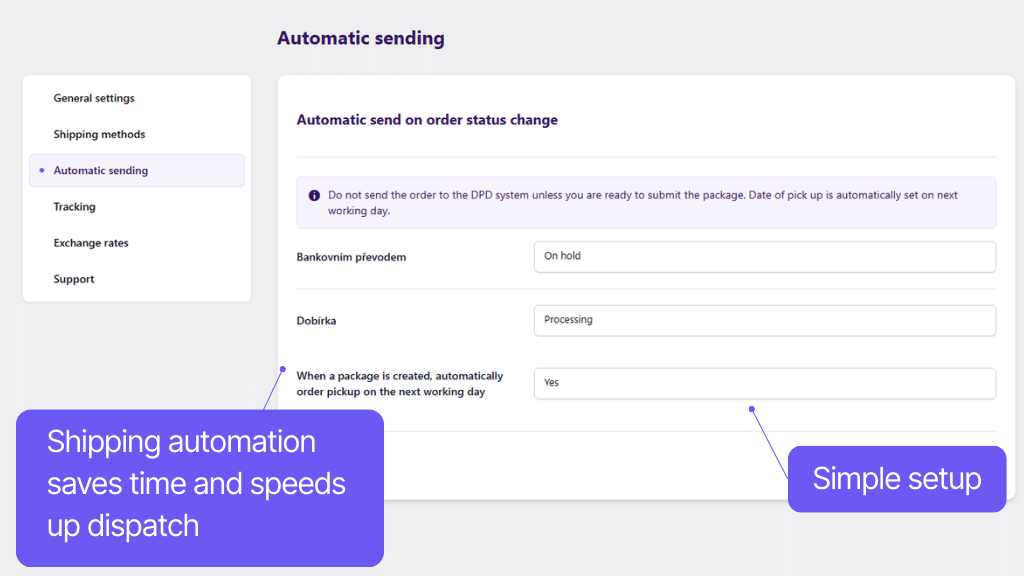
You can also use automatic submission to the system based on order status change.
You can also remove the shipment from the e-shop (individually and in bulk).
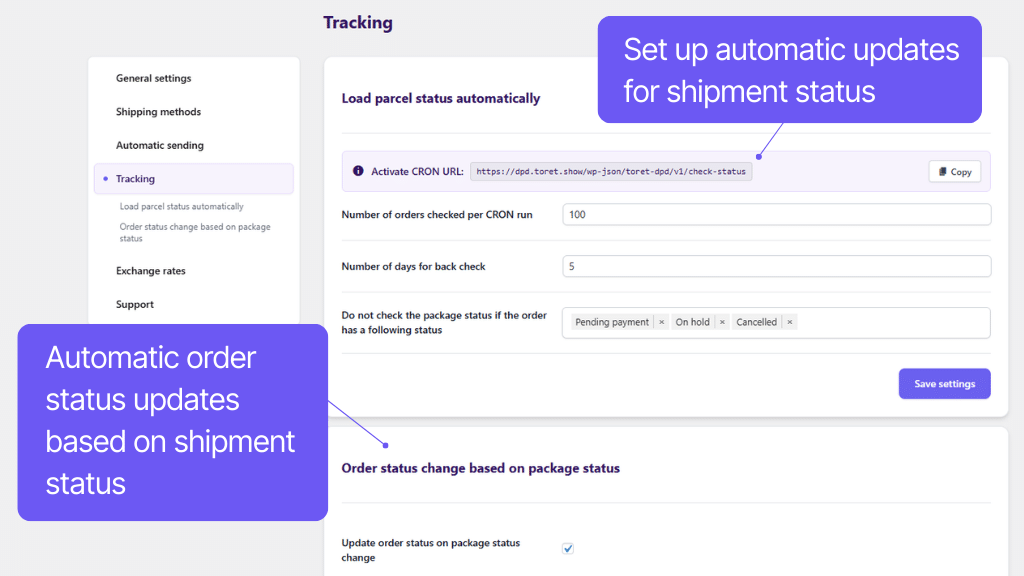
In the plugin settings, you can set an automatic order status change in WooCommerce for a certain parcel status in transit. For example, you can have orders that have already been delivered to customers completed automatically.
For orders sent to DPD, you can download the shipment label directly in WooCommerce from the order overview or order detail. Labels can also be downloaded in bulk via Bulk Actions in the order overview (API DPD SK, API DPD Shipping).
When printing labels, it is possible to select the default position of the first label (API DPD SK). With connection via CZ API, the label is generated in A6 format.
It is possible to add a custom reference to the labels. You can enter custom text and variables that add order data to the label (e.g., order number or customer note).
The plugin also offers the option of sender address masking. In the plugin settings, you can enter which sender address will appear on the label (only for API DPD CZ).
In the plugin, you can set up parcel pickup ordering. You can choose manual ordering, where you select a date in the request, or you can use automatic parcel pickup ordering for the next working day after sending the order to the DPD system.
In the order overview, you can use a link to go to the Shipment Tracking page with an automatically pre-filled number and immediately know what is happening with the parcel.
Shipment status can also be found directly in the order overview and order detail – it can be updated manually or automatically using CRON.
The pick-up point that the customer selects for the order is displayed in the administration under the order, in the order email, and on the thank you page.
The Toret DPD plugin supports bulk actions in WooCommerce, which you can find in the order overview.
Via bulk actions you can:
- Delete parcels from the GLS system
- Send parcels to GLS
- Update parcel transport status
Carefree management and regular maintenance
The Toret DPD plugin is fully compatible with other Toret plugins and popular block page builders (Gutenberg, Elementor, Divi) and multi-currency plugins. You do not have to worry that its implementation would disrupt the design or function of your e-shop.
The subscription includes access to updates, which ensure compatibility and add new features, and to customer support in case of problems.
All our plugins are mutually compatible and can be used on a single WooCommerce e-shop.
Usage example:
In the checkout, the customer can select delivery to an address or pick-up point via the shipping plugin, pay using a payment gateway, and finally, an invoice is automatically generated and sent in the order confirmation email.
The plugin fully supports WordPress Multisite, where a single license is sufficient for all managed sites. Each Multisite web can have its own plugin settings.
The plugin supports use alongside popular block page builders Elementor and Divi.
High-Performance Order Storage (HPOS), formerly known as Custom Order Tables, is a solution that provides an easy-to-understand and solid database structure – designed specifically for e-commerce needs. It uses the WooCommerce CRUD design to store order data in custom tables – optimized for WooCommerce queries with minimal impact on store performance.
We are constantly improving the plugin and updating compatibility with WooCommerce. We guarantee compatibility with WooCommerce 6.7 and higher.
Extensive documentation is prepared for the plugin. It helps you easily configure the plugin and quickly get oriented with its features.
€79,00 / year
+FREE: 3-month subscription to Toret WooCommerce Manager
Need help?
[email protected]Do you need advice on choosing a product or have a question about a feature?
What’s included?
- 1 year of updates
- 1 year support (beware of resellers)
- 14-day money-back guarantee
14-day money-back guarantee
We want to ensure that you are 100% satisfied with your purchase. That’s why we offer a 14-day money-back guarantee.